
Airbnb‘s verification process ensures user identity is confirmed for safety and compliance. Here’s how it works:
- Who Needs It: Hosts, co-hosts, and guests must complete verification at key stages like listing creation, booking, or managing properties.
- What’s Required: Legal name, address, phone number, email, and a government-issued ID (passport, driver’s license, etc.). Guests may also need a selfie or verification video.
- Timeline: Most verifications take under an hour, but delays up to 12 hours can occur.
- Common Issues: Rejections often stem from poor photo quality, expired IDs, or mismatched names. Fixes include retaking photos, updating account details, or contacting Airbnb support.
Failing to verify can block listings, invitations, or reservations. Hosts and guests should ensure accuracy to avoid disruptions. Let’s dive into the details.
How to Use Airbnb Identity Verification Step by Step
sbb-itb-103bddb
How to Complete Airbnb Verification
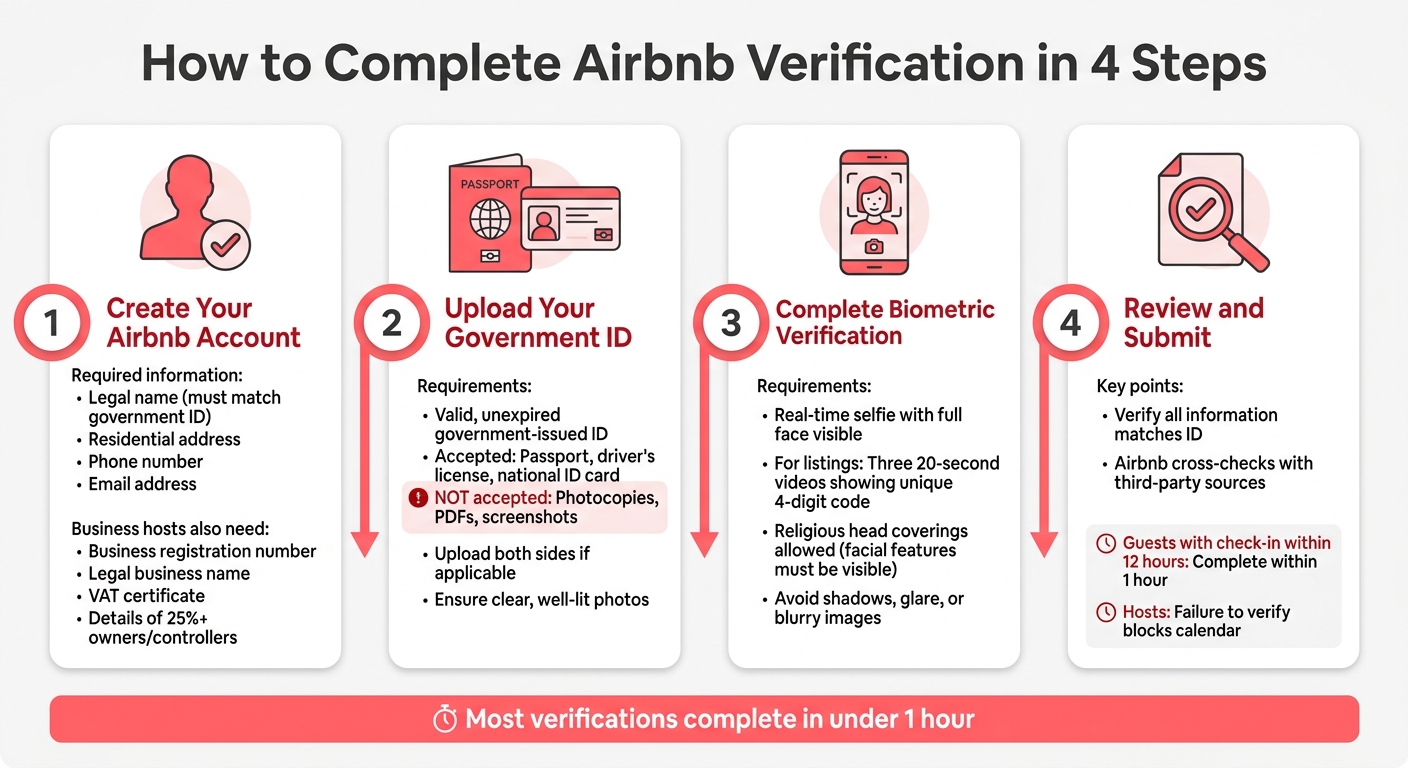
Airbnb Verification Process: 4-Step Guide to Complete Identity Verification
If you’re ready to get started with Airbnb, completing the verification process is key. Here’s a straightforward guide to help you through each step.
Step 1: Create Your Airbnb Account
Start by entering your legal name exactly as it appears on your government-issued ID. You’ll also need to provide your residential address, phone number, and email address. Any mismatch between the information you provide and your ID could delay the process, so double-check everything.
For those setting up an account as a business host to manage multiple properties through vacation rental property management, you’ll need to supply extra details. This includes your business registration number, legal business name, and VAT certificate. Airbnb also requires information about anyone who owns or controls at least 25% of your hosting business, in line with KYC (Know Your Customer) regulations [3].
Step 2: Upload Your Government ID
You’ll need to upload a valid, unexpired government-issued ID, such as a passport, driver’s license, or national identity card. Keep in mind that photocopies, PDFs, or digital screenshots won’t be accepted.
"Make sure the ID you provide is unexpired and an original – that means it’s not a photocopy, PDF, or other digital copy." – Airbnb Help Center [2]
Enable camera access for your browser or app, then take clear, well-lit photos of your ID. Make sure the ID fits entirely within the on-screen frame. If your ID has two sides, submit photos of both the front and back.
Step 3: Complete Biometric Verification
After uploading your ID, you’ll need to take a real-time selfie to verify your identity. Make sure your entire face is visible. If you’re verifying a listing, you may also need to record three 20-second videos showing a unique 4-digit code. Religious head coverings are permitted as long as your facial features remain visible.
Write the code on a piece of paper large enough to be seen clearly on camera [4]. Be sure to avoid shadows, glare, or blurry images. Airbnb processes these videos according to its Privacy Policy, and they won’t appear on your public profile.
Step 4: Review and Submit Your Verification
Before submitting, review all your information to ensure it matches your ID. Once you submit, Airbnb will cross-check your details with trusted third-party sources.
For guests, if you have a check-in scheduled within 12 hours, you’ll need to complete verification within 1 hour to avoid having your reservation canceled [2]. For hosts, failing to verify when prompted could result in your calendar being blocked, preventing you from accepting new bookings. Business hosts managing multiple properties should prioritize accuracy to avoid delays in bookings.
Fixing Verification Problems
Even with careful compliance, verification issues can crop up. The good news? Most of these problems have simple solutions.
Why Verifications Get Rejected and How to Fix Them
One common reason for rejection is poor photo quality. To avoid this, take photos in a well-lit space and use the app’s auto mode for sharper focus. Also, remember that Airbnb only accepts valid, government-issued IDs. Expired documents, photocopies, or digital PDFs will be rejected. For IDs with two sides, like a driver’s license, make sure to upload clear images of both the front and back.
Another frequent issue is a name mismatch. The name on your Airbnb account must match your government ID exactly. If you’ve recently changed your name – perhaps due to marriage – reach out to Airbnb support and provide any necessary documentation, like a marriage certificate, to update your account.
"If we’re not able to verify you with the document you provided, we’ll contact you to ask you to upload a new one." – Airbnb Help Center
Technical issues can also cause verification failures. For example, if your camera screen is black or unresponsive, check that your browser or app has the necessary camera permissions. Refreshing the page or switching to a different device can also help.
Here’s a quick reference for common issues and their fixes:
| Common Issue | Fix |
|---|---|
| Blurry Photo | Use a well-lit room and the app’s auto mode for sharper images |
| Expired ID | Submit a valid, non-expired government-issued document |
| Name Mismatch | Update your Airbnb account to match your ID exactly |
| Camera Issues | Grant camera permissions or try refreshing/switching devices |
| Locked Form | Contact Airbnb support to unlock the verification form |
If these steps don’t resolve the issue, you may need additional measures to address delays.
What to Do When Verification Takes Too Long
Most verifications are completed within an hour [6][2]. However, if you’re a guest with a check-in scheduled within 12 hours, you only have one hour to complete the verification process before your reservation is canceled.
For business hosts, verification can sometimes take days. During this time, your listing will remain unpublished, which can be especially frustrating during busy periods. For example, property managers in markets like Scottsdale vacation rental management or Denver vacation rental management may lose booking opportunities during peak seasons.
If your verification is delayed for more than 12 hours, check your email, SMS, and push notifications for any requests for further details. Double-check your submission for errors before resubmitting. You can also remove your existing ID via the mobile app (go to Account Settings > Government ID > Remove) and upload new, high-quality photos.
"After you submit your info, it typically takes us less than 1 hour to verify your identity." – Airbnb Help Center [6]
How to Resubmit Verification Information
If your initial attempt fails, Airbnb will provide specific feedback through email, SMS, or in-app notifications. Carefully review this feedback before resubmitting.
If certain fields are locked, contact Airbnb support to unlock them. When resubmitting, ensure your photos are clear and taken in proper lighting. Your selfie should clearly show your eyes, nose, and mouth. Religious head coverings are acceptable as long as these features are visible.
In cases where your government ID fails verification, Airbnb might ask for a verification video. Keep in mind that confirmation of your video submission might not be immediate, so stay attentive to your notifications for updates.
Verification Requirements for U.S. Users
Accepted IDs for U.S. Users
In the U.S., Airbnb has specific guidelines for ID and address verification to ensure compliance and security.
Accepted forms of ID include an original, unexpired driver’s license, passport, or state-issued ID with clear photos of all required sides [2]. For business hosts managing multiple properties, additional documentation is required. This includes tax documents like the IRS Letter 147C or the IRS SS-4 confirmation letter to confirm the entity’s status [5].
Starting in 2025, address requirements will become stricter. Users must provide a verifiable physical address, as PO Boxes or mailbox-only services (like UPS Stores) will no longer be accepted [8].
Biometric Verification Differences in the U.S.
For identity matching, U.S. users can choose between automated biometric review or manual photo review [7][10]. It’s important to note that biometric verification is entirely optional.
If you opt for the automated review, Airbnb and its third-party providers create a temporary facial identifier to match your features. According to Airbnb, this data is deleted immediately after the process is complete:
"Facial recognition data for the purposes of identity verification is only generated with your express consent. We delete facial recognition data as soon as the face-matching step of our identity verification process is complete" [7].
To achieve the best results, take your selfie in a well-lit space, ensuring your facial features are clearly visible. Religious head coverings are allowed as long as they don’t obscure your face. If the automated system encounters issues – like poor lighting or significant changes in your appearance – a manual review will typically follow. Regardless of the method, your biometric selfie remains private and is never shared with hosts, guests, or displayed on your profile.
How Hosts Should Handle Verified Guest Data
After the verification process, it’s important to understand how hosts should manage guest data securely. As a host, you’ll never have access to a guest’s actual government ID or selfie. Instead, you’ll see an "Identity Verified" badge. This badge includes a checkmark and the month and year when the guest first completed verification [2]. It confirms the guest’s identity has been verified without exposing sensitive personal documents. This system protects guest privacy while ensuring compliance responsibilities are met.
Airbnb’s privacy framework limits how guest data is used. Identity details provided during verification are never shared with hosts or other guests – they’re managed according to Airbnb’s Privacy Policy [2]. Hosts are required to use guest information solely for purposes related to the stay, as outlined in the same policy [9].
In some cases, local regulations may require additional documentation. For example, you might need to request a government ID directly from a guest, but only if you’ve clearly stated this requirement and its legal basis in your listing description at the time of booking [2]. Such requests are typically limited to legal or compliance reasons, like when local laws mandate guest registration with authorities. In certain U.S. cities or counties, hosts may also be required to report guest information to local tax or tourism offices.
If collecting guest data for legal purposes, it’s essential to store it securely and limit access to only what’s necessary. If you work with third parties – such as cleaning services or smart lock providers – remember that any shared guest information falls under those parties’ privacy policies [11]. For hosts managing multiple properties in areas like Denver or Pittsburgh, partnering with a professional property management service can help ensure you stay compliant with both Airbnb’s policies and local data protection requirements.
Airbnb retains government ID images for three years and keeps essential details for legal compliance [2]. As a host, your role is to adhere to these privacy standards, handling guest data only when legally necessary and properly disclosed.
Conclusion
Following the outlined steps, completing Airbnb’s verification process is simple and efficient. You’ll need to provide your legal name and contact details, upload a clear photo of a valid government-issued ID, and take a real-time selfie. Typically, this process takes under an hour [2], offering a quick way to help safeguard both hosts and guests on the platform.
If you encounter verification issues, address them promptly to avoid disruptions to your bookings. Hosts who fail to complete verification will see their calendars blocked, preventing new reservations [2] [1]. If your submission is rejected, check your email and Airbnb messages for instructions. Make sure your ID is original, well-lit, and matches the name on your profile exactly [2] [1].
For hosts managing multiple properties in markets such as Scottsdale or Denver, staying compliant with Airbnb’s verification requirements and local regulations can be challenging. Partnering with Rank One Stays can simplify this process, ensuring you meet all necessary policies while optimizing revenue opportunities.
Airbnb’s verification system plays a key role in reducing fraud, enabling background checks where allowed, and assisting in the investigation of safety concerns [2]. By completing verification quickly and accurately, you can secure your bookings while contributing to a safer community for everyone.
FAQs
Why is Airbnb asking me to verify again?
Airbnb might request you to verify your account again to uphold trust and safety across the platform. This could happen for several reasons, such as changes to your account details, spotting inconsistencies, or if your previous verification was incomplete. Additionally, they may conduct periodic checks to meet legal requirements or address security issues. Simply follow the steps they provide to complete the re-verification process and keep your account active and secure.
Can I book or host without biometric verification?
Yes, you can use Airbnb without undergoing biometric verification by choosing a manual photo review instead of automatic facial recognition. However, identity verification still typically involves sharing personal details and a government-issued ID. This process might include submitting photos or selfies, depending on the specific requirements.
How do I change my Airbnb name to match my ID?
To update your Airbnb name so it matches your ID, start by logging into your account. Head over to your profile settings, then edit your name to reflect your legal name as it appears on your government-issued ID. Once you’ve made the changes, save them. Keep in mind that this update might remove your "ID Verified" badge. If that happens, you may need to re-verify your identity for any upcoming bookings or hosting activities.