
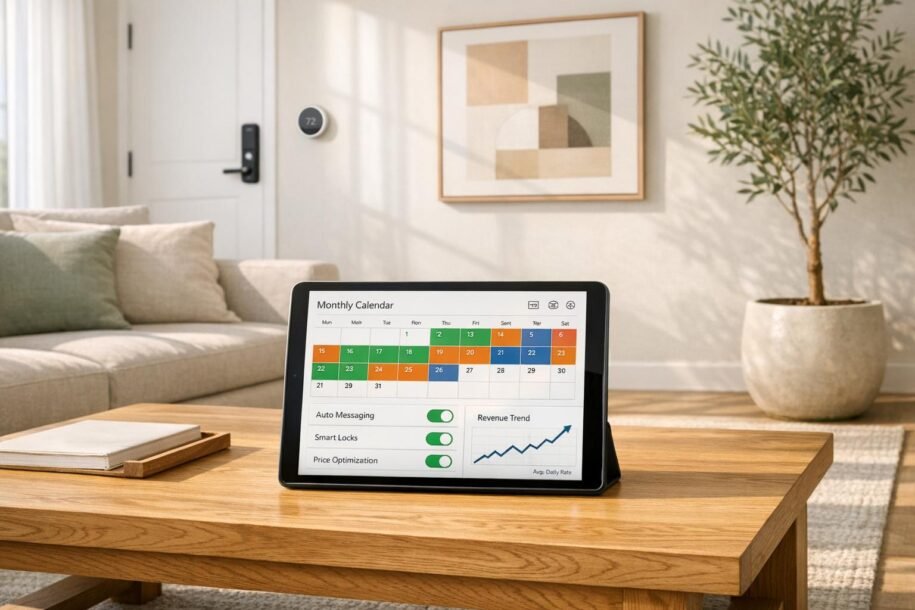
Managing Airbnb properties remotely is easier than ever with cloud-based tools. These solutions help automate tasks like guest communication, dynamic pricing, and cleaning coordination, saving time and increasing efficiency. Whether you’re a small host or managing a large portfolio, tools like Property Management Systems (PMS), dynamic pricing software, and automated messaging platforms are essential for scaling your operations.
Key Takeaways:
- Automation Saves Time: Automating workflows can cut up to 80% of admin tasks and improve response times by 98%.
- Dynamic Pricing Boosts Revenue: Tools like PriceLabs and Wheelhouse can increase RevPAR by 10–40%.
- Guest Satisfaction Matters: Faster response times and AI-driven messaging improve reviews and occupancy rates.
- Scalability: PMS platforms like Guesty and Hostaway can handle portfolios from 1 to 1,000+ properties.
- DIY vs. Professional Management: DIY tools are cost-effective for small portfolios, but professional services like Rank One Stays can increase revenue by 38% while saving time.
Quick Comparison:
| Tool/Service | Best For | Starting Cost | Portfolio Size | Key Features |
|---|---|---|---|---|
| Guesty | Large portfolios | Quote-based | 50–1,000+ properties | Advanced analytics, 60+ integrations |
| Hostaway | Growing portfolios | $99/month + per listing | 10–300 properties | 24/7 support, 40+ platform integrations |
| iGMS | Solo hosts/small businesses | $20/property/month | 1–50 properties | Cleaning triggers, basic automation |
| Lodgify | Direct booking focus | $16–$17/month + fees | 1–30 properties | Built-in website builder, basic channel management |
| Rank One Stays | Full-service management | 10% of revenue | All sizes | Turnkey management, 24/7 guest support |
For small-scale hosts, a DIY setup with tools like Hospitable and PriceLabs works well. For larger portfolios, professional management services like Rank One Stays offer higher returns with less time commitment. Choose based on your goals and portfolio size.
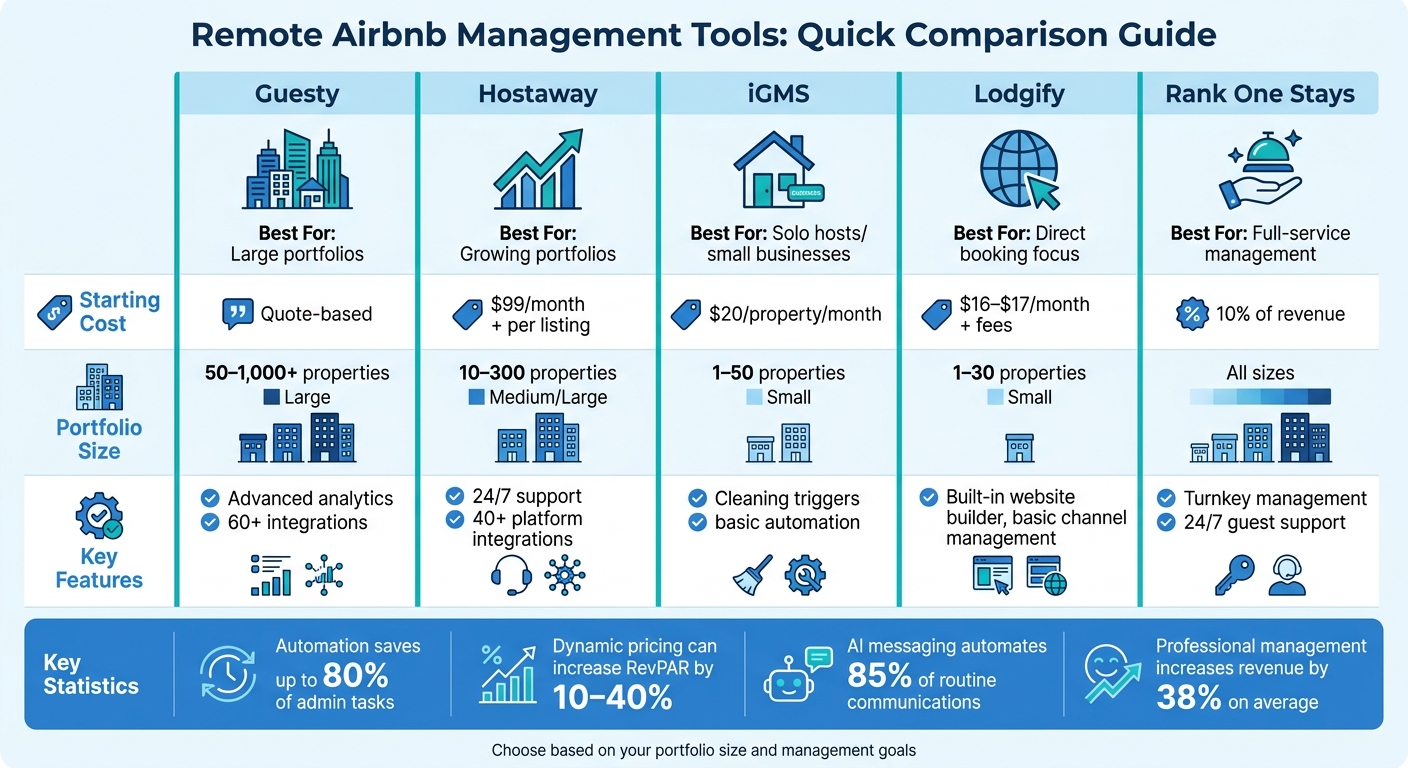
Remote Airbnb Management Tools Comparison: Features, Pricing & Portfolio Size
How I Run My Rentals From Anywhere In The World!
This video shows how I manage rentals across multiple locations using these exact systems.
sbb-itb-103bddb
Why Cloud-Based Tools Matter for Airbnb Management
Cloud-based tools are changing the game for remote property management by automating repetitive tasks. The global vacation rental management software market hit $2.13 billion in 2024 and is expected to grow at a 10.6% annual rate through 2030 [7]. This rapid growth highlights how indispensable these tools have become for managing properties efficiently from afar.
Growing Your Property Portfolio
Managing just a few properties can be done manually, but scaling up without automation? That’s a whole different story. With an integrated Property Management System (PMS), property managers can handle 30+ properties using the same time and effort it once took to manage just 10 [2]. This kind of efficiency makes it possible to expand into thriving markets like Scottsdale or Lighthouse Point without needing to move or hire extra staff.
One of the biggest perks of cloud-based systems is that they centralize everything. Instead of juggling different tools for scheduling, pricing, and guest communication, these platforms streamline it all. For instance, Hoomy manages over 1,200 properties by using PriceLabs’ Market Dashboards to monitor trends and adjust pricing during peak demand [5]. This not only simplifies scaling but also eliminates the headache of manual data entry.
Reducing Manual Work and Saving Time
Automation doesn’t just help you grow – it also slashes the time spent on mundane tasks. By automating workflows, property managers can cut administrative work by as much as 80% [5]. This means more time to focus on big-picture strategies, like increasing revenue. AI-powered messaging tools are another game-changer, automating 85% of routine guest communications [5]. For a portfolio of 15 properties, this reduces daily reply time from three hours to under 30 minutes [2].
Dynamic pricing tools are another time-saver, analyzing thousands of data points daily to adjust nightly rates automatically. Many hosts who switch from Airbnb Smart Pricing to specialized pricing tools see a 10–40% improvement in RevPAR within the first year [2]. Blue Kite, a property management company, experienced a 20% boost in occupancy within just one month of adopting PriceLabs’ dynamic pricing [5]. These tools not only save time but also enhance your bottom line.
Improving Guest Satisfaction
Automation doesn’t just benefit hosts – it also creates better experiences for guests. Faster response times lead to better reviews and higher occupancy rates. Airbnb’s algorithm penalizes listings with response times over an hour [2], so staying prompt is crucial. Automated messaging platforms can cut response times by up to 98% [5], ensuring guests quickly receive essentials like check-in details, WiFi passwords, and local tips.
AI tools are also evolving beyond basic templates. In 2025, Rod Ross, founder of Va House, used Conduit.AI to automate over 80% of guest messages across his portfolio in just one month [5]. Another operator managing 230+ properties implemented Conduit.AI’s post-stay feedback system, boosting their average guest rating from 4.7 to 4.8 in the same year [5]. These improvements directly impact bookings and revenue, whether you’re managing a single Denver vacation rental or a large, multi-state portfolio.
Core Features to Look for in Remote Airbnb Management Tools
Here are four key features that can help you streamline operations, boost revenue, and cut down on manual tasks. These tools are essential for handling the complexities of remote property management.
Multi-Platform Calendar Syncing
A channel manager, or centralized calendar system, is your first line of defense against double bookings. It works by instantly updating your property’s availability across all platforms whenever a reservation is made. This keeps your listings aligned no matter where you are and helps you avoid the headaches of relocation fees or refunds caused by overlapping bookings[3][10].
Sync speed is a critical factor here. Some tools take up to 15 minutes to update, but top-tier channel managers can process changes in under 2 minutes[3]. Always check a tool’s sync speed and ensure it has official Airbnb API certification for a stable connection, especially during platform updates[2].
Automated Pricing and Revenue Tools
Dynamic pricing tools are like having a 24/7 market analyst for your properties. They analyze factors like local events, competitor pricing, and seasonal trends to adjust your nightly rates in real time. This ensures you maximize revenue during peak demand and stay competitive during slower periods.
Examples include PriceLabs ($19.99 per listing per month) and Wheelhouse (either $19.99 per listing or 1% of revenue). These tools offer features like orphan day pricing, minimum stay rules, and last-minute discounts, giving you flexibility whether you manage a single unit in Denver or a multi-state portfolio[3].
Automated Guest Messaging
Guest communication can be a time sink, but automated messaging tools take care of routine tasks like booking confirmations, check-in instructions, WiFi details, and review requests. They also help you maintain Airbnb’s one-hour response time benchmark, which is crucial for guest satisfaction[2].
Modern platforms often include a "human-in-the-loop" feature, where AI drafts responses for you to review and personalize. This strikes a balance between efficiency and a personal touch. Look for tools with unified inboxes that consolidate messages from all booking channels, making communication far easier to manage[8][2].
Analytics and Financial Reports
Analytics tools go beyond day-to-day operations, offering insights that help you make smarter business decisions. These platforms track metrics like occupancy rates, revenue by booking channel, cash flow, and potential income comparisons. This data is invaluable for decisions on pricing strategies and portfolio expansion.
The best tools can pinpoint underperforming properties, identify the most profitable booking channels, and highlight seasonal trends. If you’re managing properties in diverse markets like Pittsburgh or Lighthouse Point, these insights can uncover patterns that might otherwise go unnoticed[2].
How to Set Up Cloud-Based Airbnb Management Tools
Now that we’ve covered the benefits of cloud-based automation, it’s time to dive into setting up your tech stack. With the right approach, the process can be smooth and efficient, ensuring all tools work together seamlessly.
Selecting the Right Tool
Your Property Management System (PMS) is the backbone of your operation. It centralizes your calendars, guest data, and channel management while connecting to every other tool in your setup.
For those managing 1–2 properties, start with a basic stack such as:
- PMS: Hospitable ($40/month for two properties)
- Dynamic Pricing: PriceLabs ($19.99 per listing/month)
- Smart Lock: Schlage Encode Plus
This combination is ideal for managing properties remotely in markets like Denver or Pittsburgh.
As your portfolio grows to 20+ units, consider tools like Hostaway (starting at $40 per listing per month), which offers over 200 integrations and a strong channel manager. For larger-scale operations with 50+ properties, Guesty is a solid choice, offering advanced features like multi-market analytics and granular permissions for better oversight.
When choosing tools, ensure they support native API integration with your PMS. API-certified tools sync updates in under two minutes, while iCal-based tools may take as long as 15 minutes, which can lead to delays.
Connecting to Airbnb and Other Booking Sites
Once your PMS is set up, connecting it to booking platforms like Airbnb is straightforward. Always opt for official API connections over iCal feeds for real-time syncing and to minimize the risk of double bookings.
Modern PMS platforms typically provide step-by-step instructions for linking accounts. You’ll need to authorize the PMS to access your Airbnb account, which will then pull in your listings, calendars, and guest messages. Repeat this process for other booking platforms.
"Every tool that doesn’t connect to your PMS creates manual work. The ‘integration tax’ is real." – Hostrexa Team
After connecting, test the sync by making a test reservation on one platform and checking how quickly it updates across others. High-quality systems update in under two minutes, which is essential during peak booking periods when timing is everything.
Setting Up Automation and Custom Rules
With your tools connected, you can now focus on automation to simplify daily operations and reduce manual tasks.
- Guest Messaging: Automate communication with a message sequence that includes booking confirmations, pre-arrival reminders, check-in instructions, and post-stay follow-ups. Use placeholders like
{guest_name}and{check_in_date}to personalize messages. - Dynamic Pricing: Set price floors and ceilings to protect your profit margins during slower periods while allowing rate adjustments based on local events and competitor pricing.
- Cleaning Coordination: Use platforms like Turno (free for in-house cleaners) or GleamSync (around $8 per property/month) to sync with your booking calendar. These tools automatically detect turnovers and notify cleaners via SMS.
- Smart Locks: Integrate your locks with your PMS to generate unique access codes for each booking. These codes should automatically expire at checkout for added security.
For AI-driven messaging, create a property-specific knowledge base with details like Wi-Fi passwords, appliance instructions, and local recommendations. To maintain a personal touch, enable a "draft-and-review" mode for the first month to refine the tone and accuracy of automated responses.
Comparing Top Remote Airbnb Management Tools
Side-by-Side Feature Comparison
Choosing the right tool for managing your Airbnb properties remotely can make a world of difference. Below is a comparison of some of the most popular cloud-based platforms to help you decide which one fits your portfolio and needs.
| Platform | Best For | Pricing | Platform Integrations | Messaging Automation | Mobile App | Portfolio Size |
|---|---|---|---|---|---|---|
| Guesty | Large portfolios & professional managers | Quote-based; Lite starts at $27/month for 1–3 listings | 60+ channels including Airbnb, Vrbo, Booking.com | Multi-step workflow automation for teams | Yes, full-featured | 50–1,000+ properties |
| Hostaway | Growing portfolios needing full PMS features | Starting at $99/month plus per-listing fees | 40+ platforms with official API connections | Rule-based and time-triggered messaging | Yes, robust | 10–300 properties |
| iGMS | Solo hosts and small businesses | Starting at $20 per property/month | Major OTAs with standard integrations | Basic automation with cleaning triggers | Yes, basic | 1–50 properties |
| Lodgify | Hosts focused on direct bookings | Starting at $16–$17/month; 1.9% booking fee on Lite plan | 12 channels plus built-in website builder | Template-driven with dynamic fields | Yes | 1–30 properties |
Guesty stands out for its advanced capabilities, making it a go-to for managing large portfolios. It supports over 60 channels and offers complex workflow automation ideal for professional teams. However, it requires a setup time of 2–4 weeks and has a steeper learning curve [13].
Hostaway, on the other hand, offers a balance between affordability and functionality, making it a strong choice for portfolios with 10 or more units. With over 40 platform integrations and a 4.7/5 rating on G2 and Capterra [14][13], it’s known for its reliability and 24/7 support – an essential feature for handling guest issues at any hour.
For those on a tighter budget, iGMS provides all the essential tools, like calendar syncing, automated messaging, and cleaning coordination. However, it lacks advanced financial reporting, which might be a dealbreaker for professional managers working with investors.
If reducing OTA commission fees is your primary goal, Lodgify is a strong contender. It combines a website builder with channel management and is an official Airbnb Preferred+ Software Partner with a 4.4/5 rating on Capterra [14]. That said, its operational capabilities aren’t as extensive as those offered by Hostaway or Guesty.
"At 3+ properties on multiple channels, a channel manager isn’t optional – it’s the foundation of your tech stack." – OperatorStack Team [13]
For smaller portfolios (under five properties), Hospitable is worth considering. Starting at $25/month, it offers highly-rated AI-powered messaging (4.8/5) [14][6]. However, if you’re planning to expand beyond 20 units or manage properties for others, tools like Hostaway or Guesty are better suited to handle growth without requiring a platform switch later.
This comparison should help you narrow down your options and prepare for integrating these tools into your management workflow or hiring a vacation rental manager.
Best Practices for Remote Airbnb Management
Cloud-based tools offer immense benefits for remote property management, but implementing best practices can make your workflow even smoother.
Setting Up Task Automation
Start by automating tasks in a logical sequence, prioritizing areas with the biggest impact. First up: guest messaging. This accounts for the bulk of your routine communication, about 80%. Airbnb’s free "Scheduled Messages" feature works well for hosts managing 1–5 properties. If you’re juggling multiple platforms, opt for tools with a unified inbox and AI-assisted responses.
Next, focus on cleaning coordination – a critical factor for maintaining good reviews. Hosts managing three or more properties often spend 45–60 minutes a week just organizing cleaning schedules [12]. Tools like GleamSync ($8/month per property) or Turno can sync with your booking calendar and automatically notify cleaners via SMS or email when turnovers are scheduled. To ensure top-notch quality, consider tools that require photo reports or digital checklists from your cleaning team.
After that, look into dynamic pricing. Tools like PriceLabs ($19.99/month for one listing) or Wheelhouse adjust your rates daily using market data and often pay for themselves quickly [12]. Finally, consider installing smart locks like Schlage Encode or Yale ($150–$300 one-time cost). These integrate with booking platforms to generate unique, time-sensitive access codes for guests.
"Automation doesn’t mean zero involvement, it means your involvement shifts from routine admin to high-value decisions." – Mark Fromson, Founder of GleamSync [12]
While automation can handle 80–90% of operations, emergencies and complex issues still require a human touch. Whether you rely on a virtual assistant or a local contact, having a backup plan is essential. To evaluate whether your tools are worth the investment, calculate the return on investment (ROI) as follows: (Monthly Time Saved × Hourly Rate) minus Monthly Tool Cost.
Once your automation is set up, shift your attention to tracking performance data for continuous improvement.
Tracking Your Performance Data
Guest feedback is a goldmine for improvement. Respond to reviews within 24 hours to address issues quickly – this can even boost your property’s search ranking [11]. Use analytics from your management tools to identify "blind spots" in quality. For example, repeated mentions of "poor lighting" or "musty smells" in reviews point directly to areas needing attention.
Real-time data also helps optimize your calendar. Spot gaps and adjust your pricing or minimum-stay rules to fill those openings [9]. Many property management systems offer sentiment analysis and keyword tracking, which can directly improve guest satisfaction and enhance your online reputation. For properties in cities like Denver or Pittsburgh, tracking seasonal trends is crucial to maximizing revenue during high-demand periods.
Smart home devices can further enhance data tracking. For instance, smart thermostats can cut energy costs by $30–$60 per month by optimizing usage [1]. Noise monitoring devices like Minut help prevent parties and property damage without violating privacy, as they don’t rely on cameras.
By regularly reviewing performance insights, you can fine-tune your software and automation strategies to keep things running smoothly.
Keeping Up with Software Updates
The short-term rental industry evolves at lightning speed. In just one year, AI adoption among operators jumped from 60% to 84%, with 78% of property managers considering AI-driven automation essential for scaling [3]. Staying updated on software features and changes is key to staying competitive.
Focus on tools with API integrations that sync updates in under two minutes, rather than slower iCal syncing options. Before committing to a tool, check its sync speed to avoid workflow bottlenecks.
Set reminders to periodically review local laws, platform policies, and software performance [9]. Subscribe to notifications from your software providers and participate in host forums like the Airbnb Community Center to stay informed about changes [9]. If your current tools no longer meet your needs, don’t hesitate to explore newer, more advanced options.
"Choose the wrong PMS and you’ll be ripping out the foundation later. Choose the right one and adding tools is like snapping in Lego blocks." – 10XBNB [3]
Lastly, keep an eye on the Airbnb Help Center for updates on automation policies and terms of service [4]. Whether you manage properties independently or consider professional vacation rental management, staying informed helps you navigate evolving requirements effectively.
DIY Tools vs. Full-Service Management with Rank One Stays
Managing an Airbnb remotely has never been easier, thanks to cloud-based tools. But let’s be honest – going the DIY route still requires a lot of time and effort. Before diving into self-management, it’s important to weigh what’s involved and how it stacks up against hiring a professional vacation rental management company.
Common Problems with DIY Management
One of the biggest myths about DIY management is that it guarantees passive income. The reality? DIY hosts often spend 20-40 hours a week managing their properties, especially when they’re not local [15]. They remain the go-to person for emergencies, maintenance issues, and guest concerns.
Even with automation tools that can handle up to 90% of routine guest messages [3], there are situations – like broken locks or no hot water at midnight – that demand immediate attention. Ignoring these can result in 1-star reviews, which can seriously hurt your search rankings.
Managing just one property might be manageable, but if you’re handling five or more, it can quickly feel like a part-time job. DIY management also comes with other headaches: juggling guest communications, making frequent pricing adjustments, and coordinating tasks like cleaning and repairs. Plus, software tools can’t do everything. You’ll still need a network of reliable local vendors and the time to oversee them.
"What feels like saving money through self-management can actually cost you more – in lost income, guest issues, 5:00 am emergencies, and hours of unpaid labor." – Hometime [15]
Another major challenge is pricing. DIY hosts often rely on guesswork, missing out on revenue opportunities during holidays or local events. Even with dynamic pricing tools, professionally managed properties outperform self-managed ones, earning 39% more monthly revenue and achieving 43% higher daily rates [15]. This is largely due to expert revenue teams leveraging real-time market data and distributing listings across multiple platforms – something most DIY hosts can’t replicate.
These obstacles explain why many property owners are opting for professional management.
Benefits of Working with Rank One Stays
Choosing a full-service provider like Rank One Stays takes the stress out of property management. They handle everything DIY tools can’t – and often do it better than most owners could manage themselves. On average, property owners working with Rank One Stays see a 38% revenue increase, with management fees starting at just 10% – far below the typical 20-35% charged by other companies [16][17].
Rank One Stays covers all aspects of property management, including:
- Listing optimization
- Dynamic pricing strategies
- 24/7 guest support
- Professional housekeeping coordination
- Maintenance and damage claims handling
You’re no longer on-call for emergencies or stuck managing cleaners at odd hours. They even troubleshoot guest issues like Wi-Fi problems, ensuring smooth operations without interruptions. Unlike DIY management, where your availability directly impacts your property’s performance, Rank One Stays ensures your property runs seamlessly – even when you’re unavailable.
For property owners in Scottsdale, Denver, Pittsburgh, or Lighthouse Point, Rank One Stays brings local expertise that no software can replace. Their team understands market trends, seasonal demand, and competitive positioning. They also handle regulatory compliance and tax collection – tasks that are often too complex for automation tools.
"The breakeven point is straightforward: if professional management increases your revenue by more than the fee percentage, you come out ahead financially while doing almost no work." – Simply VRM Team [17]
Additionally, Rank One Stays offers vacation rental interior design and staging services, creating turnkey properties that are guest-ready from day one. This eliminates the guesswork of furnishing and ensures your property stands out in photos and appeals to guests.
Real Results from Property Owners
The numbers speak for themselves. With professional management, you can boost your gross revenue by 38% while only paying a 10% fee, leaving you with more income and 15-20 hours per week back in your schedule [17]. Professionally managed properties also see a 15% increase in occupancy rates and a 36% improvement in booking conversion [15].
Rank One Stays operates on flexible, month-to-month contracts, so there’s no long-term commitment if you want to give their services a try. They also provide a transparent portal for real-time performance tracking, giving you full visibility into your property’s financials without the daily grind. With higher revenue, less time investment, and professional-grade service, full-service management offers a smarter way to turn your rental income into a truly passive experience.
Conclusion: Selecting the Right Tools and Services for Remote Airbnb Management
Picking the right approach to manage your Airbnb properties remotely depends on factors like the size of your portfolio, how much time you can dedicate, and your revenue expectations. Cloud-based tools are great for automating tasks like syncing calendars and sending messages, but they still demand regular attention. Once your portfolio grows beyond 3–5 properties, juggling multiple software platforms and coordinating with local vendors can become overwhelming [3].
Managing this complexity on your own can drain both time and profits. A DIY software stack typically costs 2–8% of your monthly revenue, and handling guest communication alone can take hours every day. In contrast, full-service management options, like those offered by Rank One Stays, charge as little as 10% while delivering an average 38% increase in revenue.
"The right tools are the difference between a portfolio that scales and one that stalls." – Hostrexa Team [2]
For smaller portfolios – say, one or two properties – a basic DIY setup costing $60–$150 per month might do the trick [3]. However, when the time spent managing outweighs the returns, it might be time to consider professional management.
If the DIY route becomes too demanding, professional management services can take the weight off your shoulders. For example, in key markets like Scottsdale, Denver, Pittsburgh, and Lighthouse Point, Rank One Stays provides 24/7 guest support, dynamic pricing expertise, and local vendor coordination. This can save you 15–20 hours per week while increasing your revenue. Plus, their month-to-month contracts let you try the service without committing long-term, giving you the flexibility to see if it aligns with your investment goals.
FAQs
What’s the minimum tool stack to manage one Airbnb remotely?
To successfully manage a single Airbnb remotely, you’ll need two key tools:
- Property management software: This is crucial for automating tasks like guest communication, booking management, and coordinating cleanings. It helps keep everything running smoothly without constant hands-on involvement.
- Dynamic pricing tool: This adjusts your rates automatically based on factors like demand and market trends, ensuring you’re maximizing revenue without constant manual updates.
While additional tools for messaging or cleaning can be helpful, they aren’t absolutely required for basic remote management. These two essentials will cover most of what you need to operate efficiently from afar.
Should I use API syncing or iCal for calendar connections?
When deciding between iCal and API syncing, it comes down to what you need. iCal is a simpler option, but its hourly sync schedule means updates aren’t instant, which can lead to double bookings. On the flip side, API syncing offers real-time, two-way updates for availability, rates, and reservations across platforms. This significantly cuts down on errors and saves time. If you’re a professional host juggling multiple listings, API syncing is often the smarter choice for maintaining accuracy and efficiency.
When does it make sense to hire Rank One Stays instead of DIY?
Hiring Rank One Stays is a smart move if you’re looking to boost revenue, save time, and ensure your property is managed professionally. Handling multiple listings or scaling your portfolio can feel overwhelming, but Rank One Stays takes care of it all. They manage listing optimization, dynamic pricing, guest support, and even cleaning services. On average, property owners who partner with them see a 38% increase in revenue. It’s an easy way to enjoy stress-free, profitable property management.