

Managing an Airbnb property? A well-trained co-host can handle guest communication, cleaning schedules, and unexpected issues, ensuring smooth operations and better reviews. Proper training helps avoid costly mistakes, boosts revenue, and maintains high guest satisfaction.
Key Takeaways:
- Co-host Role: Handles daily tasks like guest messaging, cleaning coordination, restocking, and maintenance.
- Training Importance: Reduces errors, improves response times, and supports five-star service.
- Onboarding Steps: Property walkthroughs, tool orientation, and clear communication standards.
- Metrics to Track: Response rate (90%+), guest ratings (4.8+ stars), and occupancy trends.
- When to Scale: For multiple properties or complex operations, consider professional property management.
Bottom Line: A structured co-host strategy ensures smooth operations and guest satisfaction while setting the stage for growth. If managing multiple listings becomes overwhelming, professional management services may be the next step.
Airbnb Co-Host Training Video 01 Intro and Welcome
sbb-itb-103bddb
Core Skills and Responsibilities for Co-Hosts
Building on the fundamental aspects of the role, co-hosting involves a range of tasks that require precise training and attention to detail. These responsibilities and skills go beyond the basics, focusing on maintaining high standards of guest satisfaction.
Key Responsibilities of a Co-Host
Co-hosts juggle several critical tasks, including guest communication, cleaning coordination, supply management, dynamic pricing, maintenance oversight, and performance reporting.
Guest communication is a priority. This includes responding to inquiries promptly, providing check-in instructions, and addressing any issues during a guest’s stay. Maintaining a response time of under one hour is essential for achieving and retaining Superhost status [1][4].
Cleaning coordination involves scheduling turnovers, checking quality, and managing same-day checkouts. Supply management ensures essentials like toiletries, coffee, linens, and kitchen items are consistently stocked [1][5]. On the revenue side, co-hosts use tools like PriceLabs or Wheelhouse to adjust nightly rates based on seasonality, local events, and demand trends [1][4]. They also handle maintenance requests and compile monthly performance reports, which typically include metrics like occupancy rates, average daily rate (ADR), and total revenue [4].
Skills Every Co-Host Should Have
To excel, co-hosts need strong communication skills, comprehensive platform knowledge, local market expertise, and excellent organizational abilities. Guests expect timely, professional, and friendly interactions throughout their stay. Familiarity with Airbnb’s platform tools – like messaging systems, calendar management, and the resolution center – is equally important.
Local market insight plays a big role in pricing and positioning. Whether the property is near a ski resort, convention center, or beach, understanding neighborhood demand helps co-hosts stay competitive. Co-hosts also need to be aware of short-term rental regulations in the area, even though licensing and tax responsibilities usually fall on the property owner [2]. For those managing multiple properties, tools like HouseGuide streamline cleaning and maintenance processes [4].
How to Build a Responsibilities Matrix
Breaking these responsibilities into clear, actionable steps ensures smooth daily operations. A responsibilities matrix can help avoid confusion and define accountability.
Here’s an example of how roles might be divided:
| Responsibility | Owner | Co-Host |
|---|---|---|
| Guest messaging & check-in | – | ✓ |
| Cleaning scheduling & quality checks | – | ✓ |
| Dynamic pricing adjustments | – | ✓ |
| Supply restocking | – | ✓ |
| Review management | Shared | Shared |
| Tax remittance & licensing | ✓ | – |
| Major capital repairs (over $200–$500) | ✓ | Escalate |
| Performance reporting | Receives | Prepares |
The matrix should also outline escalation procedures, such as requiring owner approval for repairs exceeding a set threshold (e.g., $200–$500). Additionally, it should clarify whether co-host fees are calculated based on gross revenue before or after cleaning fees and platform charges [2][1]. A well-structured matrix not only clarifies roles but also supports efficient and scalable co-hosting operations.
How to Onboard a New Co-Host
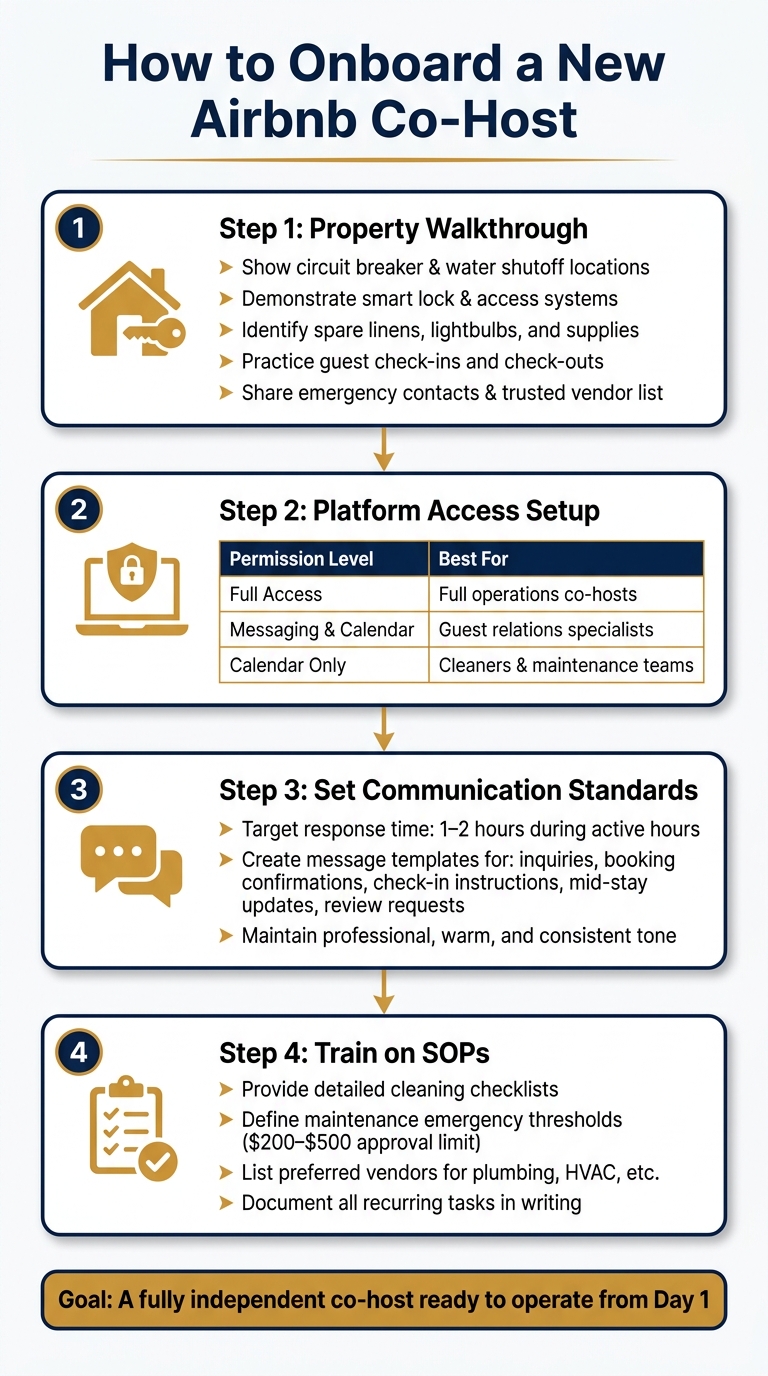
Airbnb Co-Host Onboarding Process: Step-by-Step Guide
Getting a co-host up to speed isn’t just about handing over keys and hoping for the best. A well-thought-out onboarding process ensures they’re equipped to handle the property confidently and independently. The aim? To set them up for success from day one.
Property Walkthrough and Tools Orientation
Start with an in-person walkthrough of the property. Show your co-host everything they need to know, from practical details like the location of the circuit breaker and water shutoff valve to where spare linens and lightbulbs are stored. Don’t forget to point out emergency contact numbers and trusted vendors for issues like plumbing or HVAC repairs.
Spend time demonstrating how to use smart locks and access systems. Let your co-host practice guest check-ins and check-outs to uncover any potential gaps in understanding. Written instructions are helpful, but nothing beats hands-on experience when it comes to dealing with real-world scenarios.
Once the physical walkthrough is complete, move on to platform access. Airbnb offers three levels of permissions:
| Airbnb Permission Level | Capabilities | Best For |
|---|---|---|
| Full Access | Manage rates, calendars, cleaning schedules, guest messaging | Co-hosts handling full operations |
| Messaging & Calendar | Communicate with guests, view bookings (but no reservation changes) | Guest relations specialists |
| Calendar Only | View bookings only | Cleaning crews or maintenance teams |
For daily operations, Full Access is often the most practical choice. However, roles like cleaners or contractors may only need Calendar Only access to keep things straightforward while protecting account security. This structured approach naturally leads into setting up communication protocols.
Setting Communication Standards
Guests expect quick, friendly, and consistent communication. Before your co-host interacts with guests, establish clear expectations. Aim for a response time of 1–2 hours during active hours to maintain your Superhost status [1].
Create a set of message templates for common guest interactions, such as inquiries, booking confirmations, check-in instructions, mid-stay updates, and review requests [3]. These templates save time and ensure consistency, but make sure your co-host understands the tone they should convey – professional, warm, and clear. Your guests should never feel like they’re speaking to someone new.
Once communication standards are in place, it’s time to focus on the nuts and bolts of operations.
Training on Standard Operating Procedures
Standard operating procedures (SOPs) are the backbone of a smooth and scalable operation. Every recurring task – whether it’s cleaning, restocking, managing maintenance, or replying to reviews – should have a clear, written process for your co-host to follow [1]. Align these procedures with their responsibilities to ensure accountability and efficiency.
Provide detailed cleaning checklists and inventory lists to minimize confusion and reduce mistakes. For maintenance, define what qualifies as an emergency, list preferred vendors, and set a spending limit (usually $200–$500) that requires your approval before proceeding. This keeps costs under control and prevents surprises.
The more precise your SOPs are, the easier it becomes for your co-host to operate independently. Plus, as your hosting operation grows, these guidelines make onboarding additional co-hosts much simpler.
Guest Experience and Issue Resolution
It’s essential to ensure your co-host provides an outstanding guest experience while addressing any issues promptly and effectively.
How to Communicate with Guests at Every Stage
A well-planned communication timeline can make a big difference in how smoothly a guest’s stay unfolds. On average, a single booking generates 8–12 messages, with most questions revolving around WiFi, parking, and access codes [6]. By sticking to a structured communication plan, you can reduce unnecessary back-and-forth and create a more seamless experience.
| Phase | Timing | Goal |
|---|---|---|
| Booking Confirmation | Within 30 minutes | Confirm details and ease any pre-arrival concerns |
| Pre-Arrival Reminder | 72 hours before check-in | Provide parking, WiFi, and other logistical details |
| Check-In Day Message | Morning of arrival | Share access codes and extend a final welcome |
| Mid-Stay Check-In | Day 2 of stay | Address potential issues while there’s still time to resolve them |
| Post-Checkout Message | Within 2 hours of departure | Thank the guest and request a review |
Among these, the mid-stay check-in is particularly impactful. Properties that use this touchpoint see 34% fewer negative review mentions [8]. It gives guests a private space to voice concerns, allowing you to address them before they escalate.
To cut down on repetitive questions, consider providing a 24/7 accessible digital guidebook. This simple tool can reduce common inquiries by up to 70% [6][7].
Handling Complaints and Emergencies
Quick responses are critical when it comes to complaints or emergencies. Delays can lead to negative reviews, but even a fast acknowledgment can make all the difference [6]. A message like, "I’m on it and will update you shortly," reassures guests far more than silence ever could. This approach aligns with the service recovery paradox: resolving an issue quickly and professionally can often leave a guest more satisfied than if no problem had occurred at all [8].
For emergencies requiring immediate action – like plumbing or HVAC issues – your co-host should have access to a pre-approved list of reliable vendors. Establish clear guidelines on what they can handle independently, what needs your approval, and when to escalate directly to Airbnb support. Documenting every complaint and its resolution is equally important, as it protects both the co-host and property owner in the long run.
When handled effectively, issue resolution becomes a cornerstone of positive guest reviews.
Managing Reviews and Building Your Reputation
Guest reviews are more than just feedback – they can directly influence your revenue, with high scores boosting earnings by up to 13% [7]. That’s why managing reviews should be a priority.
Proactive communication throughout the stay contributes significantly to maintaining strong review scores. Train your co-host to send post-checkout messages promptly, thanking guests and gently encouraging them to leave a review. A helpful tip: leave the guest a review first and mention it in your message to encourage reciprocity.
When you do receive a negative review, respond thoughtfully. Acknowledge the guest’s concerns, explain what steps were taken (or will be taken) to address the issue, and maintain a professional tone. Remember, prospective guests often scrutinize host responses just as much as the reviews themselves. A calm, solution-oriented reply can build trust and reassure future guests.
To stay ahead of potential problems, conduct a quick weekly review of flagged issues, late responses, or recurring complaints. A 15-minute audit can reveal patterns and help you tackle systemic problems before they grow [9].
Tracking Performance and Scaling Your Co-Host Operation
Once your co-host setup is operational, the next challenge is ensuring it stays effective and efficient.
Key Metrics to Track Co-Host Performance
Keeping an eye on specific metrics is crucial to measure how well your co-host is performing. The most important ones include response rate, response time, guest ratings, occupancy rate, and gross booking revenue.
For example, Airbnb calculates response rate over a rolling 365-day period. A single bad week can affect your metrics for the entire year [9]. To maintain Superhost status, Airbnb requires at least a 90% response rate within 24 hours. That means missing just 4 messages out of 40 in a year could cost you that badge [9]. As for response time, aiming to reply within one hour is a benchmark for top-performing hosts [1].
| Metric | Target Benchmark | Why It Matters |
|---|---|---|
| Response Rate | 90%+ within 24 hours | Required for Superhost status [9] |
| Response Time | Under 1 hour | Reduces guest frustration and inquiry drop-off [1] |
| Guest Rating | 4.8 stars or higher | Impacts search ranking and revenue [1] |
| Occupancy Rate | 75% on weekends / 55% monthly | Reflects healthy rental performance [2] |
| Revenue vs. Market | At or above market average | Indicates effective pricing and calendar management [1] |
To stay on top of these metrics, dedicate just 15 minutes each week to reviewing Airbnb’s performance dashboard. If you notice a late response or a drop in ratings, dig into the root cause. Was it a notification issue? Missing property details? A scheduling conflict? Addressing these as system-level problems – rather than individual mistakes – makes it easier to find solutions [9]. Regular reviews like this help maintain steady performance improvement.
How to Give Feedback and Coach Your Co-Host
Tracking metrics is only the first step – providing actionable feedback is what drives improvement. Feedback should focus on identifying patterns and closing gaps. For instance, if a co-host misses a message or struggles with a guest issue, figure out whether it’s due to a lack of clarity, training, or resources. If they didn’t know an answer, update your knowledge base instead of jumping to criticism.
Here are a few practical tips to keep things running smoothly:
- Set clear expectations: Be as specific as possible. For example, write “respond to all guest messages within 1 hour” instead of vague instructions like “respond quickly” [1].
- Empower decision-making: Allow your co-host to approve emergency repairs up to a certain dollar amount (e.g., $200) without needing your input. This reduces bottlenecks and keeps operations efficient.
- Regularly update resources: Schedule quarterly reviews of your property knowledge base. Refresh local tips, seasonal rules, and pricing notes in preparation for Airbnb’s assessment periods [9].
If your co-host is managing a high volume of messages, consider using AI drafting tools. Work together to fine-tune the tone and ensure accuracy before issues arise.
When to Work with a Professional Property Manager
While co-hosting works well for many property owners, it has its limits. If guest communication starts taking more than 2–3 hours of your day or you’re managing over 15 properties, you might outgrow the co-host model [9].
Signs that it’s time to switch include missed response windows, occupancy rates below local averages, or gaps in services like dynamic pricing and optimized listings. At this stage, a professional vacation rental management service can be a game-changer.
Services like Rank One Stays are designed to handle this transition. With management fees starting at just 10% – far lower than the industry standard of 25–40% – and a track record of helping property owners earn 38% more revenue than the market average, it’s a step up from managing everything yourself. Whether your property is in Scottsdale, Denver, Pittsburgh, or Lighthouse Point, professional managers bring the expertise, systems, and local knowledge that are tough to replicate solo.
Conclusion: Building a Co-Host Strategy That Scales
A successful co-host operation thrives on clear agreements, well-documented procedures, and strict accountability. These elements work together to safeguard your revenue, maintain strong guest ratings, and save valuable time.
The key to growth lies in structure, not improvisation. By investing in thorough onboarding processes, standardized operating procedures (SOPs), and defined performance benchmarks, you can minimize escalations and consistently improve guest reviews.
As your business grows and becomes more complex, the demands on your co-host strategy will increase. While a co-host charging a 10–15% fee to handle guest communication may be sufficient for a single property, managing multiple listings across various platforms introduces new challenges that require more robust solutions [1].
When your operations outgrow the co-host model, consider transitioning to professional vacation rental management. Companies like Rank One Stays offer services such as dynamic pricing, distribution across multiple platforms, and advanced operational systems. Whether your property is located in Scottsdale, Denver, Pittsburgh, or Lighthouse Point, starting with a co-host model and building strong systems ensures you’re positioned for sustainable growth.
FAQs
What should my co-host be allowed to do on Airbnb?
A co-host’s role on Airbnb varies based on the permissions granted by the primary host.
- Full-access co-hosts: These co-hosts handle a wide range of tasks, including guest communication, managing reservations, updating calendars, adjusting pricing, coordinating cleaning schedules, and even editing listing details.
- Limited-access co-hosts: Their responsibilities are more restricted, often limited to viewing bookings and messaging guests.
To ensure smooth property management, it’s important to clearly outline tasks and permissions upfront.
What dollar limit should I set for co-host-approved repairs?
Setting a dollar limit for co-host-approved repairs isn’t one-size-fits-all. It’s smart to establish a threshold that aligns with your property’s specific needs and responsibilities. This allows co-hosts to manage minor or urgent repairs quickly, avoiding unnecessary delays, while you retain control over significant decisions. When deciding on the limit, think about factors like how urgent repairs might be and the usual costs associated with maintaining your property.
How do I know when to switch from a co-host to Rank One Stays?
If managing your properties feels like a full-time job, switching to Rank One Stays might be the solution you need. Are you spending more than 2 hours a day just answering guest inquiries? Making constant trips to handle minor repairs? Or finding it hard to keep up with compliance and operational demands? These are clear signs that your current setup may not be sustainable. Rank One Stays can simplify your operations and even help increase revenue, especially if you’re overwhelmed or looking to grow without stretching yourself too thin.