
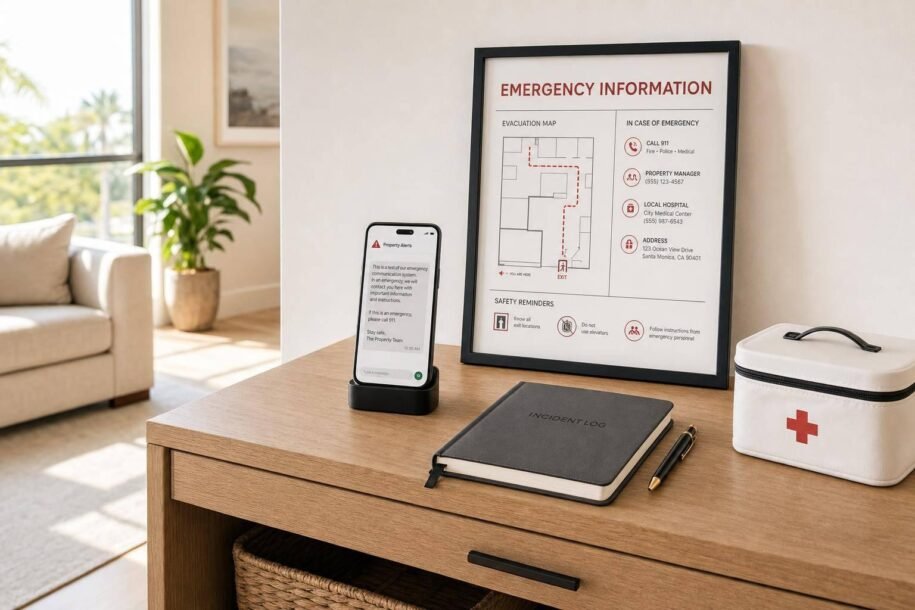
When an emergency happens, I need to do three things fast: protect the guest, share one clear next step, and keep a written record. That is the core idea.
If I run a vacation rental, my plan should be simple:
- Sort the issue by risk
- Tell guests when to call 911 first
- Use phone or text for safety threats
- Keep prewritten messages ready
- Post the property address, exits, and shutoff info inside the home
- Log every call, text, and update
- Follow up with facts only
- Review what slowed me down after the event
A few details matter a lot. For example, critical issues like fire, gas leaks, break-ins, and medical emergencies need 911 first. Less severe issues, like no hot water or internet, can often wait 1–2 hours. And if I manage 3–5 properties, guest messaging alone can add up to 40–60 messages per day and 2–4 hours of work, which makes after-hours coverage a common weak spot.
Here’s the short version:
- Life safety first: fire, smoke, gas, carbon monoxide, intruder, or medical crisis
- Use the fastest channel first: usually call or SMS
- Give one instruction at a time: “Leave now.” “Call 911.” “Go to the shutoff valve.”
- Repeat the main point: what happened, what to do, and who will update next
- Write everything down: time, message, action, vendor, responder, and outcome
If I want fewer mistakes during a stressful moment, I should build the plan before check-in, not during the problem.
Protect your Airbnb: Emergency Preparedness Tips
sbb-itb-103bddb
1. Identify the Emergency and Match the Message to the Risk
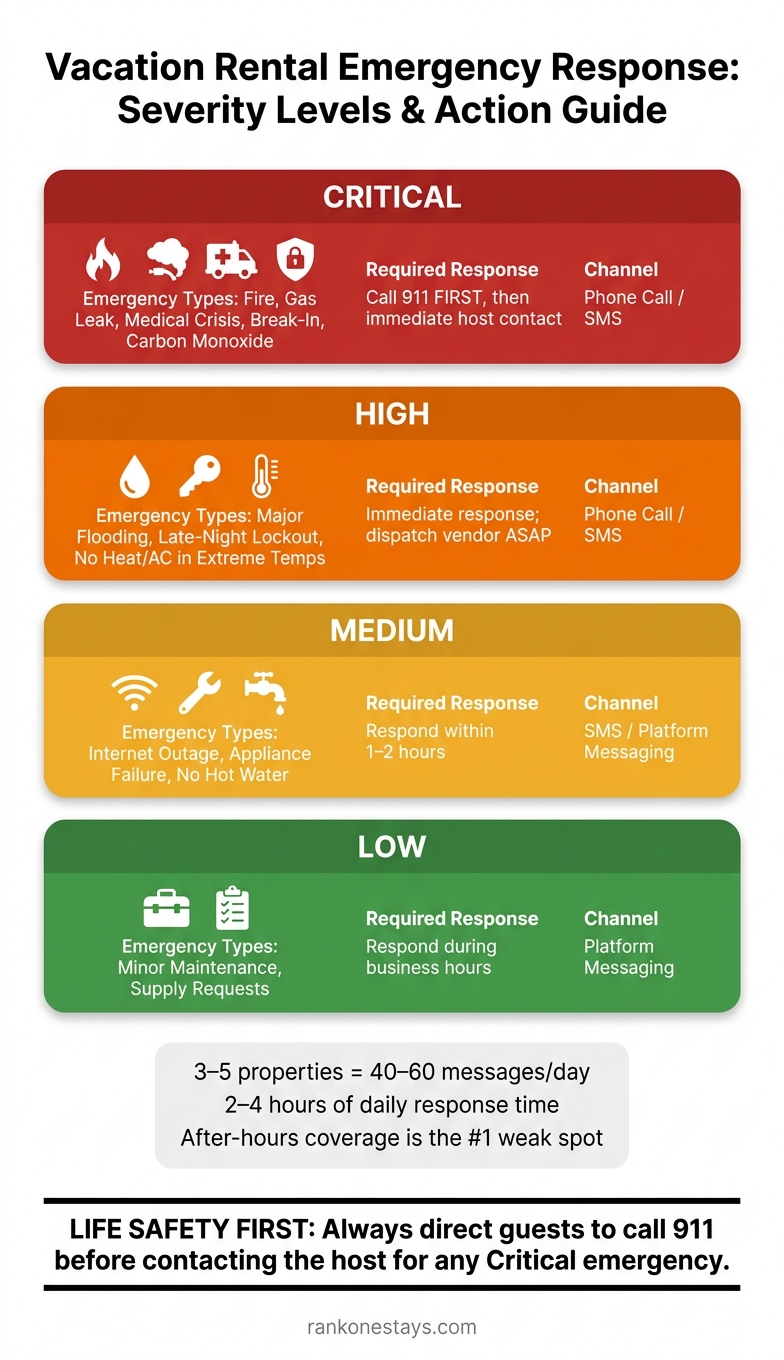
Vacation Rental Emergency Response: Severity Levels & Action Guide
Start by sorting the issue by risk level. A gas leak, fire, or medical emergency needs action right away. A broken appliance does not. If you treat both the same way, you slow things down and make the situation harder for everyone.
Common Emergency Types in Short-Term Rentals
In short-term rentals, some problems are critical and need an instant response. These include fires, gas leaks, carbon monoxide alarms, medical emergencies, and break-ins [1][6].
Other issues are urgent, but not always life-threatening. Major flooding, late-night lockouts, and HVAC failure during extreme weather fall into that group [1]. In those cases, the host should respond fast and get a vendor on the way as soon as possible.
Then there are problems that can wait a bit. Internet outages, appliance failure, or no hot water are usually medium priority and can often be handled within 1–2 hours [1]. Minor maintenance issues and supply requests are lower priority and can wait until business hours.
Use a simple severity ladder to decide what to do next: call, dispatch, or acknowledge the message and set expectations.
| Severity | Emergency Type | Required Response |
|---|---|---|
| Critical | Fire, gas leak, medical crisis, break-in | Call 911; immediate host contact |
| High | Major flooding, lockout, no heat/AC in extreme temps | Immediate response; dispatch vendor |
| Medium | Internet outage, appliance failure, no hot water | 1–2 hour response |
| Low | Minor maintenance, supply requests | Respond during business hours |
Location matters too. A home in a hurricane zone faces different risks than one in a wildfire-prone area or a place hit by severe winter storms. Your emergency plan should reflect the threats tied to that area, not a generic checklist.
When Guests Should Call 911 First
Critical incidents follow a different rule: guests need to contact emergency services first. For any life-threatening emergency, guests should call 911 before contacting the host [1][6].
If a guest smells gas, they should leave the property at once and call 911 or the gas company from a safe spot outside [6][1]. The same goes for fires, smoke, active intruders, and medical emergencies. After that, the host can share access details and help responders as needed [6][1].
It also helps to post the full street address inside the home where guests can see it right away, along with the nearest hospital and urgent care locations. In a tense moment, people shouldn’t have to hunt for that information. It can speed up dispatch [5][6].
Once the type of emergency is clear, the next move is getting your messages and backup contacts ready before check-in.
2. Set Up Emergency Communication Before Check-In
Set up your emergency communication system before guests arrive. When a problem hits, you don’t want to write messages from scratch or hunt for key details. You want to reach guests fast, give one clear next step, and keep every message aligned.
Build a Written Plan and In-Home Emergency Information
Start with a simple written plan. Assign one person to contact guests, one to call responders, and one to log the incident. That way, tasks don’t overlap, and no one wastes time guessing who should do what.
Put all urgent details in one visible emergency packet that guests can grab right away. It should include utility shutoff locations for water, gas, and electricity, fire extinguisher locations, and primary and secondary exits for each room. A laminated quick-reference card in the kitchen and a printed emergency binder are a good pair: one for a fast glance, one for step-by-step detail.
| Emergency Type | Key Information Guests Need On-Site |
|---|---|
| Fire | Exit routes, assembly point, fire extinguisher location |
| Medical | Property address, nearest hospital/urgent care, poison control |
| Utility failure | Water, gas, and electricity shutoff locations, flashlight and battery locations |
| Severe weather | Shelter-in-place location, evacuation routes |
| Security/access issue | Backup key location, 24-hour locksmith contact, manager phone number |
Send this packet before arrival through a welcome email, local guidebook, or guest app. Use the same severity ladder from the previous section to decide how much detail belongs in each message.
Write Message Templates and Set Up Backup Contact Methods
Pre-written scripts save time when every minute counts. Draft templates for the situations most likely to affect your property, such as storms, blackouts, utility failures, and medical emergencies. Store them in a notes app or shared spreadsheet so your team can copy and paste them into SMS or other messaging apps right away [4].
"Standardizing the emergency communications with protocols streamlines your hosting communications and allows your whole team to have consistency." – Tracey Northcott, Tokyo Family Stays [4]
Don’t assume your main contact method will always work. If you manage remote properties, think about backup options like landlines, Wi-Fi calling, or a satellite messenger [9]. Tell guests to turn on Wi-Fi calling on their phones so they can still place calls if cell service drops [9]. For remote or rural listings where ambulances may take 30–60 minutes to arrive, it also helps to provide GPS coordinates near the exit so guests can give dispatchers an exact location [9].
Use Professional Support for 24/7 Coverage
Running this system well takes time, and emergencies don’t wait for office hours. A gap in coverage at night or on weekends can turn a small problem into a much bigger one.
"A guest locked out at midnight needs help at midnight – not at 9 AM the next day." – Garrett Ham, Founder & CEO, Weekender Management [1]
If you want round-the-clock coverage, Rank One Stays handles guest communication and coordinates housekeeping and maintenance so emergency issues get an immediate response.
With the plan, templates, and backup channels in place, your team can move faster and make fewer mistakes.
3. How to Communicate During an Active Emergency
Once your templates and backup contacts are in place, speed and clarity matter most.
Make Contact Fast and Give Clear Action Steps
Use the fastest channel you trust first. For anything tied to immediate safety, that usually means a phone call or SMS. Platform messaging still helps because it creates a record, but if there’s a fire, gas leak, or another urgent threat, call or text the guest directly.
Your first message should do one job: tell the guest exactly what to do right now. Put the action first.
- "Leave the building now and call 911."
- "Go to the water shutoff location."
- "Move to the safest interior room."
Keep instructions short. Use plain language. Give one step at a time. [8][6]
Match the channel to the type of emergency:
| Emergency Type | Immediate Action Step | Communication Channel |
|---|---|---|
| Fire / Smoke | Evacuate immediately; Call 911 | Phone / SMS |
| Gas Leak | Leave property; Call from outside | Phone / SMS |
| Major Water Leak and Maintenance Issues | Direct guest to water shutoff location | Phone / SMS |
| Power Outage | Provide flashlight locations and ETA | SMS / Platform Messaging |
| Lockout | Direct to backup mechanical lockbox | SMS / Platform Messaging |
Repeat Key Details and Send Timed Updates
In a stressful moment, people miss things. That’s why repetition helps.
Repeat the basics: where to go, what to do next, and where to meet. If the issue lasts more than a few minutes, send short updates at set intervals. Just as important, tell guests when the next update is coming so they’re not left guessing.
Keep Messages Consistent Across Guests, Staff, and Authorities
Mixed messages can make a bad situation worse. Don’t contradict police, fire, medical responders, or utility crews. Back up their guidance instead of giving directions that conflict with it.
Before any emergency happens, name one primary communicator and one backup. During the incident, use a clear channel map like this:
| Stakeholder | Communication Goal | Recommended Channel |
|---|---|---|
| Guests | Safety instructions and reassurance | SMS/Phone (urgent), Platform (documentation) |
| Co-hosts / Staff | Role execution and status updates | Team messaging tool (Slack/WhatsApp) |
| Emergency Responders | Property access and location details | Direct phone call |
| Building Staff | Coordination on shared utilities or safety | Phone or in-person |
After guests are safe, log every message and call for the incident record.
4. Document the Incident and Handle the Aftermath
Once your guests are safe and emergency responders are looped in, the job shifts. Now it’s about documentation, communication, and cleanup. What you do in the next few hours can affect recovery, guest trust, and how well you can back up an insurance claim.
Log Every Message, Call, and Instruction
Start a clear record from the first report through the final resolution. Track the timeline, key decisions, and every person involved. Write down the time for each call, text, or update. If you use a property management system (PMS), lean on its built-in tracking tools so messages are time-stamped for you automatically [7][3].
This kind of record matters. A clean, time-stamped log can support insurance claims and help if a dispute comes up later. Keep a digital copy in a shared cloud folder and, if you can, a printed backup on-site too [3].
Your incident log should also help you pin down one simple thing: what guests need to hear next, and when.
Follow Up With Guests and Outline Next Steps
As soon as the situation is stable, follow up with guests using only facts you can confirm. Don’t guess about the cause. Don’t promise a repair timeline unless you know it’s solid [10].
If the issue affects future stays, send a short and direct note that covers:
- What happened
- The current status
- What repairs are in motion
- Any booking changes guests should expect
That kind of update goes a long way when people are stressed and just want a straight answer [10].
If you decide to issue a refund, send it straight to the guest instead of canceling the reservation outright. Canceling can trigger platform penalties [10]. And if you agree to anything, put it in writing. No gray area. No “I thought we said that on the phone.”
"The best hosts aren’t the ones who never have issues – they’re the ones who resolve issues so well that guests remember feeling taken care of." – Garrett Ham, Founder & CEO, Weekender Management [1]
Review Your Process and Decide Whether to Outsource
Once the communication piece is done, take a hard look at how the process held up. Focus on three things: speed, clarity, and whether your channels worked when pressure hit.
| Metric to Review | Why It Matters |
|---|---|
| Time of first contact | Identifies when coverage gaps are most likely [1] |
| Message clarity | Shows whether instructions were clear and actionable [1] |
| Channel reliability | Confirms whether communication methods held up under pressure [1] |
| Resolution outcome | Surfaces root causes that can be fixed before the next booking [1] |
This review can show patterns fast. Maybe messages get missed overnight. Maybe response times slip below platform rules. Maybe communication feels uneven when things get hectic. If that’s happening, you may need extra help [1][2].
Hosts managing 3–5 properties usually handle 40–60 messages per day, which can take 2–4 hours of response time [1]. That’s a lot, especially when an emergency lands in the middle of everything else.
Owners who need 24/7 coverage can use Rank One Stays for emergency guest support and damage claims handling. With 24/7 support, standard scripts, and complete logs, it’s easier to cut down on missed messages and claim gaps.
Conclusion: Build Your Emergency Communication Plan Before You Need It
Once the incident is over, use the record to tighten up your response plan. Emergencies don’t show up at a good time, and that’s the whole point. Hosts who are ready don’t have to guess what to do next.
The strongest emergency response comes from preparation, not improvisation. That means spotting risks ahead of time, writing a few short scripts, posting clear instructions, and running drills before anything goes wrong.
If handling this across several properties feels like too much, Rank One Stays offers 24/7 guest support and damage claims handling for vacation rentals.
Key Takeaways for Property Owners
Use these points as your final pre-arrival checklist.
- Assign one person to contact guests, one to call responders, and one to log the incident.
- Post one grab-and-go emergency card near the entry or kitchen with the address, shutoffs, and 24-hour contacts.
- Keep short templates ready for the first alert and follow-up messages.
- Route true emergencies to phone and SMS first.
- Log every call, text, and instruction. After each event, fix what slowed the response.
FAQs
What should guests do first in a life-threatening emergency?
In a life-threatening emergency, guests should hang up and dial 911 right away. Life safety comes first. They should get to a safe place and contact emergency services before dealing with anything related to the property.
Property owners should clearly list local emergency numbers and simple contact instructions in the guest welcome guide so guests can find help fast.
What emergency information should I post inside the rental?
Post clear emergency information in both your digital guidebook and a printed notice placed somewhere guests can easily see it. Make sure it includes local contact numbers for police, fire, hospitals, shelters, and your property management contact.
You should also list the full property address, evacuation routes, assembly points, utility shut-off instructions, and the locations of emergency supplies such as flashlights, fire extinguishers, and first-aid kits.
How can I prepare for after-hours guest emergencies?
Prepare a clear emergency plan that covers guest safety and property protection. Spell out who handles what, keep 24/7 vendor contacts in one place, name a main backup contact, and make sure property access details are up to date. It also helps to give guests a digital guidebook with simple troubleshooting steps, so they can sort out small issues fast.
If you want full coverage, Rank One Stays provides professional property management with 24/7 guest support. If you manage on your own, keep pre-written response templates ready so guests get immediate guidance at any hour.