

I use AI to personalize guest messages with verified property facts, booking details, and what guests tell me – not guesses. I keep routine updates under 120 words and use automation to control when they send.
My approach covers five steps:
- Prepare the facts: Keep each property’s records separate, protect guest data, and set clear tone rules.
- Match the booking stage: Draft messages for booking, arrival, the stay, checkout, and follow-up.
- Check local suggestions: Use stated interests and verify current details before sending.
- Keep people in charge: Send complaints, refunds, safety concerns, and exceptions to a person.
- Test before launch: Check accuracy, timing, privacy, and duplicate sends, then review automated threads each week.
My rule: AI drafts; verified facts guide the message. <u>I automate only tested, low-risk replies.</u>
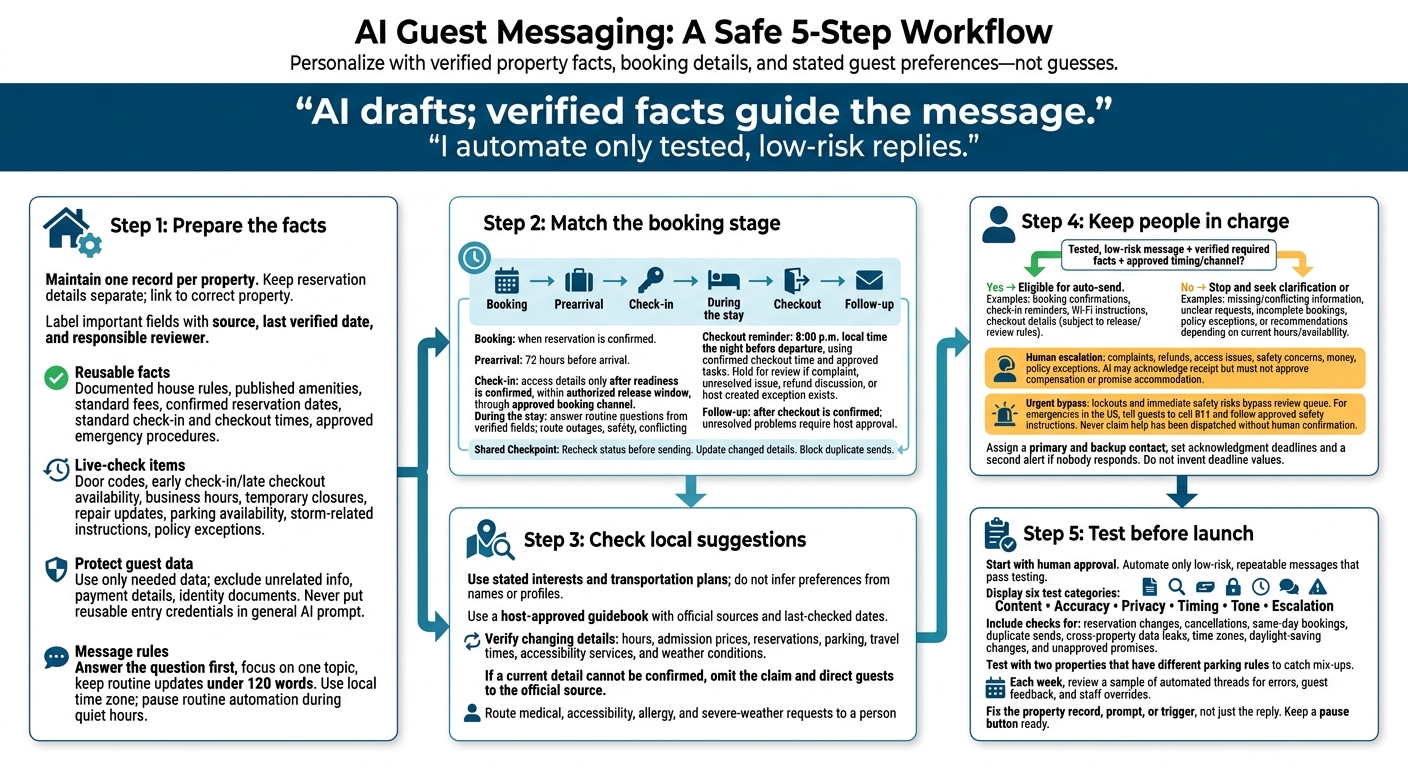
AI Guest Messaging: A Safe 5-Step Workflow
Step 1: Prepare Property Data and Message Rules
Gather Property and Reservation Details
Give AI a verified property record so it can personalize messages without guessing. Create one record per property, with separate fields for the address, amenities, parking, Wi-Fi, house rules, fees, check-in and checkout times, policies, emergency contacts, maintenance steps, and last verified date.
Keep reservation details – guest name, dates, party size, booking channel, and arrival time – separate, then link them to the right property. Use approved listing information and reviewed message templates as references. Past messages provide context, not facts. Complete every listing field and review a vacation rental booking checklist before using placeholders.[2] Test with two properties that have different parking rules to catch mix-ups.[3]
Separate Approved Facts From Details to Verify
Label each important field with its source, last verified date, and responsible reviewer. These labels help determine what AI can include without another check.
| Reusable facts | Live-check items |
|---|---|
| Documented house rules, published amenities, standard fees, confirmed reservation dates, standard check-in and checkout times, and approved emergency procedures | Door codes, early check-in or late checkout availability, business hours, temporary closures, repair updates, parking availability, storm-related instructions, and policy exceptions |
Review the full property profile before each new season and after renovations, policy changes, or reported errors. Recheck high-risk fields whenever the reservation or conditions change.
Limit access to guest data by property, role, and task. Exclude unrelated reservations, payment details, and identity documents. Never put reusable entry credentials in a general AI prompt. Send access information only through the approved reservation or property-management channel, and only at the authorized time.[4][5][8]
Define Tone and Message Limits
Write a clear style rule: answer the question first, use short paragraphs, and keep each message focused on one topic.[9] Match formality to the guest’s stated preference – not their name or profile.
Use full calendar dates, 12-hour times with a.m. or p.m., dollar amounts, miles, and °F. Don’t make unconfirmed promises about refunds, upgrades, repairs, safety, or availability.[3]
Store each property’s local time zone and use it in message text and scheduling, accounting for daylight saving time where relevant.[6][7] State that arrival times follow the property’s local time. Pause routine automated messages during quiet hours.
sbb-itb-103bddb
How to Automate Airbnb Guest Messages with AI | Build for Growth with Jay Ullrich
Step 2: Set Up Messages for Each Booking Stage
Create one rule for each stage that covers the trigger, approved data, message goal, tone, and send rule.
Once the property record is clean, match approved facts to each guest stage. AI adjusts the wording for that stage. Recheck status before sending, replace outdated messages when confirmed details change, and block duplicate sends.
Create Booking and Prearrival Prompts
- Trigger: when the reservation is confirmed, then again 72 hours before arrival.
- Approved data: guest first name, property name, stay dates, check-in and checkout times, parking, stated transportation plan, and house rules.
- Goal: confirm the booking and next step. Before arrival, share directions, timing, and reminders.
- Tone: warm, professional, and concise, with U.S. date formats and the property’s local time.
- Send rule: leave out missing fields and flag conflicts or unanswered questions for review. Promise early check-in or late checkout only with approval.
- Output: one guest-facing draft and a separate review flag.
Hold access details until the approved release window.
Send Confirmed Check-In Instructions
Send access details only after readiness is confirmed, within the authorized release window, and through the approved booking channel.[11][13]
Handle Routine Questions During the Stay
Tailor each response to the guest’s question. Automatically send direct answers from verified fields without repeating the arrival guide. Route outages, safety concerns, and conflicting records to a person. Report work as finished only when the task system marks it complete.
“The Wi-Fi network is DesertGuest. The password is in your booking-platform check-in details. Your assigned parking space is 12, and please do not use spaces marked reserved for other units.”
Set Up Checkout and Follow-Up Messages
As departure gets closer, shift from stay support to a simple checkout reminder.
- Departure reminder: send at 8:00 p.m. local time the night before departure, using the confirmed checkout time and approved tasks. Hold the message for review if there’s a complaint, unresolved maintenance issue, refund discussion, or host-created exception.
- Post-checkout follow-up: after checkout is confirmed, thank the guest and request a review through the booking platform. Require host approval for reported problems, damage investigations, or unresolved service recovery.
“Hi Taylor, checkout is by 10:00 a.m. tomorrow. Before leaving, please lock the doors, turn off the lights, and place bagged trash in the designated bin. Thank you for staying with us.”
“Thank you for staying with us. If you have a moment, please consider leaving an honest review through the booking platform.”
Check review wording and timing against the platform’s current rules. Vrbo requires reviews and responses to comply with its content guidelines.[10][12]
Step 3: Tailor Local Recommendations
Once you confirm the stay details, use guests’ stated interests to suggest local options. Stick to what they share – don’t guess.
Use Shared Preferences Without Personal Assumptions
Personalize suggestions using only information guests provide. Pass along only the name, dates, party size, transportation plans, and stated interests needed for the request. Don’t collect extra personal details just to improve recommendations.[14]
Before sending the message, check each place against current local information.
Check Local Details Before Sending
Keep a host-approved local guidebook that includes each attraction’s description, official website, area, and last-checked date. Separate fixed descriptions from details that can change: hours, admission prices, reservations, parking, travel times, accessibility services, and weather conditions.
If you can’t confirm a current detail, leave out the claim and direct guests to the official source.
Build the local guidebook into the messaging system. Send medical, accessibility, allergy, and severe-weather requests to a person.
Compare Templates, AI Drafts, and Reviewed Messages
The examples below show how personalized suggestions can help – and where unsupported certainty can creep in. Host approval must verify every factual claim. Use the host-approved version as the model for every recommendation message.
Generic Template AI-Personalized Draft Host-Approved Message Arrival example: “Welcome to Pittsburgh. Check-in begins at 4:00 p.m. Please contact us if you need anything.” “Welcome to Pittsburgh, Alex. Since you mentioned wanting museum options and will be driving, you could look into The Andy Warhol Museum or the Carnegie Museums of Art and Natural History. Please check each official website for current hours, admission, parking, and accessibility details.” Welcome to Pittsburgh, Alex. Check-in begins at 4:00 p.m. Because you mentioned museums and plan to drive, The Andy Warhol Museum and the Carnegie Museums of Art and Natural History may fit your interests. Visit the official museum websites before you go to confirm today’s hours, admission, parking, and accessibility information. Our property has [verified parking detail]. Restaurant-request example: “We hope you enjoy your stay. Let us know if you need restaurant recommendations.” “Hi Jamie, since you mentioned arriving Friday without a car and looking for vegetarian dinner for four, you might consider the host-approved restaurants within the listed downtown area. I can share options that accept reservations and are reachable by your preferred transportation.” “Hi Jamie, since you mentioned vegetarian dinner for four and no rental car, here are two host-approved options in the downtown area. Please confirm today’s menu, hours, pricing, and reservation availability directly with each restaurant. I have not independently verified tonight’s availability.” Scottsdale outdoor example: “Enjoy the many outdoor activities in Scottsdale.” If you’re interested in outdoor activities during your Scottsdale stay, you might consider a hike or another desert excursion. Check the forecast, trail status, heat conditions, and water requirements before leaving. Before a Scottsdale hike, check the current forecast and trail conditions. The official visitor guide recommends at least 1 quart of water per person for a short hike and at least 1 gallon per person for a longer hike. Use sunscreen and confirm the trail’s current status before departing.[15]
Step 4: Set Human Review and Escalation Rules
Once templates are ready, decide which messages AI can send on its own and which need human review.
Choose Messages for Automatic Sending
Auto-send only tested messages based on verified reservation and property data: booking confirmations, check-in reminders, Wi-Fi instructions, and checkout details.[11] Before turning on automation, check that names, dates, and access codes fill in correctly.
If required information is missing, stop the message and ask for clarification or hand it to a person. Don’t guess. Require approval for unclear requests, incomplete bookings, exceptions, and recommendations that depend on current hours or availability.
Route Sensitive and Urgent Issues to a Person
Send any access, safety, money, or policy exception to a person. Booking-stage requests and local-recommendation prompts must leave automation immediately if they’re high-risk or can’t be verified. AI can acknowledge receipt, but it must not approve compensation or promise an accommodation.
Lockouts and immediate safety risks bypass the review queue. For emergencies in the United States, tell guests to call 911 and follow approved safety instructions. Never say help has been dispatched unless a person has confirmed it.[16][17]
Before turning on automation, name a primary and backup contact for each issue type and shift. Set acknowledgment deadlines and a second alert if nobody responds. Give the responder the conversation, reservation details, property address, reported problem, prior troubleshooting, and relevant attachments. Guests shouldn’t have to repeat themselves.[21]
Log when each issue was received, assigned, acknowledged, and resolved.[19] Before replying, confirm that any repair timeline, fee waiver, or other commitment has approval. Keep emergency contacts at the property and in the digital guidebook so guests can reach support quickly.[20]
Arrange Human Support With Rank One Stays
If the owner won’t monitor messages around the clock, send after-hours requests to a live team. For owners who want live human coverage, Rank One Stays handles 24/7 guest support, maintenance escalation, housekeeping coordination, and damage claims.[18]
Conclusion: Test Before Turning On Automation
Once the prompts, facts, and escalation rules are in place, test the system from start to finish before automation goes live. Start with human approval. Check booking, prearrival, stay, checkout, and follow-up messages against accurate property data. Make sure every draft uses approved guest details and current local facts.
Automate only low-risk, repeatable messages that pass testing. Each week, review a sample of automated threads for errors, guest feedback, and staff overrides. Fix recurring issues in the property record, prompt, or trigger – not just in the reply. Keep a pause button ready.
Use this checklist to catch errors before guests do. Before launch, test:
- Content: Check Wi-Fi, parking, check-in, pet rules, amenities, checkout, maintenance requests, and reservation changes, including date shifts, cancellations, and same-day bookings. Confirm messages update or stop without duplicate sends.
- Accuracy: Verify amenities, fees, access instructions, contact details, local hours, and recommendation details.
- Privacy: Use only the guest data needed for the message. Block leaks between guests or properties.
- Timing: Check the property’s time zone, daylight-saving changes, late-night arrivals, and U.S. date and time formats.
- Tone: Keep wording consistent. Block unapproved refunds, discounts, early check-in, late checkout, repair deadlines, and promises of unavailable amenities.
- Escalation: Send urgent, sensitive, or unclear messages to a person, and let staff override automation.
FAQs
How can I connect AI messaging to my booking system?
The search results don’t specify how to connect AI messaging. Instead, they suggest using your property management or guest-support system rather than handling messages manually.
To put this into practice, Rank One Stays would need to set up and manage AI personalization through its guest-support channels. That means matching booking-stage prompts, local recommendations, stay details, and tone settings to its workflow. [1]
How can I keep automated messages from sounding robotic?
Give your AI prompts specific guest details and local context. Set the tone to match your property’s personality, and tailor recommendations for nearby attractions and restaurants. Have a person review messages to keep them natural and answer guest questions that need individual attention.
Rank One Stays handles all guest communications with a professional, personalized approach, maintaining a 4.93/5 rating across thousands of stays [1].
How do I measure whether AI messaging improves guest satisfaction?
Track your property ratings and the tone of guest reviews. Even a drop from 5.0 to 4.9 stars can sharply reduce your average daily rate. Review sentiment analysis helps you spot and fix issues with day-to-day operations before they hurt your scores [1].
Rank One Stays uses these tools to help owners maintain high ratings and “Guest Favorite” status while providing consistently high-quality guest experiences and earning above-market revenue [1].