
Before I publish an Airbnb listing, I check what guests can see – and who can access my account. My starting steps: complete identity verification, remove personal details guests don’t need, and turn on two-factor authentication.
Here’s the checklist I use:
- Public information: Review my profile, photos, map pin, and address-sharing settings.
- Messages and account security: Keep booking discussions in Airbnb, hide lock-screen previews, and check login and recovery details.
- Data choices: Review marketing, cookies, and available U.S. privacy opt-outs.
- Team access: Limit co-host and software permissions, and put a Scottsdale vacation rental management company’s privacy duties in writing.
- Property devices: Follow camera and noise-monitor rules, and use separate, time-limited entry codes where supported.
My rule: <u>share what guests need, not my private life</u>. Privacy settings don’t make me anonymous or replace Airbnb’s required checks. I review them before my first reservation, then every 3 months or when access, devices, or management changes.
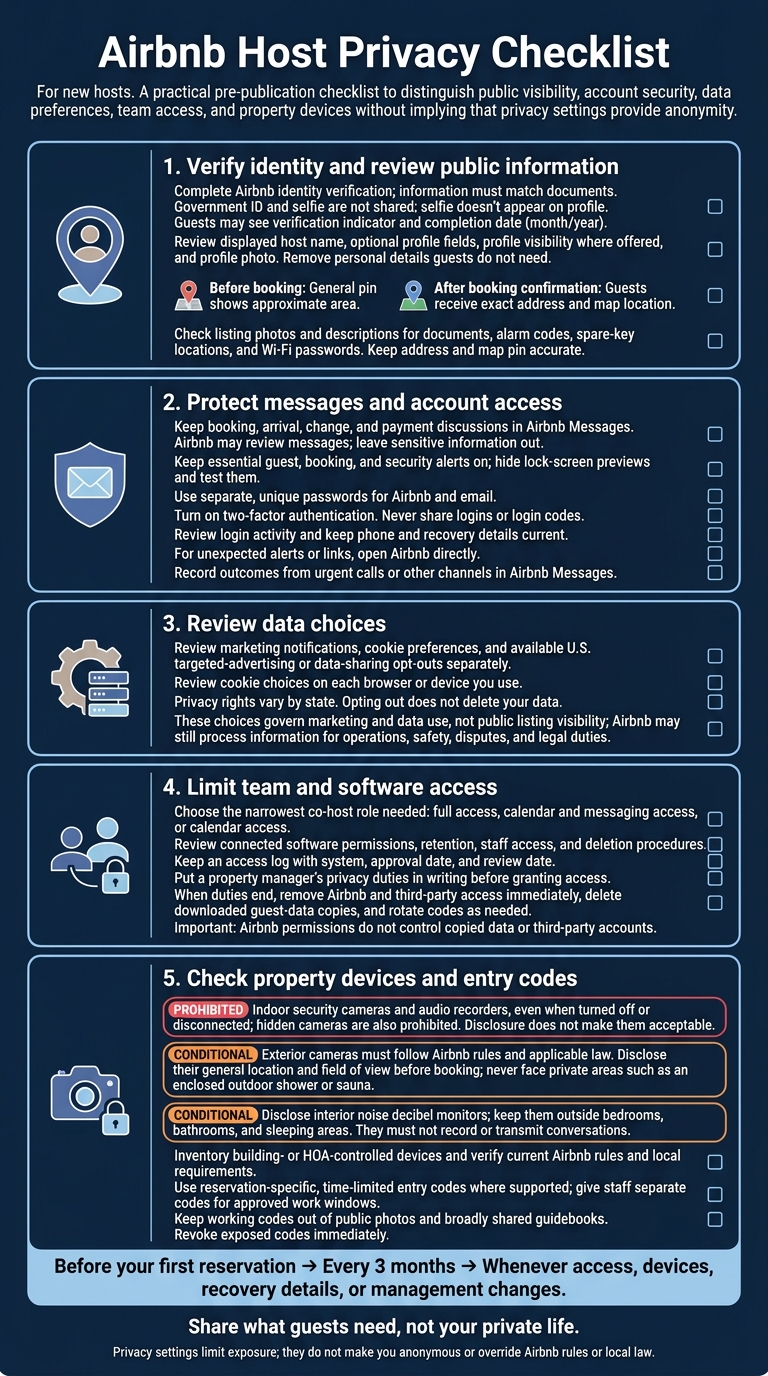
Airbnb Host Privacy Checklist
Verify Your Identity and Review What Guests See
Complete Airbnb Identity Checks
Airbnb may request your legal name, address, phone number, government ID, and sometimes a selfie or trusted third-party records. Make sure your information matches your documents.[2][12] Airbnb and authorized service providers may process these records for verification and safety.[3]
| Information | Guest visibility | Airbnb’s verification use |
|---|---|---|
| Government ID and verification selfie | Neither is shared with guests, and the selfie does not appear on your profile | Verifies identity[12] |
| Legal name, address, and contact details | Used only for verification; not shown on your public profile | Confirms identity through documents or trusted sources[2] |
| Verification status and date | Guests may see a verification indicator and the month and year you completed verification | Shows verification was completed[2][8] |
Choose What to Share on Your Profile
Once you’re verified, check every public-facing field. Review your account controls, then look at what guests see. Removing optional details doesn’t make you anonymous. Your listing, messages, emails, reservation details, reviews, photo, hosting history, and past interactions can still help guests identify you.[8][10]
| Control or field | Information exposed | Why it matters | Recommended use |
|---|---|---|---|
| Preferred first name or business name, if offered | Your displayed host name; otherwise, your legal first name may appear | Identifies you to guests | Use a preferred first name or business name if offered[8] |
| Optional profile fields | Hometown, languages, interests, and introduction | Helps guests understand your communication style | Keep useful details, such as languages, and remove personal information guests don’t need[13] |
| Profile-visibility settings, if offered | Some profile details, depending on the audience | Limits some visibility but does not hide reservation interactions | Check who can see each detail[10] |
| Profile photo | Appears across listings, messages, and reviews | Helps guests recognize their host | Use a professional image with no private documents in the background[13] |
Check Map Location and Address Sharing
Choose how much of your property’s location guests can see before booking. A precise pin shows the exact map location; a general pin shows the approximate area. A precise pin can reveal the property, even though Airbnb withholds the numerical street address until booking confirmation. Confirmed guests receive the exact address and map location. Reservation details may also include your contact number and arrival information.[6][9][11]
Keep both the address and pin accurate – changing the displayed address does not move the map pin. Zoom in on listing photos, and review captions and descriptions (or consider professional vacation rental design to ensure your space is both private and photogenic) for mail, identifying documents, security panels, spare-key locations, alarm codes, and Wi-Fi passwords. Remove details guests don’t need, but don’t misstate the neighborhood or address.[6][9]
Review Marketing and Data-Sharing Choices
Review the privacy settings for email marketing and data use outside your listing. These settings control how Airbnb contacts you and uses your data, not what appears on your public listing.
Check marketing notifications, cookie preferences, and available U.S. targeted-advertising or data-sharing opt-outs separately. Unsubscribe from promotional emails you don’t want, and review cookie choices on each browser or device you use. Privacy rights vary by state, and opting out does not delete your data. Airbnb may still process identity records, bookings, messages, and payment information to run your account, prevent fraud, resolve disputes, or meet legal duties.[5][7]
sbb-itb-103bddb
Protect Guest Messages and Account Access
Keep Booking Discussions in Airbnb Messages
Once you’ve managed what guests can see publicly, treat guest messages, alerts, and account access as parts of the same privacy system.
Keep all booking, arrival, change, and payment details in Airbnb Messages. This ties decisions to the reservation and reduces the need to share personal contact details. Airbnb may review messages for safety and policy enforcement, so leave sensitive information out.[16][4]
- Airbnb Messages: Use the reservation thread for booking questions, check-in details, changes, and payment discussions.
- Text/email: These reveal your phone number or email address. Texts stay on your device, not in the Airbnb thread. Be cautious about requests for payments, links, login codes, or action outside Airbnb.
- Phone calls: Save these for urgent matters. Calls don’t create an automatic written record.
Decline requests to move booking or payment activity outside Airbnb. Rather than follow unexpected links, open the Airbnb app or website directly, and report suspicious messages.[14][15] If an urgent issue requires another channel, record the outcome in Airbnb Messages.
Set Message Alerts and Hide Lock-Screen Previews
Check notification settings directly in the Airbnb app. Keep alerts on for guest messages, booking changes, cancellations, and security notices.
Use your phone’s privacy settings to hide message previews on the lock screen. Test with a harmless message. Confirm that guest names, check-in details, access instructions, phone numbers, and message text stay hidden both on the lock screen and in notification history.
With alerts set up, check the account’s login and recovery settings.
Secure Login and Recovery Information
Anyone who gets into your account can see reservation details, guest messages, and payout information. Use a long password for Airbnb that you don’t use elsewhere, and a separate password for your email. Turn on two-factor authentication, and never share logins or login codes.[14][15]
If you receive an unexpected code or alert, open the Airbnb app or website directly and review account activity.[14][15]
| Control | What it protects |
|---|---|
| Separate passwords for Airbnb and email, neither used elsewhere | Guest messages, reservations, payouts, and password-reset messages |
| Two-factor authentication and login-activity review | Helps block and identify access by someone without permission |
| Current phone number and recovery details | Account recovery and security notifications |
If you choose to outsource to professional property management, limit their access before sharing team tools or property details.
How to Find Hidden Airbnb Settings Nobody Knows About
Control Team Access and Property Privacy
Once you’ve secured your account, limit who can view guest data or control property systems.
Limit Co-Host and Software Access
Airbnb offers full access, calendar and messaging access, and calendar access for co-hosts. Choose the narrowest role that lets each person do their job.[1][20]
| Role | Information needed | Access method | Offboarding action |
|---|---|---|---|
| Cleaner | Cleaning dates, address, entry instructions, cleaning checklist | Calendar view, shared scheduling tool, or limited message | Remove scheduling access; rotate staff code if needed |
| Maintenance contractor | Work order, location, access window, relevant photos | One-time message or work-order system | Close the work order; remove portal access |
| Guest-messaging co-host | Reservation details, approved guest messages, calendar, house rules | Airbnb calendar-and-messaging access | Remove co-host role and shared inbox access |
| Full-service manager | Information required by the management agreement, plus approved property management systems | Airbnb full access only when necessary; separate software accounts | Remove Airbnb and software permissions; rotate codes; obtain data return/deletion confirmation |
| Pricing or channel software | Listing, calendar, reservation, and pricing data required for synchronization | Authorized connected integration | Disconnect integration; verify retention or deletion settings |
Airbnb permissions don’t control copied data or third-party accounts. Before connecting an integration, review its software permissions, data retention practices, staff access, and deletion procedures.
Keep an access log for every person and integration. Record the system, approval date, and review date. Avoid storing guest data outside Airbnb. When someone’s duties end, delete downloaded copies and remove access immediately.
Next, review cameras, monitors, and smart locks.
Follow Camera and Noise Monitor Policies
Indoor security cameras and audio recorders are prohibited – even when turned off or disconnected. Hidden cameras are also prohibited. Disclosing these devices doesn’t make them acceptable.[17][18][19][21]
Exterior cameras must follow Airbnb rules and applicable law. Before booking, disclose their general location and field of view. They must never face private areas, such as an enclosed outdoor shower or sauna.[17][18][19][21]
Disclose interior noise decibel monitors, keep them outside bedrooms, bathrooms, and sleeping areas, and make sure they don’t record or transmit conversations.[17][18][19][21]
Include building- or HOA-controlled devices in your inventory. Before installing any camera or monitor, verify current Airbnb rules and check local recording, notice, and retention requirements.
Control Entry Codes and Arrival Instructions
Use reservation-specific, time-limited smart-lock codes when your lock provider supports them. Give staff separate codes tied to approved work windows. The lock provider’s settings control code creation, expiration, and revocation.
Keep working codes out of public photos and broadly shared guidebooks. If a code reaches the wrong person, revoke it immediately. Review access logs, preserve relevant records, and notify the owner or responsible manager.
Agree on Privacy Duties With Your Property Manager
Put privacy duties in writing. Cover account ownership, permission levels, connected software, guest-data handling, device settings, and offboarding steps.
Conclusion: Review Privacy Before Your First Reservation
Before your first reservation, check that your identity, profile, map, messages, login, and access settings are locked down. Use a password you don’t use elsewhere and turn on two-factor authentication.
Confirm who has access to the listing and devices, and who controls the guest entry process. If a professional vacation rental management handles your listing, assign privacy tasks before granting access.
Privacy settings limit exposure; they don’t make you anonymous or override Airbnb rules or local law. Record the review date. Repeat the check quarterly or whenever co-hosts, software, devices, recovery details, or management arrangements change.
FAQs
How can I test what guests see before publishing?
In your Airbnb dashboard, open the listing editor and select Preview. You’ll see your listing as guests will, including the title, photo gallery, and opening lines of your description. Check that these details reflect the experience you want to offer.
If setup feels overwhelming, Rank One Stays offers full management services to help present your property professionally.
What should I do if my host account is hacked?
Secure the email account linked to your Airbnb profile right away, then change your Airbnb password to a strong password you don’t use elsewhere. In your account security settings, remove access for any devices or third-party apps you don’t recognize.
Contact Airbnb support through its official Help Center to report access you didn’t approve and get help protecting your account and upcoming reservations.
If managing your property feels overwhelming while you recover your account, Rank One Stays offers full property management support.
How can I verify my manager removed guest data?
Ask your property manager for formal confirmation that guest data has been deleted in line with your management agreement.
Professional management teams like Rank One Stays handle guest communication and data privacy procedures directly. They can confirm deletion and explain how they process and store guests’ personal information under current privacy standards – so you don’t have to manage those tasks yourself.