
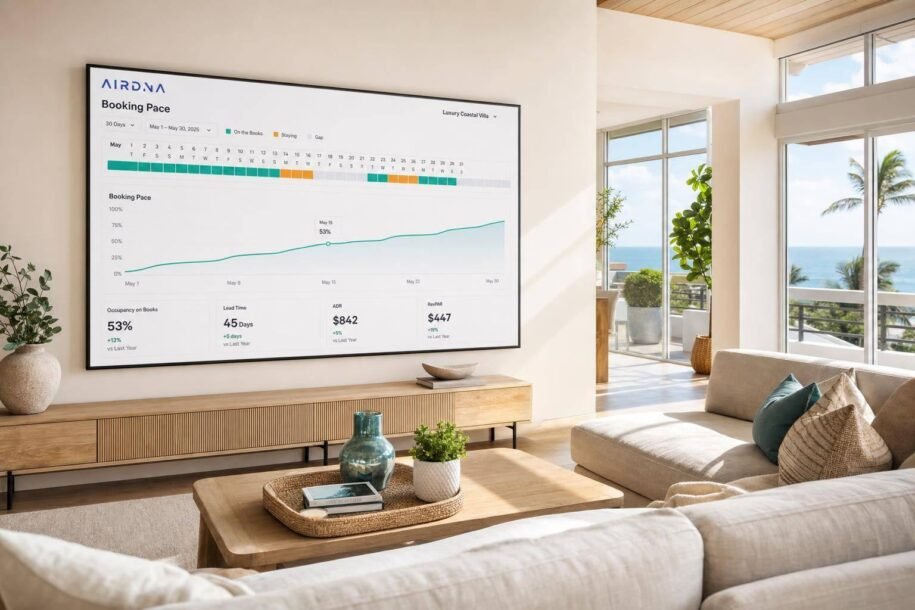
Booking pace tells me if future dates are filling fast enough before revenue is lost. If I compare my occupancy on the books, ADR, RevPAR, and lead time against the right comp set, I can spot whether I need to change price, minimum stays, or calendar rules now instead of waiting until the month ends.
Here’s the article in plain English:
- Booking pace = how fast future nights are booking
- Occupancy on books shows what share of future nights is already reserved
- Lead time shows how far in advance guests are booking
- ADR shows my average booked nightly rate
- RevPAR shows whether my rate and occupancy are working together
- Comp sets matter more than city averages when I want to judge my listing
- Shorter booking windows matter: median U.S. lead time fell from about 30 days in 2023 to about 25 days by mid-2025
- Late bookings are common: about 27% of U.S. reservations now happen within 0–7 days of check-in
- My response depends on pace: if I’m ahead, I test higher rates; if I’m behind, I adjust price, stay rules, or listing setup
What I like about this framework is that it keeps decisions simple:
- If my listing is well below my comp set, I check price, minimum stay, blocked dates, photos, and cancellation terms
- If I’m ahead of my comp set, I should stop leaving money on the table
- If I’m on track, I usually don’t need big changes
- If I cut rates, I should watch RevPAR, not just bookings
Bottom line: I should not read pace as a final score. I should read it as an early warning signal that helps me act while there is still time.
| Metric | What I use it for | What it may mean if it drops |
|---|---|---|
| Occupancy on Books | Check future demand already booked | Demand may be soft or my rate may be too high |
| ADR | Check average booked rate | I may be discounting too much |
| RevPAR | Check revenue per open night | Occupancy, rate, or both may be weak |
| Lead Time | Check booking window | Guests may be booking closer to arrival |
If I own in a seasonal or event-driven market, this article gives me a simple way to read pace data and make better pricing calls earlier.
How to Compare Your Vacation Rental to the Competition – AirDNA Tutorial
sbb-itb-103bddb
Pace Chart Basics
A pace chart shows how future bookings are building over time. It’s a forecast, not a scorecard. In plain English, it helps owners see when to adjust rates before those dates get too close.
This chart starts to make sense when you look at the metrics together instead of treating each one on its own.
The Key Metrics on a Pacing Report
AirDNA pacing reports bring several numbers into one view. That matters, because one metric rarely tells the whole story.
| Metric | What It Measures | What a Decrease Usually Means |
|---|---|---|
| Occupancy on Books | Future demand already captured | Weak demand or rates above market |
| ADR | Average price per booked night | Discounting or softer rate tolerance |
| RevPAR | Total revenue efficiency | Low occupancy, low ADR, or both |
| Lead Time | Days between booking and stay | Demand is shifting closer to arrival |
RevPAR – revenue per available night – is often the clearest single metric because it reflects both ADR and occupancy [1][2].
So don’t read these numbers like isolated stats. Read them like signals. If occupancy on books is down but ADR is holding, demand may be thinner even though pricing hasn’t cracked yet. If lead time drops, guests may still book, just later than usual.
Forward-Looking Pace vs. Historical Pace
The next step is separating what’s already booked from what still needs to book.
Forward pace shows whether future dates are filling faster or slower than expected. Historical pace shows whether demand is tracking above or below past periods. The sweet spot is looking at both at the same time, so you can tell if a date is ahead, behind, or right in line with normal demand.
The national median booking lead time is about 29 days, but that number swings a lot by market type. Urban markets usually land around 17–20 days, while vacation destinations often sit in the 45 to 90+ day range [1]. That’s why your market’s usual lead time matters so much. It tells you how much room you still have to act before a date gets too close.
Next, check how much demand is already on the books. Occupancy on books is the first place to look.
Occupancy on Books and Booking Lead Time
Occupancy on books is the share of future nights that are already reserved when you pull the report. It gives you an early read on demand, not your final occupancy. The next step is figuring out whether that pace is strong for your market.
How to Read Occupancy on Books Without Overreacting
A 40% occupancy-on-books figure can be good or bad. It depends on context.
In markets where guests book just 7–14 days before arrival, 40% at 60 days out can mean you’re ahead. In markets with longer booking windows, that same figure can mean you’re behind.[6][7][8]
The best way to read the number is to compare it with your market and your comp set. If your property is sitting at 25%–30% while the comp set is at 60%, that gap calls for action. You might tighten minimum stays, refresh your photos, or make a small rate cut. On the other hand, if you’re at 80%–90% while the market is near 50%, you’re probably priced too low and should push up your remaining rates.
Pittsburgh is a good example of how this shifts. The city tends to book later on normal summer weekends, but game and concert weekends book earlier. So a 25% fill rate 45 days out may be normal for a standard August weekend, but low for a major event weekend.[4][5]
That’s why the raw number, by itself, doesn’t tell the full story. You need to know when your market usually books before you decide whether you’re ahead, behind, or right on pace.
How Lead Time Shows Early Demand vs. Last-Minute Demand
Lead time shows you when demand shows up. That matters because pricing should follow your market’s booking window, not just the calendar.
Here’s the practical takeaway: don’t discount too early. If your market tends to book within 14 days of arrival, cutting rates at 45 days out usually makes little sense. You’re still outside the normal booking window.
A simple way to think about it:
- If you’re outside the normal booking window, hold rates steady.
- If you’re inside the window and occupancy is still weak, lower rates, loosen cancellation terms, or reduce minimum stays.
- If you’re inside the window and occupancy is strong, hold your price or move it up.
If your pace still seems off, check it against the right comp set before you touch pricing.
Comp Set Review: Compare Your Property to the Right Listings
Broad market averages can blur what’s happening in your slice of the market. That’s why your first move should be to compare your booking pace against the right comp set. This helps you see whether the gap is real or if you’re lining your property up against the wrong listings.
When to Use Comp Set, Submarket, and Market Views
Your comp set should match the things a guest actually cares about: bedroom count, bathrooms, sleeping capacity, layout, location, core amenities, and overall guest appeal. A home built for couples or remote workers shouldn’t be measured against a big party house or a low-cost unit.
AirDNA lets you build a custom comp set from scratch or use its suggested matches, then save that set for repeat use. Its daily updates make it useful for active pricing and booking-pace calls [10][11]. Keep the set tight. If a guest wouldn’t seriously choose that listing instead of yours, it doesn’t belong there.
| View | Best for | Decisions it supports |
|---|---|---|
| Comp Set | Hand-picked listings matching your bedrooms, location, amenities, and guest appeal | Nightly pricing, minimum stays, pacing gaps, revenue benchmarking |
| Submarket | Neighborhood or micro-area performance | Seasonal demand curves, event impact, local booking timing |
| Market | Full city or region averages | Long-term investment trends, year-over-year demand shifts |
If your comp set still shows that you’re behind, the issue usually comes down to price, rules, or presentation.
What to Check When Your Pace Does Not Match the Market
If your pace is trailing the comp set, don’t slash rates right away. Start with the fastest checks first.
Rate is the first place to look. Compare your ADR with similar listings over the next 30 to 90 days. If you’re priced 20% to 30% above comp-set listings and there’s no clear edge to back that up, that spread is probably slowing bookings.
Minimum-stay rules are next. A 5-night minimum on a normal weekend, when most guests are booking 2 to 3 nights, can shrink your eligible booking pool fast. Even a fair rate won’t help much if guests can’t book the stay they want.
Calendar blocks deserve a quick audit too. Sync problems or manual mistakes can make your listing seem less open than it is. If that happens, bookings drop before a guest even gets to your rate.
Presentation covers your photos and your amenity write-up. Guests make snap decisions. Dim photos or vague copy can lose to a sharper listing at the same price. Your cancellation policy matters here too. A strict no-refund policy can send guests to listings with more flexible terms.
Audience fit is the last check. If your property is set up for families, but your photos and copy lean toward the wrong crowd, you may be drawing the wrong guests – or none at all. When pace is off, fix that mismatch before touching price.
Once you know what’s causing the gap, you can turn that finding into a pricing move.
Turn Pace Data Into Pricing and Revenue Decisions
Airbnb Booking Pace: Ahead, On Track & Behind – What to Do
Once you know how your pace compares with your comp set, the next move is simple: turn that signal into action. Pace data only matters if it changes what you do with pricing, minimum stays, and availability. Start with pace, then make the smallest adjustment that can lift bookings without giving away revenue.
What to Do When Pace Is Ahead, On Track, or Behind
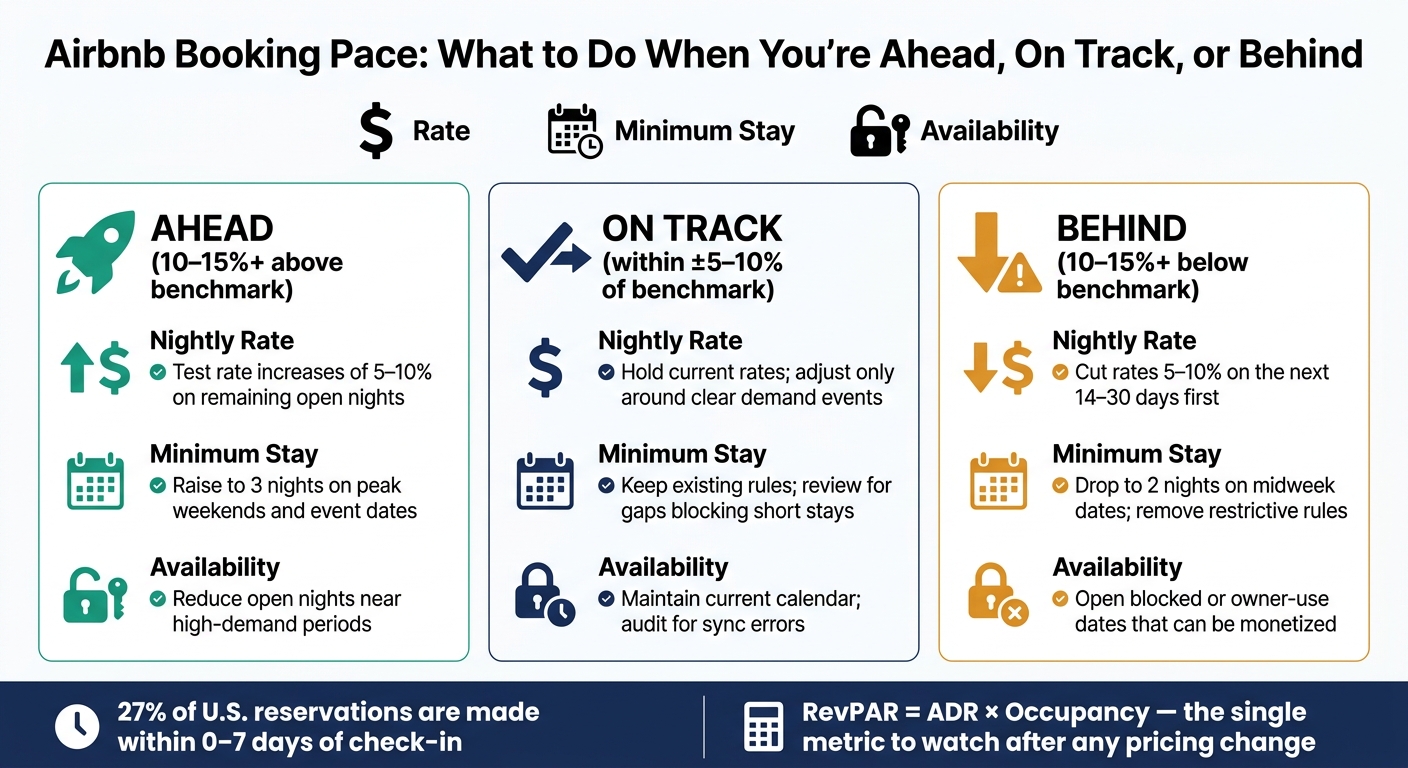
Your response should match where you stand against the benchmark. The table below shows what to do with the three levers you control most directly.[13]
| Pace Status | Nightly Rate | Minimum Stay | Availability |
|---|---|---|---|
| Ahead (10% to 15%+ above benchmark) | Test rate increases of 5–10% on remaining open nights | Raise minimum stay to 3 nights on peak weekends and event dates | Reduce open nights near high-demand periods |
| On Track (within about ±5–10% of benchmark) | Hold current rates; adjust only around clear demand events | Keep existing rules; review for gaps blocking short stays | Maintain current calendar; audit for sync errors |
| Behind (10–15%+ below benchmark) | Cut rates 5–10% on the next 14–30 days first | Drop to 2 nights on midweek dates; remove restrictive rules | Open blocked or owner-use dates that can be monetized |
Make one change at a time. Then give it a few days and see if bookings move before you touch anything else.
How ADR, Occupancy, and RevPAR Work Together
After pace shifts, look at revenue, not just bookings.
More booked nights don’t always mean more money. That’s where a lot of owners get tripped up, especially when slow pace leads to rate cuts that go too far.
The formula is simple: RevPAR = ADR × Occupancy.[14][15] A property running at 90% occupancy at $150 per night brings in less monthly revenue than one at 70% occupancy at $225 per night, even if the first one looks busier on the calendar.
When you change pricing based on pace data, track RevPAR before and after over a matching window, like the next 30 days or a single event week. If a lower rate lifts occupancy but RevPAR still falls, you cut too deep. If a small rate increase softens occupancy a bit but RevPAR rises, that’s a win. RevPAR is the metric to watch because it punishes both underpricing and overpricing in one number.[12][15]
When to Bring In Professional Revenue Management
Checking AirDNA pace data each week, making measured pricing moves, and tracking RevPAR alongside ADR and occupancy is doable for one property. It gets tougher with multiple listings, heavy seasonality, or packed event calendars. And when mistakes stack up, lost revenue stacks up too.
If pace stays off after a few measured changes, it may be time to hand pricing and calendar management to a professional team. Owners with multiple listings or more complex calendars can save time and protect RevPAR by letting a team handle pricing and availability. Rank One Stays uses pace data, dynamic pricing, minimum-stay rules, and calendar management to improve revenue for Airbnb and VRBO owners. You can see if your property qualifies to get a clearer picture of what that looks like for your market.
Conclusion: Use Booking Pace to Make Earlier, Better Decisions
Booking pace is an early warning system, not a report card. It tells you whether future dates are filling faster or slower than usual, which gives you a chance to adjust rates before the calendar gets tight. If gaps are already staring you in the face, your room to protect ADR and RevPAR is much smaller. That’s why the next step is to read occupancy on books and lead time side by side.
Occupancy on books shows demand you’ve already locked in. Lead time shows how close to arrival guests are making reservations. And with about 27% of U.S. reservations now made within 0–7 days of check-in, booking windows have gotten shorter.[3][16] A benchmark helps you tell whether your current pace is strong or weak.
Benchmark pace against a tight comp set to separate market softness from property-specific problems like price, rules, or presentation.[9] Once you see the gap, don’t overcomplicate it. Start with the smallest lever that can fix it.
Use them together:
- If pace is ahead, raise ADR or tighten minimum stays.
- If pace is on track, hold rates and keep watching lead time.
- If pace is behind, lower ADR, relax minimum-stay rules, or improve listing presentation.[9][17]
If weekly pace tracking and pricing changes are tough to stay on top of, Rank One Stays can handle pace monitoring, dynamic pricing, and minimum-stay rules so you can act before pace slips.
FAQs
How often should I check booking pace?
Check booking pace every day. Demand can change fast based on market shifts and local events, so regular tracking helps you react in time.
That makes it easier to adjust rates as things change. For example, you might increase prices by 5% to 20% when bookings are coming in faster than the market. Or you might lower them by 5% to 15% to fill last-minute gaps.
If daily monitoring feels like too much, Rank One Stays can manage dynamic pricing and listing optimization for you.
What makes a good comp set?
A good comp set should include properties that look a lot like yours, so the data actually helps with pricing and revenue decisions.
If your property is one-of-a-kind or sits at the top of the market, a mosaic comp set can be a smart move. It pulls data from several smaller, high-quality listings to give you a better read on where your property fits. And if you’d rather not manage that yourself, Rank One Stays can handle this strategy and dynamic pricing for you.
When should I change rates instead of waiting?
Change your rates when booking pace drifts from market trends or your place is still open as check-in gets closer.
If your dates are booking faster than the market average, increase rates by 5% to 20%. If the property is still unbooked within three days of check-in, cut rates by 5% to 15%. Rank One Stays can automate these daily changes to help you get more revenue.