

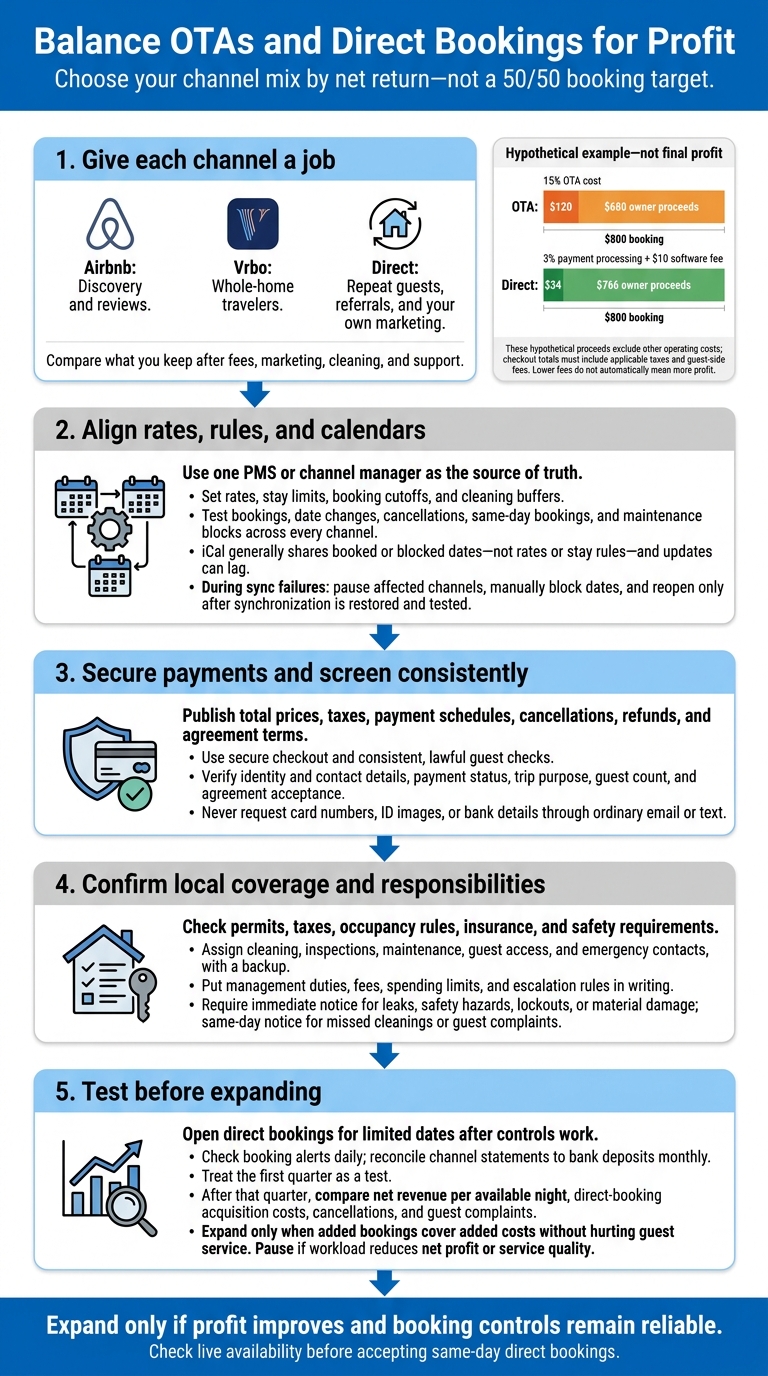
I’d balance Airbnb, Vrbo, and direct bookings by profit – not a 50/50 booking target. Start by comparing what you keep after fees, marketing, cleaning, and support. In the article’s hypothetical $800 booking, proceeds are $680 with a 15% OTA cost versus $766 with 3% direct payment processing and a $10 software fee, before other costs.
Here’s the approach I’d use:
- Give each channel a job: Airbnb for discovery and reviews, Vrbo for whole-home travelers, and direct bookings for repeat guests, referrals, and your own marketing.
- Keep rates and calendars in one master system: Test pricing, stay limits, date changes, and cancellations across every channel. Have a plan for sync failures.
- Set payment and screening rules: Publish total prices, taxes, refunds, and agreement terms. Use secure checkout and consistent, lawful guest checks.
- Confirm local coverage: Check permits and insurance, assign cleaning and emergency contacts, and put management duties and fees in writing. This is a core part of professional property management that ensures your investment is protected.
- Test before expanding: Start direct bookings with limited dates, then review profit, cancellations, and guest complaints after the first quarter.
My rule: lower fees don’t automatically mean more profit. <u>Expand only when the added bookings cover the added costs without hurting guest service.</u>
Balance OTAs and Direct Bookings for Profit
Step 1: Align Rates, Stay Rules, and Calendars
Set Base Rates and Channel Pricing
Use your PMS or channel manager as the source of truth. Update rates, availability, and blocks there first, and document who can change each field.
Build base rates around fixed and variable costs, target profit, and payment fees. Compare rentals with similar bedroom counts, locations, amenities, and review quality. Then adjust for seasons, events, weekdays, booking lead time, and remaining open nights – not competitor rates alone.
| Decision | Trigger | Net effect | Safeguard |
|---|---|---|---|
| Add an OTA markup | Lower OTA margins | Protects owner revenue, but may increase the guest’s total price and reduce conversion | Compare full guest checkout prices across channels and verify the platform’s pricing and parity terms |
| Offer a direct discount | Repeat guests, email subscribers, or qualified referrals cost less to acquire | May improve conversion and reduce commission expense | Keep the discount below the acquisition and payment costs avoided; clearly publish cancellation, tax, and fee terms |
| Require a longer minimum stay | High turnover costs, peak demand, or frequent short-stay gaps | Can increase net revenue by cutting cleaning and operating costs, but may reduce occupancy | Test against historical demand and use date-specific overrides instead of a blanket rule |
| Open all channels | The PMS, calendars, rates, and policies have been tested | Increases booking opportunities | First confirm two-way synchronization, accurate guest pricing, and a documented outage procedure |
Example: Three nights at $200, plus $150 cleaning and $50 in fees, totals $800 before tax. At a 15% OTA cost, owner proceeds are $680; at 3% processing plus a $10 software fee, they are $766. These hypothetical proceeds exclude other operating costs; checkout totals must include applicable taxes and guest-side fees.
Next, set stay limits and booking deadlines so your pricing and occupancy rules work together.
Set Stay Limits and Booking Deadlines
Set stay-length limits, arrival and departure restrictions, booking windows and cutoffs, cleaning buffers, and gap-filling rules in the master system. Accept shorter stays only when the added revenue covers turnover and vacancy costs. Airbnb supports minimum nights by check-in day, while Vrbo supports minimum and maximum stays.[4][3]
Before increasing minimum stays for winter dates or event weekends, compare historical occupancy, booking lead times, and nearby calendar gaps. Apply date-specific overrides rather than a blanket rule, and review them again as arrival approaches. Check local and state tenancy rules before accepting longer stays that could approach a statutory threshold.
Once stay rules are set, verify calendar connections before opening inventory.
Connect and Test Your Calendars
Use supported two-way API or channel-manager connections when available. Check which fields each connection transfers: support may differ for reservations, rates, stay restrictions, fees, and blocks. iCal generally shares booked or blocked dates – not rates or stay rules – and updates can lag.[5][6] Load existing reservations, owner stays, maintenance holds, and cleaning blocks before opening inventory.
Test new bookings, date changes, cancellations, same-day bookings, and maintenance blocks on every channel. Check that dates close on the other channels as expected. Confirm that your direct website and each OTA show accurate availability, channel-specific total guest prices, stay rules, and local check-in times. Assign someone to check sync alerts, last successful updates, and calendar mismatches daily.
Sync failures can lead to double bookings and pricing errors. During an outage, pause new bookings on affected channels and manually block the dates on every channel. Save screenshots or exports of the last confirmed calendar, and contact guests before relocating or canceling any stay. Reopen inventory only after synchronization is restored and tested.
With pricing and calendars set, move next to payment terms and guest screening.
sbb-itb-103bddb
Step 2: Set Payment and Guest Screening Policies
Define Payment, Tax, and Refund Terms
Before accepting direct bookings, publish the full price in U.S. dollars, the payment schedule, cancellation deadline, and refund timing and method. Include check-in requirements, guest limits, and deposit or damage-waiver terms. Explain when a reservation becomes confirmed – for example, after the guest signs the rental agreement and the first payment clears. For refundable deposits, state whether you authorize or collect the funds and when you’ll release them or make a claim.
A practical schedule might require 50% at booking and the balance 30 days before arrival, with reservations made within 30 days requiring full payment.
List all applicable state, county, and city taxes. Verify which taxes each OTA remits and which you must collect, file, and remit yourself. Keep signed agreements, receipts, tax records, refund decisions, and guest messages in a restricted-access system with a defined retention schedule.
Choose a payment processor or booking system with encrypted checkout, multifactor authentication, transaction alerts, and address-verification or card-security checks. Direct guests to a secure payment page that displays your business name, the total amount, and refund terms, then sends a receipt. Never request card numbers, ID images, or bank details through ordinary email or text.
Know the difference between authorization, capture, and completed payment. Before using an authorization for a damage deposit, check how long it lasts and renew it before expiration if needed. Log transaction IDs, timestamps, processor responses, refunds, and disputes. For chargebacks, keep the accepted listing terms, payment receipt, check-in evidence, relevant messages, and proof that you provided the stay.
Apply the same care to guest screening before confirming a booking.
Screen Guests the Same Way Every Time
Follow the same baseline process for every booking. Verify identity and contact details, review payment status, confirm the trip purpose and guest count, and require acceptance of the agreement. Check guest history or reviews when available. Compare the booking guest, payer, and person checking in, asking only for information needed to manage the stay.
Pause confirmation if details conflict, the guest refuses your approved payment method, proposes an unlisted party, cannot explain a material occupancy change, or provides contact information you can’t verify. Ask neutral follow-up questions and document the answers. Screening can reduce risk, but it cannot guarantee safety. Airbnb states that its verification and reservation-screening tools are not insurance and cannot guarantee incident prevention.[2]
Use objective, booking-related criteria – not protected characteristics or assumptions based on names, accents, age, disability, family status, race, religion, national origin, or sex. Keep questions focused on occupancy, safety, payment, property rules, and legal requirements. Check applicable short-term-rental and fair-housing rules before using automated screening or minimum-age requirements.
Collect only the information you need, explain why you need it, restrict access, encrypt stored data, and set deletion dates. Keep legally required records for the applicable period, but delete unnecessary ID copies and abandoned inquiry data sooner. Don’t sell or reuse guest information for unrelated marketing without appropriate permission. Don’t use platform guest data to solicit direct bookings when the platform’s terms prohibit it.
Use these screening rules to clarify which tasks belong to the platform and which belong to the owner.
Compare Platform and Owner Responsibilities
| Responsibility | Airbnb | Vrbo | Direct bookings |
|---|---|---|---|
| Payment collection | Airbnb generally processes reservation payments; verify account payout, fee, and refund details. | Check payment settings, processor arrangements, and cancellation policy. | Owner sets checkout, installments, taxes, refunds, and dispute procedures. |
| Guest verification | Identity verification and reservation screening do not guarantee prevention of fraud or damage.[2] | Use available guest information; payment-method checks may include preauthorization.[10] | Owner sets identity, contact, payment, occupancy, and trip-purpose checks proportionate to the booking. |
| Agreement timing | Follow platform rules for required guest agreements. Never require off-platform payment or redirect the booking. | Provide property rules and agreement terms before booking or as required by the platform setup. | Require agreement acceptance before charging or confirming, and keep the accepted version. |
| Damage handling | Host damage protection and the Resolution Center have limits; damage protection is not insurance and does not cover every loss.[2] | A card on file, refundable damage deposit, or damage protection option may be used when clearly disclosed.[7] | Define deposit authorization or collection, claim evidence, deadlines, and refunds. |
| Claims handling | Document damage promptly; reimbursement guidance specifies a 14-day checkout reporting window.[9] | Inspect promptly, keep photos and invoices, and meet claim deadlines.[7][8] | Handle inspections, claims, chargebacks, tax records, and insurer notification. |
Platform protections and payout rules depend on current terms and your booking setup. Maintain proper property and liability insurance. If Rank One Stays manages the property, use the management agreement to assign refund approval, guest screening, claims handling, recordkeeping, and direct-booking reconciliation.
Test the full booking flow before launch.
Step 3: Launch and Monitor Your Booking Process
Launch Checklist for First-Time Hosts
Once you’ve tested rates, calendars, and screening, launch with booking controls in place. Before accepting bookings on Airbnb, Vrbo, or directly, check local licensing, tax, occupancy, insurance, safety, and guest-record rules. Store approvals and renewal deadlines in one file.
Make sure your listings accurately describe sleeping arrangements, amenities, occupancy limits, and policies. Connect your calendars, then run a final test booking on each channel using permitted testing tools or platform procedures. Check confirmations, payments, taxes, cancellations, refunds, messages, and blocked dates.
Open direct bookings for a limited window only after payment, tax, cancellation, and screening controls work. Check booking alerts daily, and match each channel’s statement to bank deposits monthly. After launch, use a separate operating system to support remote monitoring and keep responsibilities clear.
Property Oversight Checklist for Remote Investors
Name a local contact and backup to handle cleaning, inspections, maintenance, emergencies, and guest access. Require timestamped turnover photos, inventory checks, and maintenance records with invoices.
Put spending limits and escalation rules in writing. Require immediate notice for leaks, safety hazards, lockouts, or material damage, and same-day notice for missed cleanings or guest complaints. Document who handles cancellations and outages. Use one shared booking record and incident form across all channels. Monthly reports should show whether these controls are protecting revenue.
Review Airbnb, Vrbo, and direct bookings separately so profit – not booking volume – guides your channel mix. Track net revenue after channel costs, occupancy, average daily rate, cancellations, response times, reviews, and maintenance spending. Reservation counts alone won’t tell the whole story. Require explanations for calendar errors, late turnovers, and unexplained expenses.
Review Management Support From Rank One Stays
For owners who want one operating system across OTAs and direct bookings, Rank One Stays offers listing optimization, dynamic pricing, 24/7 guest support, housekeeping coordination, and damage-claims handling in Scottsdale, Denver, Pittsburgh, and Lighthouse Point.
Ask for a walkthrough of its calendar, payment, tax, screening, and outage workflow. Verify that fees start at 10% and clarify what those fees apply to, excluded charges, the contract term, termination rights, and included services.
OTA vs Direct Booking: What Actually Wins in 2026?
Conclusion: Check Profits and Booking Controls
With rates, calendars, payment flow, and screening in place, choose the channel mix that delivers the best net return. Use each channel for the demand that earns the most through it. There’s no universal direct-booking target. Set rates based on what’s left after fees, marketing, software, turnover costs, and staff time – not the headline nightly rate.
Before expanding direct bookings, check that pricing and stay limits support profit, bookings meet local occupancy rules, and calendar, payment, screening, and local coverage are reliable. Check live availability before accepting same-day direct bookings.
Treat the first quarter as a test, not a full rollout. Open direct-booking dates gradually. After that quarter, compare net revenue per available night, direct-booking acquisition costs, cancellations, and guest complaints. Expand only if the added channel improves profit without increasing failures in day-to-day work. Pause if the workload cuts net profit or service quality.
FAQs
How do I calculate a profitable direct-booking discount?
Compare your discount with Airbnb and VRBO commission fees, which often range from 12% to 15%. Offering 5% to 10% off your standard rate can encourage guests to book directly. Since the discount is lower than the platform fees, you can earn more net profit than you would from an OTA booking [1].
For more complex pricing strategies, Rank One Stays manages dynamic pricing and listing optimization to keep rates competitive and maximize revenue across booking channels.
How can I attract direct bookings without breaking OTA rules?
Build a professional brand presence that stands on its own, rather than relying on OTAs. Use multi-channel marketing to reach guests while following each platform’s terms of service.
DIY management can mean lost revenue and less efficient day-to-day work. Rank One Stays provides marketing expertise across Airbnb, VRBO, and other platforms. Their support helps you maintain high ratings and visibility that drive traffic to your own booking channels – all while complying with OTA policies.
Can Rank One Stays manage all my booking channels remotely?
Yes. Rank One Stays manages your booking channels remotely as part of its full-service property management. The team handles marketing across Airbnb, VRBO, and Booking.com, fine-tuning your listings and keeping them in sync.
It also takes care of day-to-day tasks, including 24/7 guest support, cleaning, maintenance, and damage claims. You get a hands-off experience while the team maintains your property’s visibility and pricing power across platforms.