

For 1–2 listings, I’d start with Airbnb messaging and a guidebook – not a large software stack. For multiple booking channels or a larger team, I’d add a shared inbox and a PMS or CRM to track requests. Each request needs one owner, one deadline, and a completion check.
Here’s how I’d divide the work:
- Airbnb messaging: Ask about optional stay preferences and send scheduled reminders.
- Shared inboxes: Bring messages from multiple booking channels into one queue.
- PMS or CRM systems: Store reservation-linked requests and track staff assignments.
- Digital guidebooks: Use Touch Stay or Hostfully Guidebooks to share check-in details, Wi-Fi, and local tips.
- Forms and guest portals: Use Jotform for intake forms or Enso Connect for a connected pre-arrival process.
- Full-service management: Consider Rank One Stays if you want guest support and local follow-through handled for you. They also offer Airbnb interior design and staging to help your property stand out.
Quick Comparison
| Tool | Main job | Best fit | What I’d check |
|---|---|---|---|
| Airbnb messaging | Collect requests and send replies | Hosts with a few listings | Scheduling and co-host access |
| Shared inbox | Combine channel messages | Multi-channel teams | Message syncing and assignments |
| PMS or CRM | Store requests and track work | Remote owners and larger portfolios | Task delivery, permissions, and fees |
| Digital guidebook | Share stay information | Hosts answering repeat questions | Delivery and property-specific links |
| Form or guest portal | Collect structured answers | Hosts planning arrival and access | Reservation matching and deletion rules |
My rule: <u>collect only what you need</u>, keep preferences optional, and test the handoff before automating it. I’d send arrival details 24–48 hours before check-in and measure completed requests, not sent messages. For example, 18 requests fulfilled before arrival out of 20 equals a 90% completion rate.
7 Tools to master vacation rental guest communication | Breezeway Academy
sbb-itb-103bddb
Airbnb Messaging and Shared Inboxes
Airbnb messaging gives hosts a simple way to collect guest preferences and act on them fast. It works well when Airbnb is your only booking channel. If you manage bookings across several channels, a shared inbox can bring those messages into one queue.
After booking, ask only what you need to prepare the stay: special setup requests, accessibility needs, and arrival time. If guests request aesthetic upgrades, consider professional design services to standardize your property’s appeal. Keep preference questions optional. Don’t ask for payment details, identification, or other sensitive information that isn’t needed in a preference message.[3][5]
Set up quick replies for recurring questions and schedule messages around booking, arrival, and checkout. You can send a pre-arrival message one day before check-in. Check the last-minute and short-stay settings so scheduled messages still go out, and update templates for each property, season, and time zone.[4][5]
| Area | Advantage | Limitation |
|---|---|---|
| Setup | Guests don’t need another app. | Replies still need to become tasks or records. |
| Retrieval | Search and filters help you find decisions. | Reservation threads don’t have standardized preference fields. |
| Automation | Quick replies and scheduled messages keep common replies consistent. | Timing and instructions need regular review. |
| Portfolio fit | Hosts and co-hosts can use the same reservation thread. | Larger teams may need cross-channel assignments and escalation tools. |
A message is not a task. Keep the guest’s request and your confirmation in the reservation thread, then move the work details into a checklist or structured record. Assign each request to a person and set a deadline before arrival. That keeps the conversation intact while showing the person responsible what needs to happen. Preferences should lead to pre-arrival actions, not just stored messages.
For remote owners, check co-host permissions and template visibility. A co-host’s templates aren’t necessarily shared with the host. Shared inboxes are most useful when Airbnb is one of several booking channels. Before choosing an external inbox, verify its Airbnb connection, message synchronization, internal notes, assignments, and user permissions. Don’t assume those features are included.
Keep Airbnb as the reservation record. Use email or SMS only after checking current platform rules, privacy requirements, and guest consent.[6][7][8]
PMS and CRM Systems for Storing Guest Requests
A property management system gives remote owners and growing portfolios one place to review reservations and guest requests. Messaging records the request; a PMS adds structured storage, assignments, deadlines, and team visibility, depending on its features.
Store requests with the reservation – not as permanent guest profiles. Record the property, stay dates, request, assignee, deadline, and completion status.
Keep built-in tools separate from integrations. Test that the request, property, date, assignee, and status transfer correctly, including later changes or cancellations. A reservation note isn’t a housekeeping task. Assign the work, then verify the result before marking it complete.
| Area | Advantage | Limitation and setup caution |
|---|---|---|
| Setup | Consistent workflows help teams coordinate across listings. | Set up each property’s bed options and instructions separately. |
| Data handling | Booking details make requests easier to find. | Treat each reservation as the source of truth; confirm preferences before reusing them. |
| Automation | Messaging and reminders help teams follow up. | Task delivery depends on the configured workflow; a person still needs to verify completion. |
| Property coordination | Teams can review requests across listings. | Centralized records don’t guarantee guest matching across properties or completed work. |
First-time hosts should start with one record format and test one request handoff before adding automation. For a single low-volume listing, a PMS may require more setup than it’s worth. For a growing portfolio, its main benefit is consistent coordination. This is especially critical when hiring a vacation rental manager to handle these systems for you.
Use the PMS to store and track requests, forms to collect preferences, and guidebooks to share stay information.
Digital Guidebooks for Sharing Stay Information
Once you record a request in the PMS or a form, the guidebook gives guests a place to find stay details and local tips. Touch Stay and Hostfully Guidebooks can bring check-in instructions, Wi-Fi details, house rules, and local recommendations into one guest guide. Use forms or PMS fields to collect requests, rather than relying on the guidebook alone.
Touch Stay lets you share guides through a web link or QR code, with no app download needed[9][10]. Automated delivery depends on your plan and PMS integration[2][1]. For Hostfully, check guidebook integration and template fields in your PMS. After updating parking instructions or Wi-Fi credentials, open the guest link to confirm guests see the latest information.
This keeps instructions easy to find while the PMS or CRM remains the source of truth.
| Area | Advantage | Limitation and setup check |
|---|---|---|
| Delivery | Guests can access stay information through a shared guidebook link. | Check how links are sent. Automation depends on the tools you’ve configured. |
| Personalization | Hosts can direct guests to relevant recommendations. | Check whether the guidebook supports reservation-specific content. |
| Preference storage | A supported or linked form can collect requests. | Confirm who receives responses and make sure linked form responses feed the PMS or CRM. |
| Setup | One published resource keeps property instructions together. | Check property details and reopen the guest link after edits. |
Use guidebook-linked questions to send location-specific requests into the PMS or task system your team monitors, so someone can follow through.
First-time hosts can start with one manually shared guidebook and a vacation rental booking checklist to ensure nothing is missed. Remote owners should test delivery and assign someone to keep information updated. Larger portfolios should check property-specific links before automating delivery.
Check-In Forms and Guest Portals for Collecting Preferences
A guidebook can explain the stay, but a form or guest portal collects the details you need to plan arrival and access.
Jotform suits first-time hosts and small operators who need a flexible intake form. Its no-code builder includes templates, conditional questions, signatures, notifications, and third-party integrations.[11] Conditional questions keep pre-arrival forms short, though linking answers to reservations may take extra setup.[13]
Enso Connect suits remote owners and larger portfolios that want one pre-arrival process. Its no-download Boarding Pass flow brings together guest data collection, identity checks, agreements, and fees.[12] Integrations connect guest messaging, PMS data, and smart locks. It can also hold back access credentials until guests complete the required steps.[14][15]
Separate required check-in data from optional stay preferences. Require only what the law or your check-in process calls for. Keep arrival windows, bed setup, accessibility needs, parking, celebrations, child gear, pets, and communication preferences optional.
| Area | Jotform: advantages and limits | Enso Connect: advantages and limits |
|---|---|---|
| Setup | No-code templates and conditional logic. | Built for onboarding; requires check-in rules and connected systems. |
| Integration | Connects with many tools; matching reservations may need custom mapping.[13] | Connects PMS, messaging, and smart locks.[14] |
| Guest effort | Short forms reduce friction; uploads and extra questions add effort. | No-download flow; required verification adds effort.[12] |
| Security and access | Encryption and two-factor authentication are available; permissions depend on the plan and setup.[16][18] | Team permissions are available; confirm who can view identity records.[19] |
| Retention and deletion | Automatic deletion options; manually deleted submissions stay in Trash for 30 days.[11][17] | Confirm retention, deletion, backup, and export terms. |
| Privacy | Flexible fields make it easy to collect too much data. | Centralized intake can reduce scattered records. |
Before launch, test a dummy reservation on mobile. Include cancellation, modification, duplicate submission, and failed verification. Check that answers reach the correct reservation, reminders stop after completion, and unanswered optional questions don’t block access.
Share only the preparation details housekeeping needs. Track where data lives across the vendor, PMS, email, and exports, and set deletion rules for each destination. Your privacy notice should explain why you collect the data, who can access it, how long you keep it, and how guests can request corrections or deletion.
Send completed submissions to your PMS or task system so the right team member can act before check-in.
Build a Guest Preference Workflow
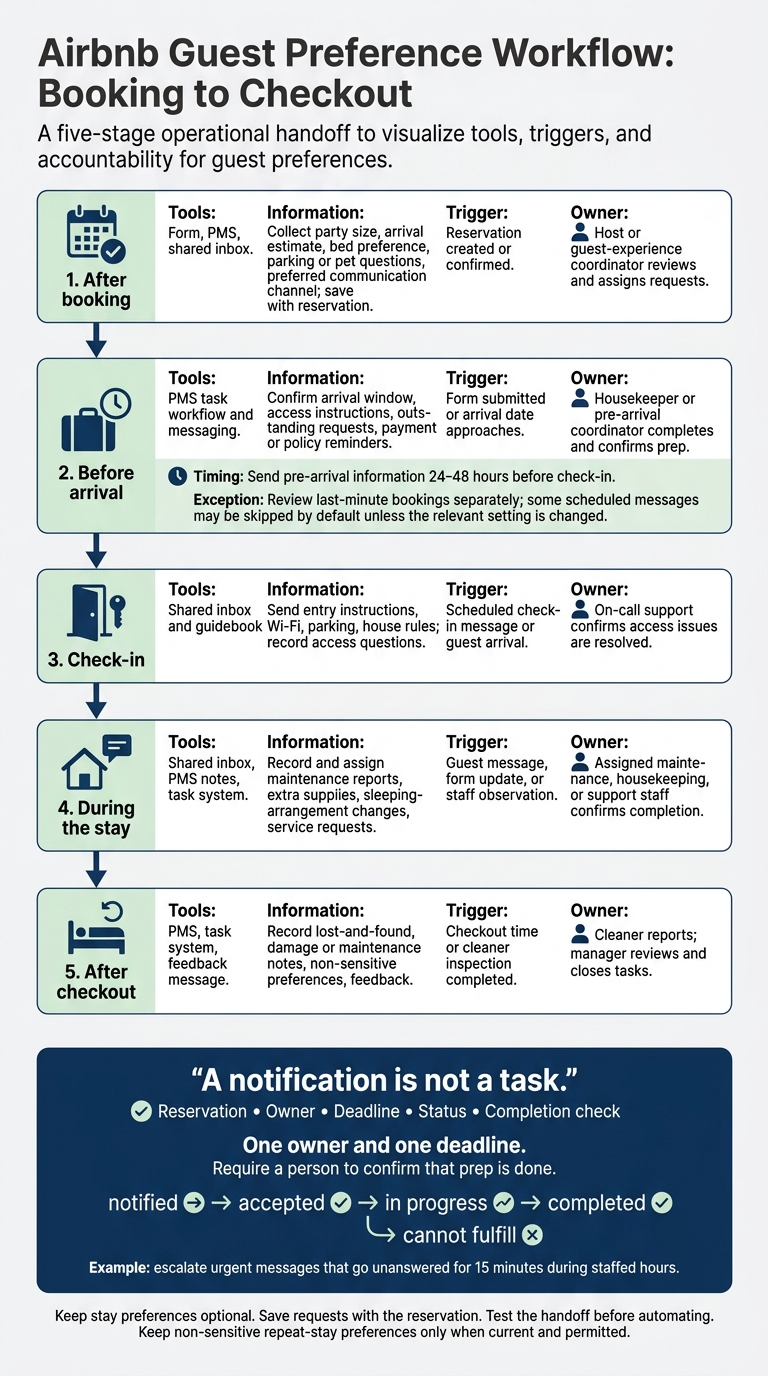
Airbnb Guest Preference Workflow: Booking to Checkout
Once you’ve chosen your tools, set up a clear handoff process. Use forms to collect requests, the PMS to store them, messaging to coordinate work, and guidebooks to answer repeat questions. Before choosing tools, check that they support the Airbnb, Vrbo, calendar, form, webhook, API, or native guidebook connections you need. An automated message does not prove a task is done.
Choose Tools for Your Hosting Setup
Start with the smallest stack that gets the job done. Compare monthly and annual pricing, per-listing or per-user fees, integration costs, and staff setup time – not just the advertised subscription price.
| Hosting setup | Recommended combination | Setup and data handling | Best use |
|---|---|---|---|
| First-time host with one or two listings | Airbnb messaging + a guidebook; add a form only for recurring requests | Low setup effort; reservation-linked notes; little duplicate data | Manual follow-up |
| Remote owner or small multi-property operator | PMS, shared inbox, form or portal, housekeeping tasks, and guidebook | Moderate setup effort; centralized records, restricted access, named owners | Remote coordination |
| Larger portfolio or management company | PMS/CRM, channel connections, shared inbox, guidebook templates, and task workflows | Higher setup effort; standardized fields, role-based permissions, audit trails, and property-level records | Portfolio oversight |
Choose a stack that gives each request one owner and one deadline.
Assign Guest Requests From Booking to Checkout
Use this sample workflow, adjusting triggers to fit your tools and staff. Send pre-arrival information 24–48 hours before check-in.[22] Review last-minute bookings separately: some scheduled messages may be skipped by default unless you change the relevant setting.[3]
| Stage | Responsible tool | Information collected or delivered | Automation trigger | Follow-up owner |
|---|---|---|---|---|
| After booking | Form, PMS, shared inbox | Collect party size, arrival estimate, bed preference, parking or pet questions, and preferred communication channel; save them with the reservation | Reservation created or confirmed | Host or guest-experience coordinator reviews and assigns requests |
| Before arrival | PMS task workflow and messaging | Confirm arrival window, access instructions, outstanding requests, and payment or policy reminders | Form submitted or arrival date approaches | Housekeeper or pre-arrival coordinator completes and confirms prep |
| Check-in | Shared inbox and guidebook | Send entry instructions, Wi-Fi, parking, and house rules; record access questions | Scheduled check-in message or guest arrival | On-call support confirms access issues are resolved |
| During the stay | Shared inbox, PMS notes, and task system | Record and assign maintenance reports, extra supplies, sleeping-arrangement changes, and service requests | Guest message, form update, or staff observation | Assigned maintenance, housekeeping, or support staff confirms completion |
| After checkout | PMS, task system, and feedback message | Record lost-and-found, damage or maintenance notes, non-sensitive preferences, and feedback | Checkout time or cleaner inspection completed | Cleaner reports; manager reviews and closes tasks |
A notification is not a task. Give every request a reservation, owner, deadline, status, and completion check. Track notified, accepted, in progress, completed, and cannot fulfill as separate statuses. Require a person to confirm that prep is done.
Set escalation rules – for example, escalate urgent messages that go unanswered for 15 minutes during staffed hours. Keep non-sensitive repeat-stay preferences only when they’re current and permitted. Airbnb limits guest-data use to reservation management, legal compliance, and host services.[21]
Rank One Stays for Managing Guest Follow-Up
For owners who want someone else to handle follow-through, Rank One Stays offers full-service vacation rental management, including 24/7 guest support, check-in help, maintenance coordination, and housekeeping.[20] Ask for a current proposal that explains how requests are logged, assigned, and closed.
Conclusion: Collect Preferences and Follow Through
A good setup turns each guest preference into an assigned task. Use messaging to collect requests, a PMS or CRM to store them, guidebooks to answer repeat questions, and forms to gather only the details staff need. Choose the smallest combination that works for your property, and don’t collect the same preference twice.
First-time hosts can use Airbnb messaging and simple records. Remote owners and those with larger portfolios need a PMS or CRM, a guidebook, and clear responsibility for each task.
Before relying on an integration, test a sample reservation and cases like date changes and same-day bookings. Check that every request reaches the right person and has an owner and deadline. Protect guest records with limited staff access, separate passwords for each account, and multifactor authentication. Delete data when you no longer need it.
Measure completed requests, not installed tools. Track the percentage fulfilled before arrival and the issues still unresolved at checkout. Software helps teams stay consistent and see what needs attention, but accurate records and dependable follow-through still matter.
If you need help getting tasks done locally, Rank One Stays can handle guest support and local follow-through in its service markets.
FAQs
When should I upgrade beyond Airbnb messaging?
Move beyond Airbnb messaging when you’re ready to grow your business or maximize revenue. Manual messaging can mean missed opportunities and less satisfied guests, which can hurt ratings and daily rates [1].
Rank One Stays provides 24/7 professional guest support to keep communication consistent, maintain high ratings, and support above-market revenue – without leaving you to manage messages manually every day [1].
How should I handle preferences I can’t fulfill?
Let guests know about your property’s limits before they arrive so they know what to expect. Being clear about what you can provide helps prevent negative reviews that could hurt your ratings and average daily rate [1].
If guest requests become too much to handle, Rank One Stays can manage guest communications for you. Their professional, consistent responses help keep guests satisfied and protect your revenue potential – without requiring you to step in for every request [1].
Can Rank One Stays manage guest requests for me?
Yes, Rank One Stays handles guest requests as part of its full-service property management [1]. Its 24/7 guest support team manages guest communication and interactions, helping maintain high guest ratings and Guest Favorite status [1].
Working with Rank One Stays takes day-to-day management tasks off your plate so you can earn passive income while its team handles the guest experience from start to finish [1].