
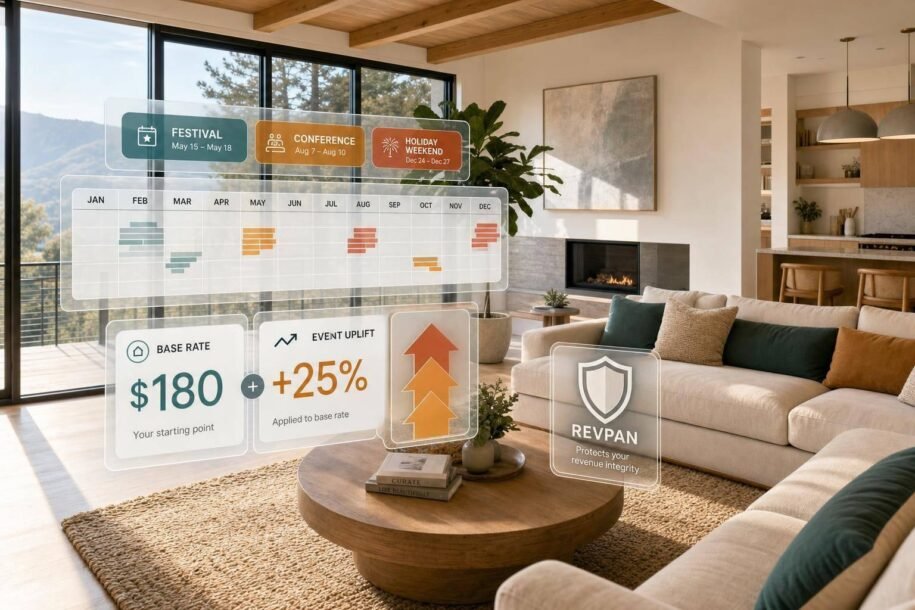
If I price only by season, I can miss the biggest money dates of the year. Short event windows like concerts, graduations, conventions, and playoff games can push Airbnb revenue 20%–40% higher when I price them the right way.
Here’s the simple version:
- I build a 12-month event calendar
- I set a base nightly rate in USD
- I add event premiums by demand level
- I watch booking pace, occupancy, and RevPAN
- I adjust if my place is still open while nearby comps are booking
A few numbers stand out:
- Tier 1 events can support 100%–300%+ rate jumps
- Tier 2 events often support 40%–80%
- Tier 3 events may support 15%–30%
- If my listing is still open 14 days out and comps are filling, my rate is likely too high
- If I stay above 85% occupancy, my base rate may be too low
This article shows me how to price event weekends without guessing, how to use minimum stays without hurting bookings, and when software or professional property management may make more sense than doing it all by hand.
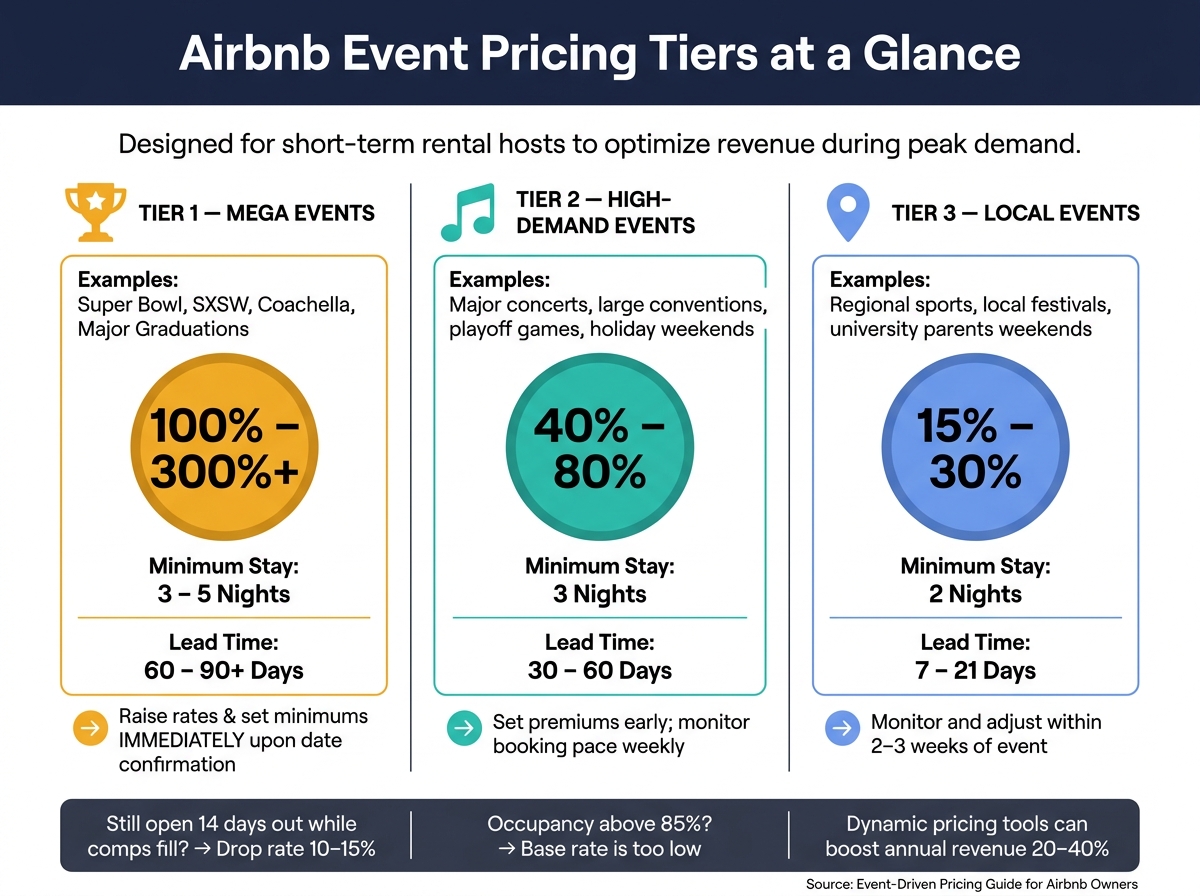
Airbnb Event Pricing Tiers: Rate Uplifts, Minimum Stays & Lead Times
How Smart Hosts (strategically) Price Their Airbnbs During Events, Games, Concerts and Conferences!
sbb-itb-103bddb
1. Build a 12-Month Event Calendar for Your Market
Build a 12-month calendar of dates that can push rates up.
Use CVBs, convention center calendars, stadium and arena schedules, university calendars, plus Eventbrite or Ticketmaster. For each event, record the date, expected attendance, distance to the venue in miles, and booking lead time.
Smaller local events belong on the calendar too. A regional tournament or mid-size conference may not make headlines, but it can still fill nearby hotels. Proximity matters. A property that sits closer to the venue can charge far more than one that’s farther away, so distance should always be part of your tracking.
Find Recurring and One-Off Demand Drivers
Recurring events give you the base of a strong calendar. Annual festivals, NFL and MLB home games, graduation weekends, marathon weekends, and holiday weekends tend to land around the same time each year. SXSW in Austin drives demand increases of +180%, and graduation weekends bring a steady +10% to +25% demand boost for properties near large universities [1]. Use last year’s occupancy and rate data to price these dates early.
For recurring dates, lean on past data. For new events, rely on alerts and booking pace. One-off events need closer attention and faster moves. Set Google Alerts for "[Your City] events" and "[Your City] festival." That’s where the split becomes clear: recurring events reward planning, while one-off events reward speed and close tracking of booking pace. Major events like championship games often see bookings 60–90 days ahead, so if you miss the announcement, you may miss the early booking window too [1].
Rank Events by Likely Rate Impact
Not every event calls for the same pricing move. Split events into three tiers so you can decide how hard to push rates and how long a minimum stay to require.
| Event Tier | Examples | Rate Uplift | Min. Stay | Lead Time |
|---|---|---|---|---|
| Tier 1 (Mega) | Super Bowl, SXSW, Coachella, Major Graduations | 100% – 300%+ | 3 – 5 nights | 60 – 90+ days |
| Tier 2 (High) | Major concerts, large conventions, playoff games, holiday weekends | 40% – 80% | 3 nights | 30 – 60 days |
| Tier 3 (Local) | Regional sports, local festivals, university parents’ weekends | 15% – 30% | 2 nights | 7 – 21 days |
The tier system also shows you when to act. For a Tier 1 event, lift rates and set minimum stays as soon as you confirm the date. For Tier 3, you can usually wait longer. One smart safeguard is to set a higher price floor for any dates more than 180 days out [4]. That way, early bookers can’t grab event dates at your standard rate before you’ve had time to adjust pricing.
"One missed event weekend can cost $1,000–$2,000 in underpriced bookings." – Sean Rakidzich, 155-property operator [2]
Review the calendar once a year, then refresh it each quarter as new events are announced. Next, set your base weekday and weekend rates before layering on event premiums.
2. Set a Base Rate Before Adding Event Premiums
Event premiums only make sense if your base rate is backed by market data. If your floor is too low, you lose income. If it’s too high, slower nights can sit empty.
Start with your market median. On Airbnb, look for places within 1–2 miles of your property that match your bedroom count, guest capacity, and amenity level. Then check what those listings charge for a random Tuesday, 30 days out, during a non-event week. That midweek rate is your anchor.
Try to find at least five comparable listings with 10+ reviews and a 4+ star rating. Once you have that median, adjust it based on what your place offers.
Set the base rate around what the market pays on a normal date, then build from there.
Use a property adjustment between 0.8 and 1.3 to reflect features that set your listing apart, like a private hot tub, dedicated parking, a pool, or a premium view. For instance, a lakeview condo with a comp set ADR of $210 and a modest adjustment of 0.9 lands at a base rate of $189 per night [5]. That keeps your pricing tied to the market while still accounting for your property’s differences.
Occupancy is a useful gut check. If you’re above 85%, your base rate is probably too low. If you’re below 60%, your rate may be too high, or the listing may have another issue that needs attention. The U.S. average Airbnb occupancy was 54.3% in 2025, and 55%+ is the current benchmark for solid performance [2].
If your listing has fewer than 10 reviews, start 10%–15% below the market median to build booking momentum. Once your review count grows, move rates up [2]. After that, break your base into weekday and weekend pricing.
Create a Weekday and Weekend Rate Structure
A flat nightly rate is simple. It’s also one of the easiest ways to underprice Friday and Saturday.
A basic three-tier setup does a better job of matching demand without turning pricing into a full-time job.
- Set your Sunday–Thursday rate as the base.
- Price Friday at 1.2x–1.3x the base.
- Price Saturday, or peak weekends, at 1.3x–1.5x the base.
In plain terms, weekday pricing should land about 10%–20% below your Friday–Saturday rates if you want to stay attractive to business travelers and remote workers [9].
Here’s what that can look like: moving from a flat $120 nightly rate to $110 weekday / $140 Friday / $165 Saturday can add about $5,280 in annual revenue for a single listing [10]. And that’s before event premiums come into play.
For weekends with strong demand that isn’t off-the-charts, like a regional conference or a sold-out concert, a 2-night minimum often works well. It helps avoid orphan nights and cuts turnover costs without the added friction of a 3-night stay. Save 3-night minimums for your biggest-demand weekends [1][9].
Choose a Pricing Model That Fits Your Workload
The best pricing model comes down to how hands-on you want to be.
Flat pricing takes the least effort, but it misses demand swings. Tiered pricing gives you a solid middle ground. Dynamic pricing tools handle event shifts and day-to-day changes for you [2][9].
Airbnb’s built-in Smart Pricing tends to lean toward occupancy and platform volume, not your revenue. In practice, that often means rates get pushed lower than they should [2][9]. Third-party dynamic pricing tools focus on RevPAN – Revenue Per Available Night – and let you set price floors plus event-specific overrides [2][9].
If that still sounds like too much to manage week after week, a full-service manager can take it off your plate.
When to Use Professional Pricing Support
If manual rate management is taking too much time, Rank One Stays handles dynamic pricing and ongoing rate updates as part of full-service management.
3. Raise Rates for High-Demand Weekends Without Overpricing
Once your base rate is set, use event premiums as short-term lifts, not permanent changes. Add the premium on top of your base rate, then watch booking pace to see if the number still makes sense.
Apply Event Uplifts by Demand Level
Set the uplift based on demand level, not just the event name.
- Minor events (local festivals, regional sports): 15%–25% uplift, 2-night minimum
- Major events (conventions, music festivals): 40%–80% uplift, 3-night minimum
- Mega events (Super Bowl, Eras Tour, SXSW): 100%–300% uplift, 4–5 night minimum for multi-day events
As soon as demand becomes clear, set your premiums. Then, as booking pace picks up, tighten rates.
It also helps to price adjacent nights above your usual weekday rate, but below the peak event nights. Think of it like a staircase, not a cliff: for example, $350 on the peak night, then $250, then $200, then back to base rate.
After you set the uplift, check whether the total stay cost still lines up with nearby bookings. That’s the number guests are weighing, even if they don’t say it out loud.
Use Minimum Stays and Total Cost Carefully
Minimum stays protect revenue, but guests usually decide based on the full cost, not just the nightly rate.
A 2-night minimum works well for single-day events like concerts. A 3-night minimum fits most weekend festivals. For multi-day mega-events, set a 4–5 night minimum to match the event length [1]. That helps avoid orphan nights that are hard to fill at premium rates.
Cleaning fees matter here too. If your cleaning fee is high, it may make sense to shift part of that cost into the nightly price and lower the visible cleaning fee. That can make the listing look more competitive and cut down on sticker shock at checkout [2]. In practice, guests compare the nightly price after fees when choosing between listings.
If bookings slow down, the problem is usually the price, not the event itself.
Spot Overpricing Before It Hurts Occupancy
Here’s the simple test: if nearby comps are booking and your calendar is still open 14 days out, your rate is too high [7][11].
Big event demand doesn’t mean guests will book at any price. In markets with too much supply, extreme rates can lead to zero occupancy [4][6]. Smart event pricing brings in both early bookers and mid-window bookers, while also helping long-term review velocity. Miss a peak-night booking because the price was too high, and you usually don’t get that chance back.
If comps are filling and you’re not, cut the rate by 10%–15% and check again [1].
Track results each week so you can adjust before the event window closes.
4. Use Market Data and Weekly Reviews to Protect ROI
Raising rates only helps if it lifts annual RevPAN, not just one busy weekend. Once your event pricing is live, a weekly review shows whether those rates are paying off or just looking good on the calendar.
Track the Numbers That Matter Most
The clearest metric to watch is RevPAN (Revenue Per Available Night). It blends rate and occupancy into one number, so you can see fast whether your event uplift and minimum-stay rules are doing their job.
Here’s the simple read:
- If comparable dates are filling fast 60–90 days out, demand is stronger than your current rate suggests, and you may be underpriced [5][8].
- If guests keep booking closer to check-in, your rate may be too high, and you’re likely pulling in discount-driven bookers [8].
That weekly read matters. It gives you a cleaner way to adjust next year’s event multipliers and minimum stays instead of guessing.
Compare Manual Pricing, Software, and Full-Service Management
If performance looks soft, the next step is to match your pricing setup to the size of your operation.
| Method | Time Required | Data Depth | Revenue Upside | Risk of Mispricing |
|---|---|---|---|---|
| Manual (Spreadsheets) | Very high | Low (manual checks) | Baseline | High – misses spikes and trends |
| Dynamic Software | Low (setup + 15 min/week) | High (algorithmic, real-time) | High | Moderate – needs calibration |
| Full-Service Management | Zero (turnkey) | Expert (local + proprietary data) | Maximum | Lowest – professional oversight |
Dynamic pricing software can improve annual revenue by 20%–40% compared with static rates [12][13]. That said, it’s not magic. Some tools still clear early bookings at rates that are too low before the algorithm catches up [3].
When a Full-Service Manager Makes Financial Sense
If you own more than two properties, or you just don’t want pricing to become a weekly chore, full-service management can make financial sense. At that point, the issue usually isn’t effort alone. It’s missed revenue at scale.
The average host leaves 15%–25% of potential annual revenue on the table because of weak pricing and inefficient fee structures [14].
Rank One Stays handles pricing, guest support, housekeeping, and claims for owners who want a hands-off setup. Property owners earn 38% more revenue than the market average, and management fees start at 10%.
Conclusion: Build a Repeatable Event-Pricing System
Pull all the pieces into one system you can run again and again. Event-driven pricing works best when it follows a repeatable process: track events early, set a clear base rate, add measured uplifts for peak weekends, and review booking pace each week.
Every week, check your event calendar. Every month, review RevPAN, ADR, and lead times. If dates are filling fast, your rates may still be too low. If your calendar stays open while similar listings are getting booked, make changes before those booking windows close.
When peak dates are underpriced, you leave money on the table. That’s not bad luck – it’s a system issue.
If you’d rather take a hands-off route, Rank One Stays offers full-service vacation rental management, including dynamic pricing, guest support, and housekeeping. Fees start at 10%, and owners earn 38% more revenue than the market average. The aim is simple: price ahead of demand instead of reacting after it peaks.
FAQs
How early should I raise rates for big events?
Increase rates as soon as event dates are announced so you don’t end up selling rooms at your base rate.
For major events, use premium pricing 60 to 90 days in advance. Early bookers are often less sensitive to price, so this is the best window to charge more.
For mid-tier events, like conventions or concert weekends, update rates 30 to 45 days ahead of time.
Before bookings start coming in, run an event-adjacency audit so your pricing plan is locked in.
What if my event dates aren’t booking?
If your event dates aren’t getting booked, don’t panic. Start by checking your minimum stay settings. If they’re too strict, loosen them as the event gets closer so you can fill the gaps that are still open.
If you’re within 7 to 14 days of the event, try a small discount off your peak event rate. Even with a partial discount, your event pricing can still bring in more than your standard nightly rate.
Should I use software or manage event pricing myself?
Use a hybrid approach. Pricing software helps with day-to-day rate changes and occupancy, but it can lag when a big event is coming up. Why? Because it often waits for market signals and competitor bookings before it adjusts.
A better setup is to use software as your base, then check your calendar months in advance and set higher price floors or manual overrides for event dates.
If that sounds like a lot to manage, Rank One Stays can take care of pricing and management for you.