

You do not need to cut your whole calendar to fill a few empty nights. If short gaps stay open, your ADR can look fine while your RevPAR slips. For example, 60 empty gap nights at $200/night can cost about $12,000 per year.
If I wanted the short version, I’d do this:
- Keep my base rate in place for dates that can still book at full price
- Open short gaps with gap-fill minimum stays so 1- to 3-night openings can book
- Use last-minute discounts by booking window, not broad monthly cuts
- Set a hard price floor based on cleaning, fees, utilities, and target margin
- Use check-in and check-out rules so one booking does not create a new gap
- Tighten event dates early, then loosen late if nights are still open
- Watch the next 14 days; if more than 20% is still empty, change only that part of the calendar
Here’s the main idea in plain English: I’d fix the specific nights that are hard to sell instead of lowering rates everywhere. That helps protect ADR, pick up more occupancy, and keep more revenue on the books.
A simple setup looks like this:
- 8+ days out: base rate
- 4–7 days out: 10%–15% off
- 1–3 days out: 20%–25% off
- Same-day: deeper cut, but never below my floor
Bottom line: I’d use minimum-stay rules first, then layer on tight last-minute discounts only where needed. That is the core playbook for filling orphan nights without training guests to wait for cheaper rates.
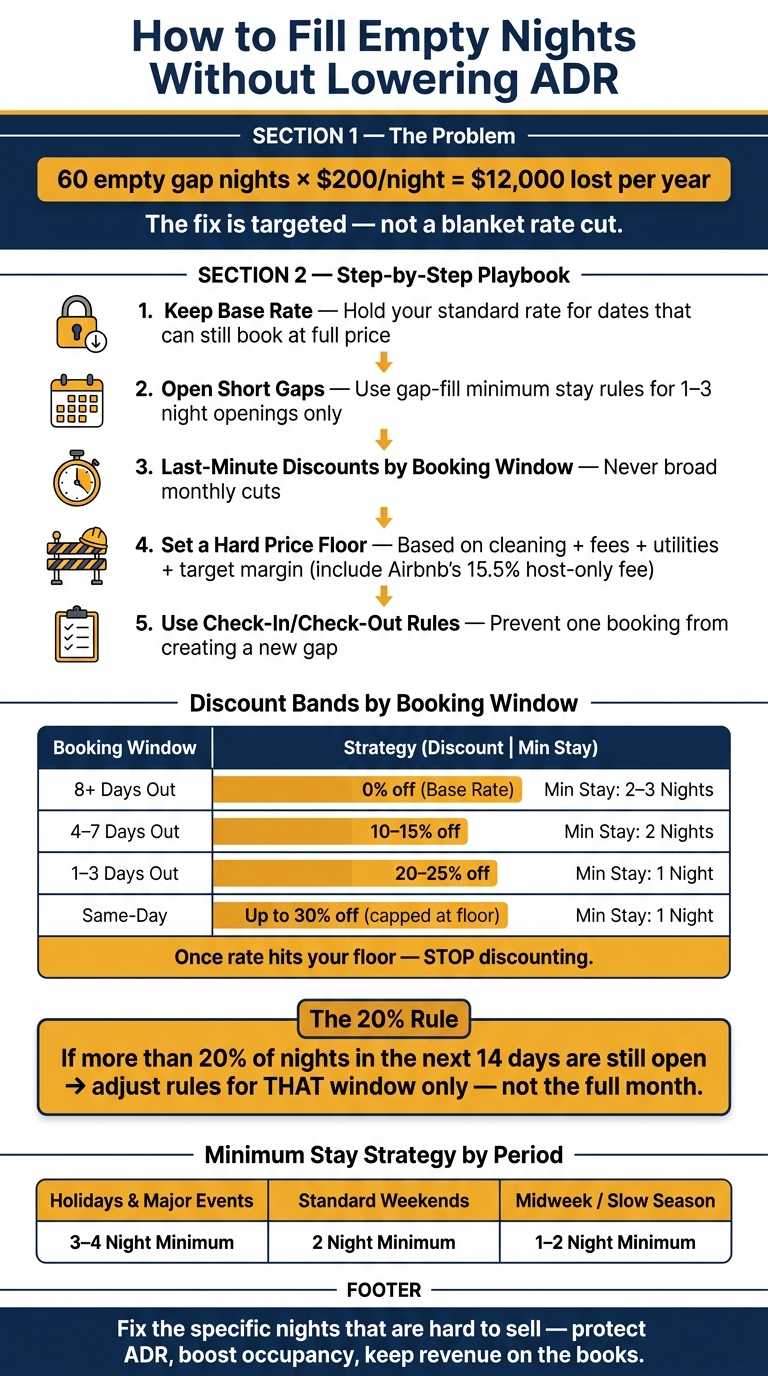
How to Fill Empty Nights Without Cutting Your Base Rate
Set Length-of-Stay Rules That Prevent and Fill Gaps
A blanket 3- or 4-night minimum can protect peak dates. But it can also leave behind awkward 1- to 2-night gaps that no one can book.
The fix is pretty simple: use one rule for peak periods and another for short openings. Length-of-stay rules help protect ADR before you even think about discounting. Once those rules stop new gaps from showing up, pricing bands can help clear the ones still left on the calendar.
When to Keep a Higher Minimum Stay
Use a 3- to 4-night minimum for holidays and major event dates, a 2-night minimum for standard weekends, and 1- to 2-night minimums for midweek during the slow season [3].
That setup gives you room to protect high-demand dates without making slower nights harder to book.
How to Add Gap-Fill Minimum Stay Rules for 1- to 3-Night Openings
Gap-fill rules are different from a standard minimum stay rule. Instead of applying one setting across the whole calendar, the rule turns on only when a short gap already exists between two bookings.
Here’s the plain-English version: if two confirmed reservations leave a 2-night opening in the middle, a gap-fill rule drops the minimum stay to 2 nights for that opening only. It does not change the rest of the month.
That’s the point. You keep your normal minimum stay in place, but you still make those orphan nights bookable. It’s a nice middle ground between protecting rate and avoiding empty nights.
Tools like PriceLabs or Wheelhouse can handle this for you by scanning for gaps shorter than your standard minimum and changing the rule automatically [3][1]. Without software, you’d have to watch for these gaps yourself and update them by hand, which is easy to miss.
Static Minimum Stays vs. Dynamic Gap-Based Rules
| Strategy | Effect on ADR | Effect on Occupancy | Ops Burden |
|---|---|---|---|
| Blanket 3–4 Night Minimum | High – protects premium rates | Low – creates unbookable gaps | Low – set and forget |
| Static 1–2 Night Minimum | Low – high turnover costs eat into margin | High – fills the calendar | High – frequent cleanings |
| Dynamic Gap-Fill Rules | Balanced – protects peaks, fills gaps | High – eliminates orphan nights | Moderate – requires software |
Dynamic rules protect peak ADR while opening only the nights that would otherwise sit empty. After that, last-minute pricing bands and hard floors can help fill the nights still left over without cutting your base rate.
Build Last-Minute Pricing Bands With Hard Rate Floors
Once gap-fill rules open up the right nights, pricing bands control how fast those leftover orphan nights move.
Set Discount Bands by Booking Window, Not by Month
These bands should apply only to nights your gap rules didn’t fill. A common mistake is using a seasonal discount instead of linking discounts to how close the check-in date is.
Here’s the better setup:
- 8+ days out: base rate
- 4–7 days out: 10%–15% off
- 1–3 days out: 20%–25% off
- Same-day: deepest discount, capped at your floor
This setup protects future dates and cuts rates only on nights most likely to go unsold.
Use booking windows, not seasons, so you discount only nights close to arrival.
Airbnb‘s native Smart Pricing leans toward platform booking volume, not your RevPAR [5][4]. Setting your own bands in a tool like PriceLabs, Beyond, or Wheelhouse gives you control that Smart Pricing just doesn’t give you.
How to Calculate a Minimum Acceptable Nightly Rate Before Discounting
Before you set any discount, you need a hard floor. That’s the lowest nightly rate you can take without losing money on the booking.
Build that floor from your cleaning, linens, consumables, utilities, platform fees, and margin. Include Airbnb’s 15.5% host-only fee [4]. Never go below that number. If a discount would push the rate under your floor, leave the night open instead.
Pricing Bands by Booking Window With Discount Caps
| Booking Window | Discount Cap | Minimum Stay |
|---|---|---|
| 8+ Days Out | 0% (Base Rate) | 2–3 Nights |
| 4–7 Days Out | 10%–15% | 2 Nights |
| 1–3 Days Out | 20%–25% | 1 Night |
| Same-Day | 30% (capped at your floor) | 1 Night |
The cap matters more than the headline discount. Once the rate hits your floor, stop discounting.
Use these bands only for nights still open after length-of-stay rules. Next, use calendar controls to avoid creating new gaps.
sbb-itb-103bddb
How to Apply Gap-Night Discounts and Calendar Controls Step by Step
Use calendar controls to fill orphan nights without cutting your base rate. The pricing bands from the previous section set your ceiling. In practice, that means you use the discount band as the cap, then tighten the rule based on the size of the gap.
Match Discount Depth to Gap Length to Protect Overall ADR
Start with the smallest orphan nights.
Work through each gap in this order: gap length → stay minimum → discount depth → action threshold.
- 1-night gaps: Allow 1-night stays only within 7 days of arrival. Then layer in last-minute discounts: 5% at 7 days out, 10% at 3 days out, 15% at 2 days out, and 20% at 1 day out [6].
- 3- to 4-night gaps: A small 5% to 10% cut is often enough to attract a short-break traveler while still protecting overall ADR [3][2].
- If more than 20% of nights in the next 14 days are still open: your rate or minimum stay is too tight for that window. Adjust rules for that part of the calendar ONLY, not the full month [3].
Use Check-In, Check-Out, and Event-Date Controls to Avoid Creating New Orphan Nights
Discounting a gap works better when you pair it with arrival and departure controls. Use check-in and check-out restrictions so one booking doesn’t split the gap and leave you with a new orphan night [3][2].
Around sports weekends, festivals, and other demand spikes, tighten rules early and loosen them late. Set higher minimum stays 30 to 45 days before arrival, then relax them only as the date gets closer [3]. If nights are still open within 7 days of arrival, drop to 1-night stays to recover revenue that would otherwise go unbooked [3]. That keeps the calendar open for the booking pattern you want, instead of trading one gap for another.
Manual Calendar Changes vs. Automated Gap Rules
Once your rules are in place, choose how you’ll run them: manual edits or automation.
Manual changes can work, but they’re easy to miss when the calendar shifts. Automation is usually steadier because it applies gap-fill settings only when the calendar changes [3]. Put simply: manual edits are hands-on, while automated rules do the repetitive work for you.
| Approach | Effect on ADR Stability | Effect on Occupancy | Operational Workload |
|---|---|---|---|
| Manual One-Off Edits | Low; reactive and inconsistent across the calendar [3] | Moderate; relies on the host spotting gaps in time [2] | High; requires 5–15 hours per week [4] |
| Automated Gap Rules | High; applies floors only to the open gap [3] | High; fills orphan nights by adjusting minimum stays [5] | Low; needs only weekly checks [4] |
When to Use Professional Revenue Management and What to Do Next
When these rules start eating up too much of your week, it’s time to hand the work to a pro. If dynamic minimum stays, pricing bands, and calendar controls need constant manual updates, professional management can take that load off your plate. You get automated pricing plus human review, which helps when demand shifts fast.
Two signs usually make that move pretty clear: a property that keeps booking far ahead, which can mean your rates are too low, or occupancy below 50% when demand is strong, which can mean your pricing or minimum-stay rules are too tight [3].
This matters most when occupancy and pricing need to change faster than you can manage with manual calendar edits.
How Rank One Stays Manages Orphan Nights Without Broad Rate Cuts

Rank One Stays uses rule-based minimum stays, gap-fill logic, and dynamic pricing across Airbnb and VRBO to protect ADR while improving occupancy. Property owners partnering with Rank One Stays have seen 38% more revenue than the market average.
Internal Links for Owners Who Want Help
Start with your market page or request a revenue review.
Conclusion: Target Only the Nights That Need Help, Not the Whole Calendar
Whether you run the property yourself or pass it off, the idea stays the same. Focus on the nights that need help, not the entire calendar. Use gap-based minimum stays, last-minute pricing bands, and calendar controls to protect ADR.
FAQs
How do I calculate my rate floor?
Calculate your rate floor by finding the lowest nightly price that still leaves you with actual profit after all operating costs.
Then look at your true competitive set: similar properties within 1 to 2 miles with about the same number of bedrooms, amenities, and guest capacity. Check their past rates and occupancy, set your base price at or a little above the median, and review it every quarter as costs, local supply, and reviews shift.
When should I allow 1-night stays?
Allow 1-night stays mainly to fill orphaned gaps between existing bookings. That helps you book empty nights without opening the door too wide to issues like parties.
It also makes sense to lower your minimum stay only for dates that are coming up soon, so those nights don’t sit empty.
If your team can handle short-notice turnovers, you can drop the minimum stay for bookings within the next 7 days to pick up more occupancy. Keep a cleaning fee in place to cover the extra turnover costs that come with fast back-to-back stays.
Should I manage gap nights manually or automate them?
Manual gap-night management often wastes time and leaves money on the table. Static pricing and rigid calendars just don’t react fast enough when the market shifts.
Automation helps by adjusting rates and stay rules in real time based on demand, booking pace, and local events. That makes it easier to fill orphaned nights instead of letting them sit empty.
If you want a more hands-off setup, Rank One Stays handles pricing, calendar strategy, and listing optimization to help keep your property competitive.