

I’d start vacation rental email marketing with one goal: more profitable bookings – not more emails. Build a permission-based list, connect it to your reservation data, and test 1–2 relevant promotions per month aimed at unsold nights.
Here’s the approach I recommend:
- Set booking and profit targets. Track repeat stays, referrals, direct bookings, and revenue after costs. High-quality vacation rental design often serves as the foundation for the visual content needed to drive these conversions.
- Connect your tools. Keep guest permissions, bookings, cancellations, and opt-outs in sync.
- Match emails to the guest’s stay. Automate welcome, arrival, service, post-stay, return-stay, win-back, and unfinished-booking messages.
- Protect your list. Keep required reservation notices separate from promotions, check marketplace rules, and follow U.S. email and privacy requirements.
- Assign responsibility. Decide who approves offers, handles replies, checks workflows, and reviews results each month.
My rule: <u>measure bookings and profit, not just clicks</u>. A 10% discount still costs money – even when the email brings in a reservation.
Email Marketing That Actually Works: Real Vacation Rental Campaigns That Drive Bookings
sbb-itb-103bddb
Grow and Segment a Permission-Based Guest List
Use the goals set above to choose your sign-up sources, guest segments, and offers. Focus on building a list that supports direct bookings and repeat stays.
Collect Marketing Permission
A booking email is not marketing permission. Collect subscribers through website forms, separate checkout opt-ins, destination-guide downloads, guest portals, and on-property QR codes. Leave marketing boxes optional and unchecked. Explain what subscribers will receive, who will send it, and how often. Save the consent wording or form version.
Skip purchased lists. For referrals, ask subscribers to share a sign-up link instead of submitting someone else’s address. Consider double opt-in for public forms to confirm address ownership before sending promotions.
Check each booking source’s rules before inviting guests to subscribe. Airbnb prohibits soliciting guests for email or other communication channels through its messaging system or email alias after a booking. It also restricts off-platform communication, booking, and payment activity.[2][1] Vrbo blocks certain pre-booking contact details and alternative booking instructions. Do not move a Vrbo reservation or payment off-platform.[3]
Review each marketplace’s terms before sending subscription invitations, including after a stay. Send post-stay invitations only where permitted.
Group Guests by Stay History and Interests
Define VIP status with one clear rule, such as two completed stays within 24 months. Group guests by property, destination, season, recency, and stated interests. If your portfolio spans multiple markets, keep destination preferences separate.
Use the segments and timing below as a starting point. Match each offer to your booking goals and the guest’s stage of stay.
| Segment | Message | Timing | Suppression rule |
|---|---|---|---|
| First-time guest | Thank-you content and an optional sign-up link | After checkout | No promotions without sign-up; no invitation where prohibited |
| Repeat guest | Early access or loyalty benefit | Before peak dates open or 6–12 months after the last stay | Exclude opt-outs and guests already booked for those dates |
| VIP guest | Personalized early access | Before the broader campaign | Exclude guests without permission or who no longer meet VIP criteria |
| Future arrival | Trip planning and permitted add-ons | About 30, 14, and 3 days before arrival | Stop after cancellation; exclude conflicting offers |
| Recent past | Feedback request, then return-stay inspiration | About 2–14 days after checkout | Suppress promotions after opt-out or a recent email campaign |
| Canceled | Rebooking info only when permitted | After cancellation and a defined cooling-off period | Exclude contacts without permission; stop if reinstated |
| Lapsed | Destination update or return incentive | About 6–18 months after the last stay | Exclude inactive contacts and irrelevant destinations |
| Engaged | Content matching selected interests or clicks | According to preferences and campaign calendar | Stop at the frequency limit or after preference changes |
| Inactive | One re-permission email | After 6–12 months without meaningful engagement | Suppress nonresponders and opt-outs |
Keep Lists Clean and Sync Opt-Outs
Suppress invalid addresses and hard bounces immediately, and review repeated soft bounces. Test suppression rules after imports, integrations, or system changes.
Remove canceled reservations from arrival workflows. Exclude active reservations from discounts for dates those guests have already booked.
Review inactive subscribers before sending a re-engagement email. Then suppress nonresponders according to your retention policy. Keep only the suppression data needed to prevent accidental re-enrollment – generally the email address, opt-out status, date, and source.
A marketing unsubscribe should stop promotions, not required reservation, payment, safety, or service notices. Manage those messages separately from marketing suppressions.
Use these list rules when automating messages for each stage of the guest journey.
Automate Emails Before, During, and After Stays
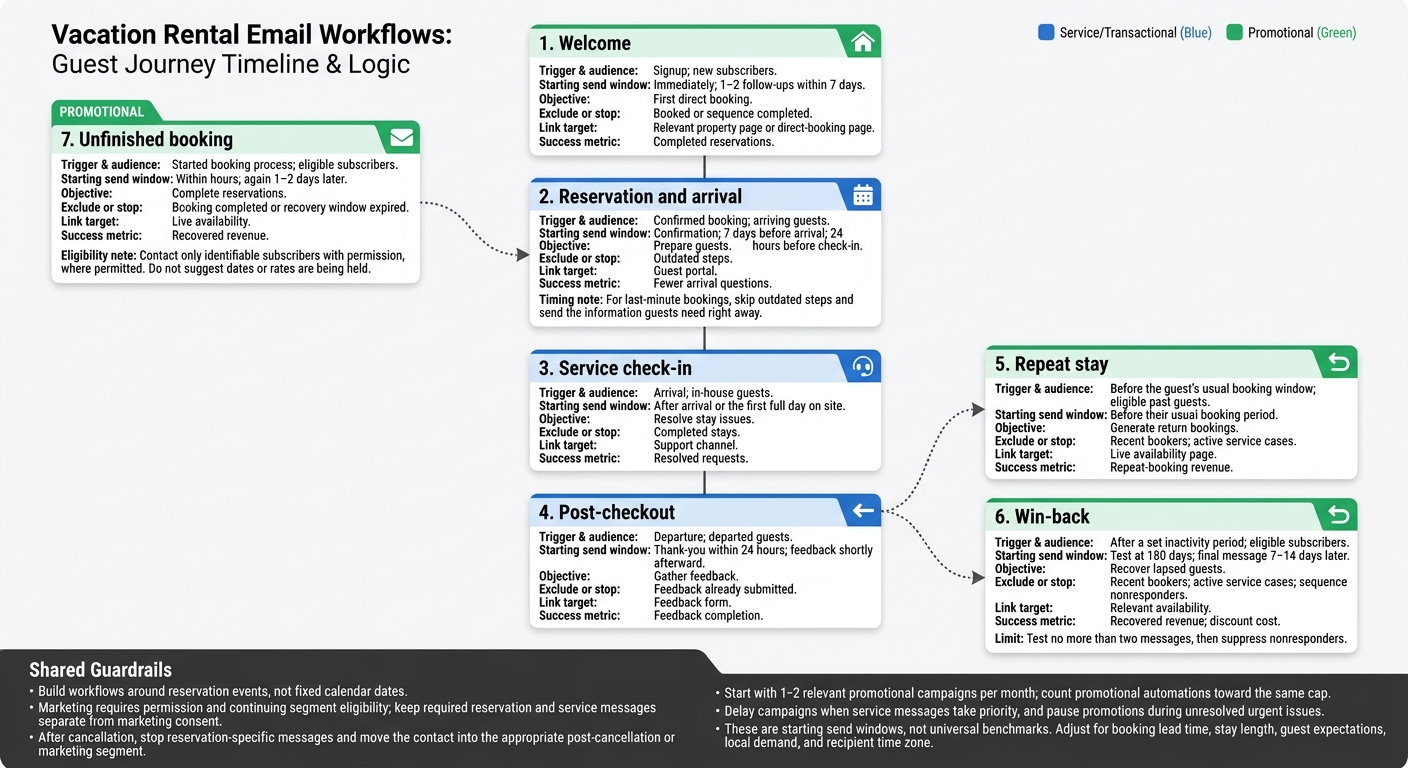
Vacation Rental Email Automation: 7 Guest Workflows
Build these seven workflows around reservation events, not fixed calendar dates. Include only contacts with permission who still meet the segment rules above. Keep required reservation messages separate from marketing consent. Adjust send windows for booking lead time, stay length, guest expectations, local demand, and the recipient’s time zone.
| Workflow | Trigger and audience | Starting send window | Objective | Exclude or stop | Link target | Success metric |
|---|---|---|---|---|---|---|
| 1. Welcome | Signup; new subscribers | Immediately; 1–2 follow-ups within 7 days | First direct booking | Booked or sequence completed | Relevant property page or direct-booking page | Completed reservations |
| 2. Reservation and arrival | Confirmed booking; arriving guests | Confirmation; 7 days before arrival; 24 hours before check-in | Prepare guests | Outdated steps | Guest portal | Fewer arrival questions |
| 3. Service check-in | Arrival; in-house guests | After arrival or the first full day on site | Resolve stay issues | Completed stays | Support channel | Resolved requests |
| 4. Post-checkout | Departure; departed guests | Thank-you within 24 hours; feedback shortly afterward | Gather feedback | Feedback already submitted | Feedback form | Feedback completion |
| 5. Repeat stay | Before the guest’s usual booking window; eligible past guests | Before their usual booking period | Generate return bookings | Recent bookers; active service cases | Live availability page | Repeat-booking revenue |
| 6. Win-back | After a set inactivity period; eligible subscribers | Test at 180 days; final message 7–14 days later | Recover lapsed guests | Recent bookers; active service cases; sequence nonresponders | Relevant availability | Recovered revenue; discount cost |
| 7. Unfinished booking | Started booking process; eligible subscribers | Within hours; again 1–2 days later | Complete reservations | Booking completed or recovery window expired | Live availability | Recovered revenue |
Use the short templates below as starting points, adjusting timing for stay length and local demand.
Send Welcome and Pre-Arrival Emails
Welcome: After signup, send a useful local guidebook, followed by a link to current availability.
Sample welcome copy: Welcome – find your ideal Scottsdale stay.
Reservation and arrival: Include dates, parking, house rules, contact details, and access instructions when appropriate. For last-minute bookings, skip outdated steps and send the information guests need right away. Keep promotions separate.
Sample reservation copy: Your stay is confirmed for July 12–15. Review your arrival details and contact our team here. You can also share a booking checklist to help them prepare.
Check In During Stays and Follow Up After Checkout
Service check-in: Log issues in the PMS so the team can resolve them promptly and support guest retention.
Sample copy: Hope you’re settled in. Is anything needed to make your stay more comfortable? Contact support here.
Post-checkout: Ask about cleanliness, communication, check-in, and property condition. Keep review requests neutral: never tie them to incentives or positive ratings. Send referral and future-stay offers only to eligible marketing subscribers.
Sample copy: Thank you for staying with us. Please share feedback about your experience so the team can improve future stays.
Prompt Return Stays and Recover Unfinished Bookings
Repeat stay: Use reservation history to estimate when past guests usually start planning their next trip.
Win-back: Test no more than two messages, then suppress nonresponders.
Unfinished booking: Contact only identifiable subscribers with permission, where permitted. Link to live availability, and don’t suggest that dates or rates are being held. After a cancellation, stop reservation-specific messages and move the contact into the right post-cancellation or marketing segment.
Set Email Frequency and Message Priorities
Start with 1–2 relevant promotional campaigns per month. Adjust that frequency based on bookings, clicks, complaints, and unsubscribes – not a universal benchmark. Count promotional automations toward the same cap.
Delay campaigns when service messages take priority, and pause promotions during unresolved urgent issues. Test timing by recipient time zone. If a manager handles execution, assign responsibility for monitoring replies, checking workflow failures, and reporting booking and service outcomes.
Keep automation setup separate from compliance decisions, and assign ownership before launch.
Plan Direct-Booking Campaigns and Track Revenue
Promote only unsold nights. Before sending a campaign, check inventory, profitable rates, minimum stays, and service capacity. Link to an offer-specific page with live availability, clear total pricing, secure checkout, cancellation and house policies, and support details.
For contacts acquired through a marketplace, check the platform’s current rules before marketing to them. Use the framework below to connect timing, targeting, and offers to measurable revenue.
Time Campaigns Around Local Demand
Start with each property’s booking pace, available nights, minimum acceptable net revenue, and local demand patterns. Use this rolling 90-day planning calendar, and put the person who manages pricing, inventory, and guest communications in charge of campaign timing and execution.
| Campaign | Audience | Timing | Inventory | Offer | Primary success metric |
|---|---|---|---|---|---|
| Shoulder-season escape | Past guests who stayed in the same market | 60–75 days before arrival | Unbooked weekdays and low-demand dates | 10% discount only if the net rate stays profitable | Net revenue per recipient |
| Extended-stay offer | Remote workers and guests who previously stayed 5+ nights | 45–60 days before arrival | Open blocks of 7–14 nights | Cleaning-fee waiver or weekly rate discount | Qualified booking conversion |
| Repeat-guest campaign | Guests who completed a prior stay and opted into marketing | 30–60 days before the same travel season | Select dates suitable for return stays | Early access or modest credit toward a future stay | Repeat-booking rate |
| Property-update campaign | Previous guests and local referral contacts with permission | 30–45 days before updated inventory opens | Newly renovated or newly furnished property | Preview access, not necessarily a discount | Click-to-book rate |
| Referral campaign | Existing guests and approved referral audience | 30–45 days before low-demand periods | Dates with flexible availability | Perk for the guest and referred traveler, subject to terms | Referred bookings and net revenue |
| Multi-property campaign | Guests interested in a market or property type | 21–45 days before arrival | Inventory across properties with similar demand | Choice of properties, dates, or amenities | Direct-booking share |
Build Each Offer Around 1 Booking Goal
Choose one action: check availability. Match the subject line to the eligible dates and landing page. Before launch, provide verified property features and perks, exact stay dates, the full U.S. dollar price and fee breakdown, minimum stay, exclusions, and an expiration date with a time zone.
Keep targeting narrow enough that the offer fits the audience without creating extra versions.
| Campaign approach | Reach | Relevance | Effort | Best use |
|---|---|---|---|---|
| Broad seasonal campaign | High | Low to medium | Low | Filling a broad range of eligible dates when plenty of inventory is available |
| Segmented repeat-guest campaign | Lower | High | Medium | Encouraging return stays with destination- or property-specific messaging |
| Extended-stay campaign | Medium | High | Medium | Filling longer gaps while protecting occupancy and reducing turnover costs |
| Property-update campaign | Low to medium | High | Low to medium | Promoting a renovated or newly furnished property without a deep discount |
| Referral campaign | Medium | Medium to high | Medium | Generating qualified prospects from past guests |
| Multi-property campaign | Medium to high | Medium | High | Matching guests with alternate homes when their preferred property is unavailable |
Check the cost of perks as carefully as discounts. Reject either if revenue after discounts, payment costs, management fees, cleaning, refunds, and fulfillment falls below the property’s minimum. Exclude taxes collected for the government from operating revenue.
Measure Bookings and Test 1 Variable at a Time
Use the same definitions for every campaign so you can compare results across properties and months.
- Delivered emails = sends minus confirmed undeliverables.
- CTR = unique clicks divided by delivered emails.
- Booking conversion = attributed bookings divided by delivered emails, or by unique clickers for post-click conversion.
- Revenue per recipient = revenue divided by delivered emails; report net separately after cancellations, refunds, and costs.
- Unsubscribe and complaint rates = actions divided by delivered emails.
- Repeat-booking rate = eligible prior guests who rebooked divided by eligible prior guests contacted.
- Direct-booking share = direct bookings divided by all bookings in the same property, market, and period.
State which denominator you use for booking conversion. Keep campaign tags intact through checkout, state your attribution window, and reconcile booking-engine records monthly – including later refunds. Ignore privacy opens and bot clicks.
Test one variable at a time, keeping rates and terms unchanged. Treat small results as directional, not proof. Use a randomized holdout when you need to establish cause and effect.
Once the revenue model is set, define compliance rules and assign responsibility for execution.
Set Compliance Rules and Assign Responsibilities
Follow U.S. Email and Privacy Rules
Once your workflows are set, define the rules for consent, suppression, and data handling.
Use CAN-SPAM as your federal baseline. It requires accurate sender details and email headers, truthful subject lines, a valid postal address, and a working opt-out link. Label ads when required. Honor unsubscribes within 10 business days, and keep the opt-out link active for 30 days. Don’t charge a fee or ask for extra personal information to unsubscribe.[1][4] See the FTC CAN-SPAM compliance guide and 15 U.S.C. § 7704.
CAN-SPAM generally doesn’t require advance opt-in, but permission-based collection should still be your standard. Other laws and platform rules may require it. Keep service-related emails separate from marketing emails, and remember that vendor support doesn’t transfer the sender’s liability. This is general guidance, not legal advice. Ask counsel to review applicable state privacy laws and international marketing requirements.
Record each contact’s consent source, date and time, disclosure version, permission category, and opt-out history. Sync suppression across systems. If you delete unsubscribed addresses without keeping suppression records, those contacts could end up back on your list.
Document retention, access, imports, approvals, and vendor changes. Contracts should address data ownership, exports, complaint handling, breach reporting, and deletion when service ends.
Assign clear responsibility for carrying out these rules and approving changes.
Divide Tasks Between Owners and Managers
Put responsibilities in writing before launch. The owner should approve offers, discount caps, revenue targets, and guest-data use. Name one operator and one backup to handle inventory updates, replies, opt-outs, and urgent issues. Keep permissions, suppression, and reporting duties in the same document so you can trace campaign results.
| Work area | Owner-run | Manager-run |
|---|---|---|
| Integrations | Owner maintains integrations and field mappings. | Manager monitors syncing and fixes errors. |
| Segmentation | Owner builds permissioned groups and exclusions. | Manager maintains segments using approved guest data. |
| Automation testing | Owner tests triggers, dates, links, and suppression. | Manager records tests and pauses faulty workflows. |
| Pricing and inventory | Owner approves offers and updates availability. | Manager updates inventory and proposes offers within owner-approved limits. |
| Deliverability | Owner checks authentication, bounces, and complaints. | Manager monitors delivery and takes corrective action. |
| Costs | Owner pays software and labor costs directly. | Contract states what work is included and what costs extra. |
| Data ownership | Owner keeps records and export rights. | Contract defines access, retention, exports, and offboarding. |
| Replies and compliance | Owner handles replies, opt-outs, and escalations. | Named operator handles execution and escalates exceptions. |
| Owner reporting | Owner reconciles campaign and reservation records. | Manager reports bookings, net revenue, list health, and deliverability monthly. |
Conclusion: Launch Small and Review Monthly
Use this checklist to launch only what you can track, support, and maintain.
- Confirm the booking goal, budget, discount caps, and approval process.
- Verify that data ownership, permissions, retention, and suppression rules are documented.
- Test authentication, reply handling, triggers, personalization, inventory, and exclusions.
- Check booking links, sender details, postal address, mobile display, and opt-outs.
- Confirm coverage from the operator and backup, then launch to a small eligible audience.
- Review bookings, net revenue, list health, and sync incidents monthly. Expand only after launch checks pass.
FAQs
How can I start email marketing with a small guest list?
Focus on consistent, high-quality emails – not sending more of them. Give existing guests useful content that builds trust, encourages repeat bookings, and leads to word-of-mouth referrals.
As your business grows, a professional firm like Rank One Stays can take some of the work out of managing your email list. That support can improve the guest experience, help maximize direct bookings, and keep your subscribers active and engaged.
How do I know if email bookings are truly incremental?
Track email-driven bookings separately from organic platform traffic with dedicated booking links or promo codes. Then use dynamic pricing and real-time demand monitoring to see whether those bookings fill dates that would otherwise go unbooked.
Prefer a hands-off approach? Rank One Stays handles performance tracking and revenue optimization to help keep occupancy steady and profitable – without manual tracking or daily rate adjustments.
What should I ask Rank One Stays about email campaign management?
Ask how Rank One Stays fits direct booking marketing into its guest communication strategy, including 24/7 guest support. Find out how the team grows your guest email list while following data regulations.
Ask how it uses multiple marketing channels and personalized campaigns to bring past guests back to book directly. Have the team explain how these efforts work alongside listing optimization and dynamic pricing.