
Bad guest screening can cost you bookings, damage money, and claim support. In 2026, I’d keep it simple: use platform checks, review each booking by hand, get guests to accept rules in writing, and keep every message documented before check-in.
Here’s the short version:
- I use Airbnb, Vrbo, and direct-booking tools based on what each channel can and can’t do.
- I review every reservation the same way to cut fraud, parties, disputes, and chargebacks.
- I look for common warning signs like local weekend bookings, one-night stays, third-party bookings, and off-platform payment requests.
- I set minimum age rules, guest limits, visitor rules, and security deposits in writing.
- I keep proof through message threads, signed rental agreements, noise logs, and cleaning photos.
A few numbers stand out:
- Direct-booking deposits can range from $50 to $2,000.
- Many hosts use a minimum booking age of 21+ or 25+.
- Noise monitor hardware often starts around $150, plus $9 to $15 per month.
- A noise alert may trigger at around 75 dB for 10 minutes.
If I had to boil the whole article down to one idea, it’s this: screening only works when I use the same process for every guest and keep a written record from booking to checkout.
How to Master Guest Screening For Your Short Term Rentals: The Key to Protecting Your Business
sbb-itb-103bddb
Quick Comparison
| Channel | What I get | What I still need to do |
|---|---|---|
| Airbnb | Basic platform checks, on-platform messages, Instant Book controls | Manual review, rule confirmation, added deposit setup if needed |
| Vrbo | On-platform messages, built-in deposit support | Manual ID checks, rule confirmation, booking review |
| Direct booking | Full control over ID checks, deposits, and rental agreements | I handle all screening, payment checks, and records myself |
That’s the core playbook: use the channel tools, add a repeatable manual review, and back everything up with written proof.
Use Airbnb, Vrbo, and Direct-Booking Tools Correctly
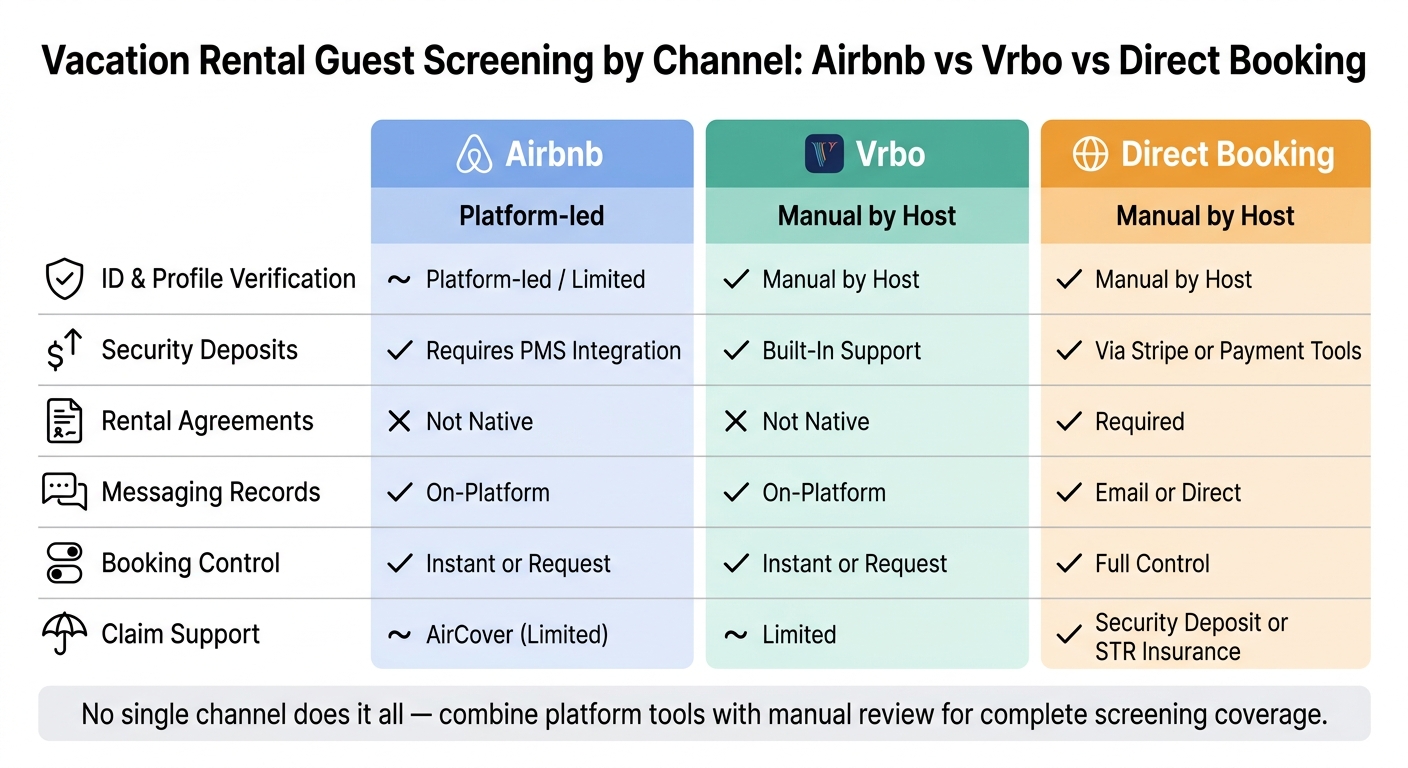
Vacation Rental Guest Screening by Channel: Airbnb vs Vrbo vs Direct Booking
Use each channel’s settings the right way to cut avoidable risk before check-in.
Airbnb and Vrbo Settings That Reduce Avoidable Risk
Instant Book can help you get more bookings. The tradeoff is simple: you give up some control before the reservation is accepted.
On Airbnb, you can still put a few guardrails in place. You can require a verified government ID, a complete profile, and strong review history before a reservation is confirmed automatically [1].
Vrbo handles built-in security deposits, while Airbnb will usually need a PMS integration if you want to collect one [6]. If you’re heading into a big event weekend or a local demand spike, it often makes sense to switch from Instant Book to Request to Book so you can review reservations by hand [6][1]. And when the built-in settings don’t go far enough, that manual review step fills the gap.
What Changes With a Direct Booking
Direct bookings give you more control, but they also remove platform oversight. That means the screening process falls on you.
At a minimum, require a matching government ID and payment name, confirm payment through your processor, collect a refundable deposit of $50 to $2,000, and use a signed rental agreement to back up claims [6][7]. Keep all communication in writing.
Screening Controls by Booking Channel: Airbnb vs Vrbo vs Direct
These differences matter most when you standardize screening across channels.
| Feature | Airbnb | Vrbo | Direct Booking |
|---|---|---|---|
| ID and profile verification | Platform-led / limited [6] | Host verifies manually [6] | Manual by host [6] |
| Security Deposits | Typically requires a PMS [6] | Built-in deposit support [6] | Stripe or other tools [6] |
| Rental Agreements | Not native [6] | Not native [6] | Required [6] |
| Messaging Records | On-platform [6] | On-platform [6] | Email or direct [7] |
| Booking Control | Instant or Request [1] | Instant or Request [1] | Full control [7] |
| Claim Support | AirCover, limited [6] | Limited [6] | Security deposit or short-term rental insurance [6][5] |
No single channel does it all. Airbnb gives you platform-led verification, Vrbo makes deposits easier, and direct bookings give you the most control while putting more of the screening work on your side. Those weak spots are exactly what the manual screening process needs to handle next.
Build a Manual Screening Process for Party and Fraud Risk
Platform tools catch basic risk. Manual screening is what helps you spot the behavior that often leads to parties, property damage, and denied claims.
A Standard Pre-Acceptance Review for Every Reservation
After platform checks, do a manual review to catch party and fraud risk the software can miss.
Before you accept any reservation, follow the same review process every time. Match the booking name to the guest profile and the payment name. Confirm the guest count, visitors, vehicles, and trip purpose. Restate your no-party, no-smoking, and quiet-hours rules in the message thread, and ask the guest to confirm them in writing.
That written confirmation matters. If a claim shows up later, you have a clear record in the platform thread.
Red Flags That Signal Parties, Fraud, or Claim Risk
One red flag doesn’t always mean you should decline a booking. But when you see two or three together, that’s usually where trouble starts. These are often the reservations that turn into damage claims.
The clearest warning signs in 2026 include a local guest booking a large home for a weekend night, a last-minute one-night weekend stay, vague or evasive answers about who’s coming and why, a booking made for someone else, and any request to move communication or payment off-platform. That last one is a strong fraud signal.
Pushback on minimum-age or deposit terms is another strong warning sign. Same with cash-only payment requests. If someone doesn’t want a paper trail, that’s a problem.
Screening Table: Red Flags, Low-Risk Signals, and Host Response
| Signal | What It May Indicate | Correct Next Step |
|---|---|---|
| Local guest booking a large home | High party or unauthorized event risk | Ask for trip purpose; restate occupancy and noise rules in writing |
| Last-minute one-night weekend booking | Party booking or high-risk weekend booking | Review profile history; confirm guest count again |
| Vague or evasive answers about trip purpose | Hidden guest count or unauthorized gathering | Ask specific follow-up questions about visitors and planned activities |
| Booking made for someone else (third-party) | Fraud risk; actual guest hasn’t agreed to house rules | Ask the person staying to book directly |
| Request to move communication or payment off-platform | Fraud or payment scam | Decline; keep all payment and communication on-platform |
| Pushback on minimum-age or deposit terms | High-risk guest profile | Reiterate that terms are non-negotiable; decline if refused |
| Cash-only payment request | Fraud or attempt to avoid a documented payment trail | Decline; require platform-approved payment methods only |
Keep all booking communication in the platform thread so you have claim evidence. Use these warning signs to decide when stricter age and deposit rules should apply.
Set Deposit, Minimum Age, and House Rules That Support Claims
When a booking shows risk signals, your next layer of protection is simple: rules and deposits.
House rules aren’t just a polite list for guests to skim. They’re part prevention tool, part claims tool. Clear rules around no parties, no smoking, check-in, quiet hours, occupancy, and visitors can filter out higher-risk bookings before they turn into a problem. And if something does go wrong, those same rules can help back up a claim later.
Minimum Age Rules and Age Verification in Practice
Many hosts set a minimum booking age of 21+ or 25+. Put that rule in the listing, then repeat it in the signed rental agreement for direct bookings.
That extra step matters. A written age rule is much easier to defend if a dispute comes up. In practice, age rules tend to matter most for one-night stays and weekend bookings, where party risk is often higher. A deposit also gives that rule more teeth.
Security Deposits, Damage Waivers, and Written Terms
Airbnb protection and direct-booking deposits do not do the same job.
On Airbnb, damage claims run through AirCover. It’s free, but it has limits and may take time to pay. It also has exclusions tied to cash, pets, and shared spaces [5]. With direct bookings, you can set deposit terms yourself.
Before arrival, make sure every key term is in a signed rental agreement. If a dispute happens, that’s usually your main piece of evidence.
Policy Table: Which Rules Most Improve Prevention and Claims
| Policy Lever | Party Prevention | Enforceability | Claims Documentation |
|---|---|---|---|
| Minimum Age (21+/25+) | High – deters higher-risk groups | Moderate – requires ID verification | Strong if stated in signed terms |
| Minimum Stay (2+ nights) | Moderate – discourages one-night party bookings | High – set via platform calendar | Useful for showing intended use |
| Guest Count Limits | High – prevents unauthorized gatherings | High – via exterior cameras or noise sensors | Critical for unauthorized guest fee claims |
| Visitor Restrictions | High – blocks "invite-only" party scenarios | Moderate – requires active monitoring | Supports rule-violation claims |
| Security Deposit (USD) | Moderate – financial deterrent | High – strongest when collected off-platform | Essential for immediate cost recovery |
| Quiet Hours | Moderate – sets behavioral expectations | High – enforceable via noise monitoring (e.g., Minut) | Decibel logs provide objective, time-stamped proof |
For occupancy and quiet-hour enforcement, objective logs matter most.
Noise monitors like Minut or NoiseAware cost about $150 for hardware, plus $9 to $15 per month for monitoring [4]. They don’t record conversations, which helps address privacy concerns. Instead, they track sound levels. If noise stays above a threshold like 75 dB for 10 minutes, you get an alert along with a time-stamped log [4].
That kind of record can make the difference between a weak complaint and a clear rule-violation file.
How Professional Management Standardizes Screening and Damage Prevention
Screening only works if you apply it the same way every time. That’s why professional management is part of the screening process, not something separate from it.
What a Full-Service Manager Handles From Booking Review to Claims
Once your screening rules are set, the hard part is sticking to them on every single booking.
A full-service manager puts the same process behind each reservation. That includes setting up platform controls the right way, reviewing guest messages and booking details before accepting a stay, enforcing age and occupancy rules, coordinating signed rental agreements for direct bookings, and documenting incidents with timestamped records that may support a claim later.
The gap between DIY hosting and professional management isn’t only about saving time. It’s about consistency.
| Task | DIY / Self-Managed | Professional Management |
|---|---|---|
| Guest Screening | Manual profile review; often inconsistent | Automated ID verification, fraud detection, and background checks [3] |
| Communication | Dependent on owner’s schedule | 24/7 coverage with a unified inbox and written records [2] |
| Risk Monitoring | Relies on neighbor complaints | Real-time monitoring and response [3][4] |
| Claims Handling | Owner negotiates directly with platform | Professional documentation and platform resolution management [2] |
| Cleaning Documentation | Informal or inconsistent | Photo-documented clean checks that create a damage baseline [4] |
They also handle locks, sensors, and cleaning records.
For owners who want that system managed the same way every time, full-service management closes that gap.
Where Rank One Stays Fits for Pittsburgh and Scottsdale Owners
For owners in markets like Pittsburgh, Pennsylvania or Scottsdale, Arizona, Rank One Stays handles screening, guest support, housekeeping coordination, and damage claims. Management fees start at 10% of rental income.
If you’re spending more than 5–10 hours a week per property on operations, professional management moves from helpful to hard to ignore [2][4].
That shift turns screening into a repeatable risk-control process.
Conclusion: The Screening Steps Owners Should Take First
Consistent screening starts with a handful of clear steps:
- Use every platform control available
- Add a documented manual review before accepting reservations
- Set clear minimum age and deposit policies in writing
- Keep all guest communication on-platform or in a signed agreement
- Connect screening records to damage documentation from the start
The goal is simple: bring in the right guests and keep clear records if something goes wrong. A screened guest, signed agreement, noise log, and photo-confirmed clean report can turn a damage issue into a claim.
FAQs
How do I screen guests consistently across Airbnb, Vrbo, and direct bookings?
Use a property management system (PMS) to keep your calendar and guest details in one place. That way, your house rules and screening standards stay the same across Airbnb, Vrbo, and direct bookings.
For bookings that need a closer look, like last-minute stays or guests with no reviews, add AI-powered risk tools and smart locks that issue unique, time-based codes. If you’d rather stay hands-off, Rank One Stays can handle guest vetting, 24/7 support, and damage claims.
What red flags should make me decline a reservation?
Decline a reservation if a guest shows high-risk behavior that points to noise issues, parties, or property damage.
A few common red flags:
- no prior reviews
- last-minute booking requests
- one-night weekend stay inquiries
AI screening tools can help you check bookings before you approve them. Rank One Stays can also manage guest screening and damage claims, which helps protect your property.
What records should I keep to support a damage claim?
Keep clear, verifiable records of the property’s condition before and after each stay. Take accurate, unedited photos that show the unit as it actually is.
It also helps to keep digital cleaning checklists with photo verification for every turnover. Those records can support a damage claim and show the property’s condition in a clear, factual way.