
Your Airbnb host login should be treated like your bank login. If I check bookings or payouts while traveling, I lower risk by using a private connection, turning on MFA, using a password manager, hiding my screen, skipping public USB ports, and logging in less often.
Here’s the short version:
- Use my phone hotspot first instead of airport, hotel, or coffee shop Wi-Fi.
- Check for
https://and the padlock before I sign in on the web. - Avoid shared computers unless I have no other option.
- Use a different password for every account and store them in a password manager.
- Turn on MFA for Airbnb, email, and bank or payment accounts.
- Review active sessions and sign out of devices I don’t use.
- Hide lock-screen previews and use a privacy screen in public.
- Limit app permissions and keep my phone updated.
- Avoid public USB charging stations; use a wall outlet and my own charger or a power bank.
- Handle payout changes and tax forms in private, not in public places.
- Use alerts and automation so I don’t need to log in over and over.
A host account can expose guest messages, reservation details, payout data, and tax documents. That’s why I keep my routine simple: safer network, tighter login, less screen exposure, and fewer travel logins.
| Area | What I do |
|---|---|
| Network | Use hotspot or a trusted connection |
| Login | Password manager + MFA |
| Devices | Remove old sessions and avoid shared computers |
| Screen | Hide notifications and block shoulder surfing |
| Charging | Use wall outlets or power banks, not public USB |
| Travel routine | Batch account tasks and log in less |
If I’m away often, the goal is simple: check what matters, protect private data, and avoid extra exposure while I travel.
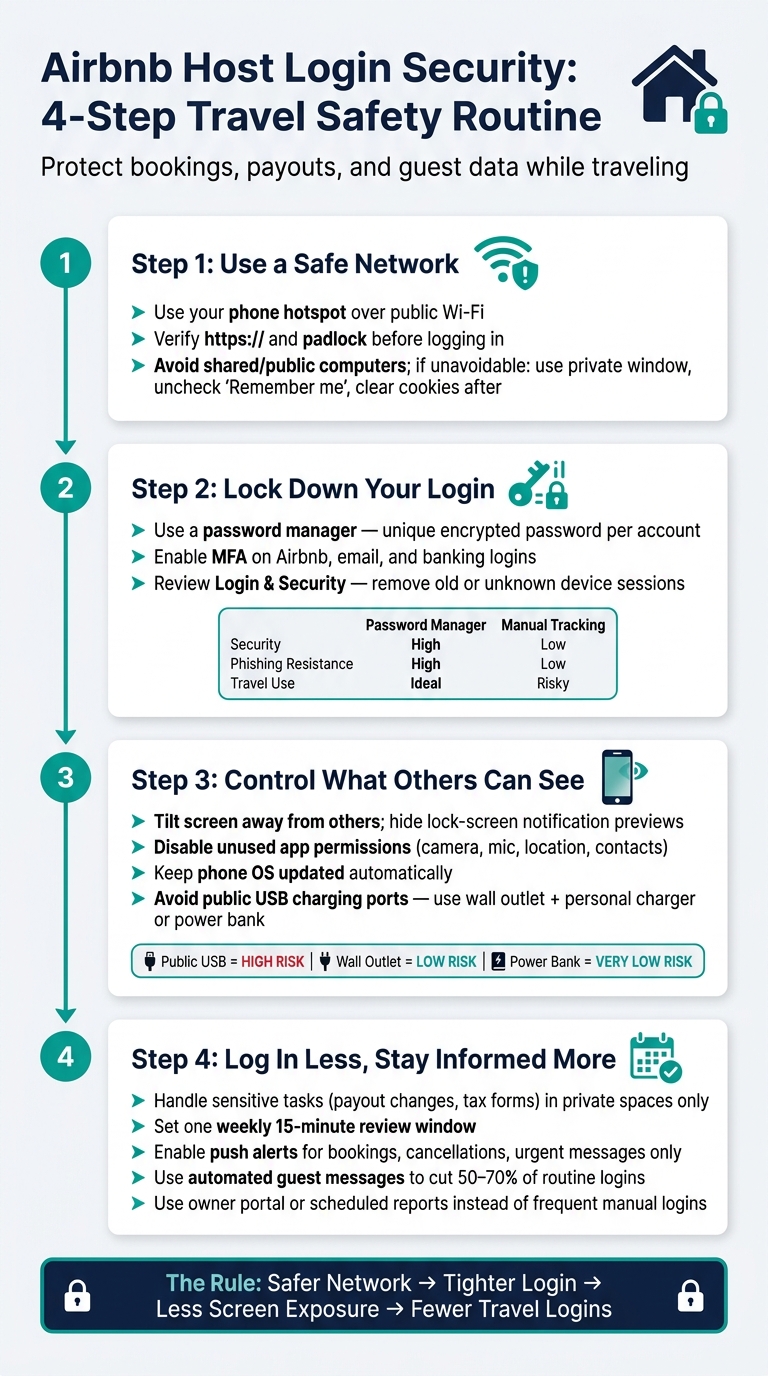
Airbnb Host Login Security: 4-Step Travel Safety Routine
Security Tips for Using Airbnb Safely
sbb-itb-103bddb
Step 1: Avoid risky networks and shared devices before you log in
Public Wi‑Fi at airports, hotels, and coffee shops can be unsecured or even fake. So before you check bookings or payouts, use a private connection.
Use a personal hotspot or trusted network for Airbnb and payout activity
Your phone’s hotspot should be your first choice. It gives you a private cellular connection, which is safer than open public Wi‑Fi.
If you’re logging in through a browser, look at the address bar first. Make sure you see https:// and a padlock icon. If one of them is missing, don’t log in.
If you can’t get a trusted connection, the device itself becomes the next thing to watch.
Use private browsing only as a last resort on shared computers
Shared computers can keep session data or even have keyloggers on them. That means you should use one only if you have no other option. If a shared device is your only way to access host logins, do this:
- Open a private window.
- Leave “Remember me” unchecked.
- Sign out through the account menu.
- Clear cookies and browsing history before you leave.
Private browsing only hides traces on the local device. The next step is to lock down your password and multi-factor authentication.
Step 2: Secure your passwords, multi-factor authentication, and active sessions
Once your connection is locked down, the next job is the account itself.
This is where things can go sideways fast. If your login details leak, someone may not need much else to get into your Airbnb account. The best way to cut that risk is pretty simple: use a different password for each account, turn on MFA, and check which devices still have access.
Use a password manager instead of reusing Airbnb credentials
Using the same password for Airbnb, your email, and your payout account is like using one key for your house, car, and office. If that one key gets copied, everything is exposed.
A password manager fixes that problem by making a different password for each account and storing them in an encrypted vault. That helps protect booking details, payout access, and the rest of your sign-ins in one place.
Set it up on your personal phone and laptop before you travel. Don’t install a password manager on a public or shared computer. One more plus: auto-fill makes sign-ins much faster when you’re on the move.
Turn on multi-factor authentication for Airbnb, email, and banking logins
MFA adds another lock to the door. Even if someone steals your password, they still can’t get in without that second step.
Turn it on for:
- Airbnb
- Your email account
- Banking and payment logins tied to hosting income
Your email matters most because it’s the reset point for almost everything. If someone gets into that inbox, they can reset your Airbnb password, reroute payouts, and lock you out of the account. The same risk applies to any bank or payment account linked to your hosting income[3].
Review saved devices and sign out of sessions you no longer use
After each trip, open Login & Security and check which devices still have access. Remove anything you don’t know and anything you no longer use.
An active session on a temporary device is basically an open door. Signing out of old sessions closes it.
Doing this by hand gets messy fast, especially when you use more than one device, which is why many owners opt for professional property management.
Comparison table: Password managers vs. manual password tracking
| Feature | Password Managers | Manual Password Tracking |
|---|---|---|
| Security | High – different encrypted passwords | Low – high risk of reuse or theft |
| Convenience | High – auto-fills across apps and websites | Low – manual entry and memorization |
| Device Sync | Syncs across your devices | None – tied to one location or file |
| Phishing Resistance | High – won’t auto-fill on fraudulent URLs | Low – users may enter credentials on fake sites |
| Travel Use | Ideal – secure access via one master key | Risky – easy to lose or expose |
Step 3: Protect your screen, app permissions, and charging habits while traveling
Once you’ve secured the network and login, the next step is to lock down what people around you can see and what your phone shares in the background. Strong passwords and MFA help a lot. But your screen and device can still give away private details.
Block shoulder surfing with privacy screens and hidden notifications
People nearby can spot private guest messages and payout alerts at a glance. If you check bookings in public, keep your screen tilted away from others.
It also helps to hide lock-screen previews. That way, urgent guest messages still show up, but account details stay out of sight.
Review Airbnb app permissions and keep your phone updated
Take a minute to review the Airbnb app’s permissions on any device you use for booking or payout access. Turn off camera, microphone, location, and contacts access unless you need them for hosting[3].
Also, keep your phone updated and set it to install updates automatically when you can[3].
Avoid public USB charging stations for devices used to access host accounts
After screen privacy, charging is the next weak spot.
Skip public USB charging ports at airports, convention centers, and similar places for any device you use for Airbnb, email, or banking. Use your own wall charger with a wall outlet whenever possible.
Need a backup? A portable power bank is the safest pick because it doesn’t create a data connection to an unknown source.
Comparison table: Public USB stations, wall outlets, and power banks
| Charging Method | Security Risk | Convenience | Best Use |
|---|---|---|---|
| Public USB station | High – avoid for host devices | High – widely available | Avoid for devices used for Airbnb, email, or banking |
| Wall outlet + personal charger | Low – safest routine option | Moderate – requires access to an outlet | Best option for routine charging while traveling |
| Portable power bank | Very low – best backup | High – works anywhere | Ideal backup when outlets aren’t available |
These habits help cut off a few of the last easy ways host data can leak while you travel. The next way to lower risk is to log in less often while you’re on the road.
Step 4: Lower login exposure with safer travel habits
Log in less, but still keep an eye on bookings and payouts. Every extra login creates another chance for trouble.
Once your device is private, the next move is simple: open Airbnb only when you need to.
Handle sensitive account tasks at set times and in private spaces
Not every Airbnb task carries the same level of risk. Changing your payout method, updating bank details, or downloading a tax form calls for more privacy.
Do those tasks in a private room, not in an airport lounge, hotel lobby, or coffee shop. If something can wait, let it wait until you’re somewhere secure.
It also helps to set one weekly review window, like 15 minutes every Sunday, to check messages, financial reports, and account changes [2][1].
Use app alerts and owner reports to cut down on unnecessary logins
A better alert setup helps you stay informed without sitting in the Airbnb app all day. Keep push alerts limited to new bookings, cancellations, and urgent guest messages [6][5].
You can trim logins even more by automating routine guest communication. Automated messages can cover confirmations, pre-arrival instructions, check-in, mid-stay check-ins, and checkout. When set up well, these messages can cut 50% to 70% of routine guest questions [2][5]. That means fewer reasons to log in while traveling.
If you work with a professional manager, lean on scheduled reports or an owner portal instead of checking your account over and over from airports, hotels, and cafés [4].
Conclusion: Build a repeatable login routine and log in less while traveling
Treat Airbnb like banking. Use private connections, MFA, a password manager, tight app permissions, screen privacy, and safe charging habits. The goal is simple: fewer logins from safer places.
If you want fewer logins while traveling, Rank One Stays can handle hosting operations while you’re away, with fees starting at 10%.
FAQs
Is a VPN worth using for Airbnb logins?
Yes, especially if you’re logging into your Airbnb account or handling sensitive financial details on public or unsecured Wi-Fi while traveling.
The source material doesn’t directly discuss VPNs. But it does make one point clear: working with Rank One Stays can cut down on these day-to-day risks because their team handles account access, pricing, and guest communication in a secure way.
What should I do if I logged in on a public computer?
Stop using it, log out at once, and change your Airbnb password right away. Turn on 2-factor authentication so no one can get into your account later.
Also close all browser windows, not just the tab, and turn off “stay signed in” anywhere you used it. For future checks while traveling, use private browsing and a password manager instead of shared devices.
Which Airbnb tasks are safest to postpone until I’m home?
When you’re traveling, it’s smart to put off Airbnb tasks that involve sensitive data, close document review, or direct back-and-forth about guest disputes and maintenance problems until you’re back on a secure, private home connection.
The day-to-day stuff is easier. Routine messages like check-in instructions and review reminders should be set up ahead of time with automation.
If you want a more hands-off setup, Rank One Stays can take care of those guest interactions for you.