
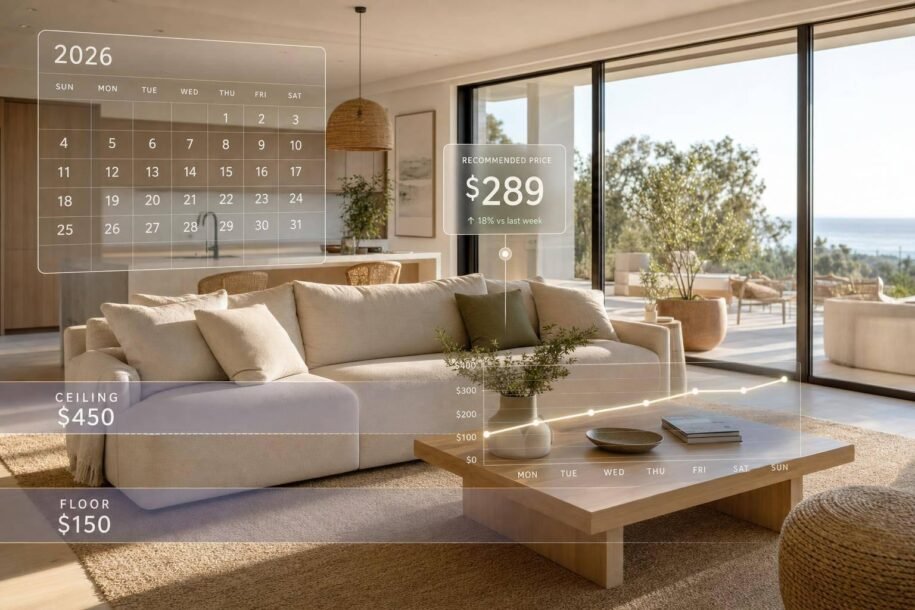
If I want higher Airbnb or Vrbo revenue in 2026, I can’t set one nightly rate and forget it. The article’s main point is simple: dynamic pricing works best when I set a solid base rate, a hard minimum, a sensible maximum, and then review pace, fees, stay rules, and event dates every week.
Here’s the short version:
- Fixed pricing keeps the same rate most of the time, but I can miss busy-date revenue and overprice slow nights.
- Seasonal pricing is better, but it can still miss short event spikes and booking-window shifts.
- Dynamic pricing changes rates by demand, day of week, lead time, booking pace, comp availability, and local events.
- My floor matters most. If my minimum rate is too low, I can book nights and still lose money after cleaning, utilities, fees, and turnover costs.
- Occupancy alone is not enough. I should track ADR, RevPAN, net revenue, lead time, and channel parity.
- Airbnb Smart Pricing is simple, but it stays inside Airbnb. Third-party tools usually give me more rule control and multi-channel sync.
- Pricing does not fix a weak listing. Photos, reviews, cleaning, amenities, calendar sync, and guest communication still shape results. Professional Airbnb interior design also plays a critical role in conversion.
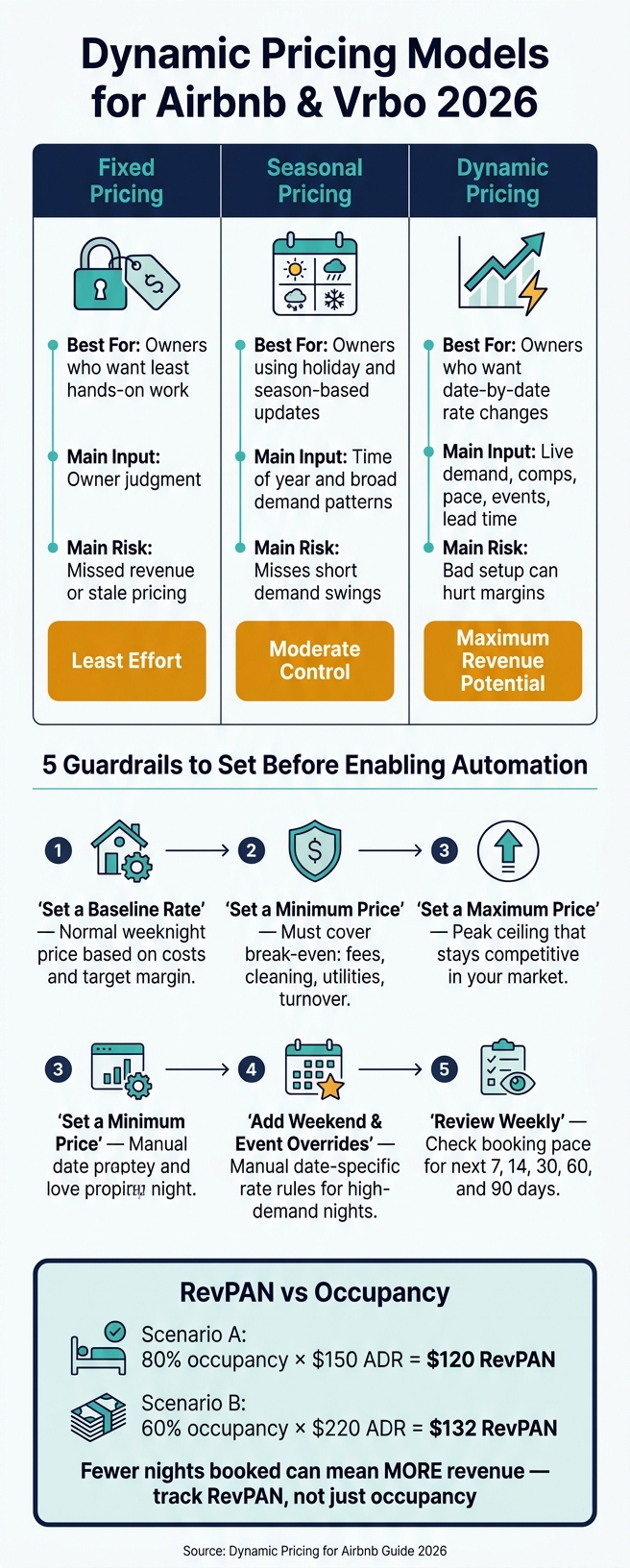
Dynamic Pricing Models for Airbnb & Vrbo: Fixed vs Seasonal vs Dynamic
Beginners Guide to Dynamic Pricing Software (Pricelabs)
sbb-itb-103bddb
Quick Comparison
| Pricing model | Best for | Main input | Main risk |
|---|---|---|---|
| Fixed | Owners who want the least hands-on work | Owner judgment | Missed revenue or stale pricing |
| Seasonal | Owners using holiday and season-based updates | Time of year and broad demand patterns | Misses short demand swings |
| Dynamic | Owners who want date-by-date rate changes | Live demand, comps, pace, events, lead time | Bad setup can hurt margins |
I’d treat dynamic pricing as a system, not just a tool: set guardrails first, check guest-facing totals, compare Airbnb and Vrbo side by side with Denver vacation rental management, and review results by season, stay length, and booking window.
How Dynamic Pricing Tools Set Nightly Rates
Once you’ve set a base price and clear guardrails, the software can handle each open night on its own. It starts with your base rate, then checks live demand signals to decide whether a date should move up, move down, or stay the same, all while staying inside the limits you set.
The Demand Signals Pricing Software Tracks Daily
Airbnb says Smart Pricing uses many demand signals to adjust nightly prices based on demand.[1] In practice, those signals often include guest search demand, seasonality, local events, day-of-week patterns, booking lead time, booking pace, how many similar listings are still open, and length of stay.
In Scottsdale, Friday and Saturday nights tend to beat midweek dates. So pricing tools often add a weekend premium, then push rates higher if nearby comps start filling fast.
Local events can change the picture even more. In Pittsburgh, a major concert, sports event, convention, or festival can send demand up for just a few dates. Citywide averages often gloss over that. Tools that track comp availability and booking pace can spot those short bursts, even when the event doesn’t show up in a standard event database.[5]
Length of stay matters too. A four-night booking may cut turnover costs enough to support a small discount. On the flip side, one open gap night between reservations may need a higher rate, or a gap-night rule, to make the booking worth taking. Good pricing software looks at the value of the whole stay, not just one night at a time.
Airbnb Smart Pricing vs Third-Party Pricing Software
Airbnb Smart Pricing is built into the platform. You set a floor and ceiling, and Airbnb adjusts rates inside that range using listing details, local search activity, and bookings for similar property types.[2] But it only works on Airbnb. So your platform choice affects pricing, not just software setup.
Third-party tools usually go further. They often pull in market data, event calendars, comp availability, booking pace, and the custom rules you set. Many also sync across Airbnb and Vrbo, which matters if you list in more than one place. Property management systems connect pricing with reservations, calendars, guest messages, and day-to-day operations.
| Capability | Airbnb Smart Pricing | Third-Party Pricing Tool | Property Management System |
|---|---|---|---|
| Scope | Airbnb only | Multi-channel revenue optimization | Pricing tied to reservations, operations, and channel management |
| Data inputs | Airbnb demand, listing details, search activity, comparable bookings | Market demand, events, booking pace, lead time, comp listings, custom rules | Market data, reservations, guest data, operations, and channel settings |
| Owner controls | Minimum and maximum prices | Floors, ceilings, event rules, lead-time rules, overrides | Pricing controls plus workflow permissions and channel settings |
| Cross-channel syncing | Airbnb only | Often supports Airbnb and Vrbo | Designed to coordinate rates across connected channels |
| Setup complexity | Low | Moderate | Higher |
| Oversight required | Review prices and boundaries regularly | Review comps, events, recommendations, and exceptions | Review pricing, sync, reservations, and operational effects |
One thing to watch: Airbnb says Smart Pricing can override other rule sets when both are active at the same time.[6] If you’re using a third-party tool alongside Smart Pricing, check which system has final control before you switch both on.
Why Nearby Listings Matter More Than Broad Market Averages
Most pricing tools let you build a comp set, meaning the listings your property is actually up against. That set should be narrow. Filter by neighborhood, bedroom count, guest capacity, property type, amenities, review quality, and availability for the same dates.[4]
A three-bedroom pool home is competing with similar nearby homes, not a studio across town. If you price from a broad city average, you can end up below what your property can support based on size and amenities.
And the sticker price alone doesn’t tell the full story. A competitor listed at $225 per night may already be booked for your target dates. A $190 listing with weak reviews may not be a real substitute for a well-reviewed home. Availability and booking pace matter just as much as the number on the screen. Those signals are most useful when you pair them with clear pricing rules.
How to Build a Dynamic Pricing Strategy for Airbnb and Vrbo
Pricing Rules to Set Before Turning on Automation
Before you let software change your rates, set the limits first. Think of them as guardrails. The idea is simple: decide where pricing can and can’t go before automation starts doing its job.
Start with a baseline rate. That’s the price you’d charge for a normal Sunday-to-Thursday stay when there’s no big event and no seasonal push. Set it using your costs, past booking data, and target margin.
Next, set a minimum price that covers your actual break-even point. Airbnb notes that discounts can push the guest price below the minimum Smart Pricing amount, so you need to test the final payout before you publish any rule.[1]
Your maximum price should leave room for peak demand without looking out of place in your market. For example, a Scottsdale home with a pool, parking, and a strong location can carry a higher ceiling than a basic studio. But even then, the top end still has to make sense for local guests.
You control the inputs. The software should handle market movement.
| Owner-controlled settings | Automated market signals |
|---|---|
| Baseline rate for a normal week | Current demand and booking activity |
| Minimum rate that protects net revenue | Comparable nearby listing prices |
| Maximum rate that remains marketable | Seasonality and day-of-week patterns |
| Weekend premium | Lead time and booking pace |
| Holiday and local-event overrides | Availability in the competitive set |
| Minimum and maximum stay rules | Booking pace |
| Early-bird, last-minute, weekly, and monthly discount limits | Changes in demand for similar properties |
| Gaps or compression in local inventory |
Airbnb supports weekly, monthly, early-bird, and last-minute discounts.[3] Vrbo rate automation lets owners set minimum and maximum rate limits and create up to 10 custom seasonal rules.[7] Use those settings to add weekend premiums, seasonal changes, and holiday overrides. Then check the final guest-facing total before anything goes live.
A 2026 Weekly Pricing Review Process
Once automation is on, a weekly review helps keep pricing lined up with demand. Each week, check your booking pace for the next 7, 14, 30, 60, and 90 days. Then compare that pace with your past baseline.
If a weekend is filling much faster than usual, your rate may be too low for current demand. If near-term weekdays are staying empty, price might be the issue. But it could also be your minimum stay settings or the listing itself. It’s not always a demand problem.
If you’re on both Airbnb and Vrbo, make sure your rates, fees, minimum stays, and discounts match across both platforms. Professional Airbnb services can help manage these complexities. A channel manager can help, but it’s still smart to do manual spot checks of the guest-facing total. Sync tools miss things.
The table below shows common patterns and what they often mean:
| Scenario | Likely interpretation | Recommended action |
|---|---|---|
| A weekend is filling much faster than normal | Price may be below demand or a local event is compressing inventory | Raise future unbooked nights gradually; review minimum stay; check nearby availability |
| Several near-term weekdays remain empty | Demand may be weak, the listing may be overpriced, or the stay rules may be restrictive | Test a targeted price reduction or shorter minimum stay; verify listing quality first |
| High views, low bookings | Guests may be rejecting the total price | Compare guest-facing total pricing; test a modest rate change |
| A discount can fill nights but reduce net revenue | The discount may be buying low-value bookings or displacing higher-value demand | Measure net revenue per available night and turnover costs before continuing |
| A major event is approaching and comparable listings are disappearing | Local demand is strengthening | Reassess rates, remove unnecessary discounts, consider a longer minimum stay |
| If Airbnb and Vrbo show different prices or open dates | Channel rules are not synchronized | Check the channel manager, platform discounts, fees, and date-specific overrides |
Make one change at a time and write it down. If you change price, minimum stay, and listing details in the same week, you won’t know what actually made the difference.
Pricing Mistakes That Cut Into Revenue
The most common pricing mistakes usually happen before the software does anything. They come from the choices owners make up front.
Setting the minimum price too low is often the costliest error. If your floor doesn’t include platform fees, cleaning supplies, utilities, turnover labor, and taxes, you can fill the calendar and still lose money on single stays. Work out the true break-even first. Then set the floor above that number.
Copying a competitor’s rate without matching the product can hurt just as much. A listing with weak reviews, no parking, and an older interior is not a fair comparison for a polished home with a pool and strong guest ratings. Look at amenities, review scores, cancellation terms, and minimum stay rules, not just the nightly rate.
Leaving event dates unreviewed is another common leak. A big sports event, convention, or festival can tighten nearby inventory for only a handful of dates. If you haven’t set a date-based override before demand climbs, you’ll either miss the higher rate or end up rushing after other listings are already booked. Build an event calendar for your market and set overrides months ahead.
Over-discounting near check-in is a habit that often backfires. Last-minute discounts can work for nights that would otherwise go empty. But they don’t make sense for dates that are still booking at a healthy pace. Check booking pace and nearby availability before cutting rates. And if Airbnb and Vrbo are running different discount rules, you may be underpricing one platform without noticing.
Track revenue per available night, not occupancy by itself. These mistakes tend to show up fast in ADR and revenue per available night.
How to Tell If Dynamic Pricing Is Actually Working
The Metrics That Show Pricing Performance Clearly
Once pricing automation is live, the next step is simple: check whether it’s lifting revenue, not just filling nights.
That distinction matters. Occupancy on its own can fool you. A full calendar may look good at first glance, but it can still mean you priced dates too low or gave away profit after fees and turnover costs.
RevPAN is the clearest top-line metric to watch. It blends ADR and occupancy, so you can see price and volume together. For example, 80% occupancy at a $150 ADR gives you $120 RevPAN. But 60% occupancy at a $220 ADR gives you $132 RevPAN. Fewer booked nights, more revenue per available night.
Use the table below to read each metric the right way.
| Metric | What it measures | What an increase may indicate | What a decrease may indicate |
|---|---|---|---|
| RevPAN | Revenue per available night | More efficient revenue generation | Excessive vacancy, weak rates, or heavy discounts |
| ADR | Average revenue per booked night | Stronger pricing power or higher-demand bookings | More discounts, softer demand, or lower-priced dates |
| Occupancy rate | Booked nights as a share of available nights | Stronger demand or lower prices | Overpricing, weak listing performance, or calendar restrictions |
| Booking pace | How quickly future dates are filling vs. normal | Healthy forward demand; may support holding or raising rates | Slowing demand; may call for price adjustments or targeted promotions |
| Lead time | Number of days between reservation and check-in | Strong advance demand | More last-minute bookings or weaker early interest |
| Net revenue | Revenue after platform fees, management fees, discounts, refunds, cleaning costs, taxes paid by the owner, and other operating costs | Pricing is improving actual owner income | Gross revenue is rising, but costs are consuming the gains |
| Cancellation rate | Percentage of reservations canceled | More stable confirmed demand | Guest hesitation, policy effects, or demand-quality issues |
| Channel consistency | Whether Airbnb and Vrbo show comparable rates, availability, restrictions, and revenue results | Better parity and cleaner reporting | Rate mismatches, sync errors, inconsistent fees, or different guest behavior |
One more thing: define revenue once and stick with it. Use nightly, gross, or net revenue – but use the same version everywhere. When owners mix definitions, they often end up misreading their own numbers.
How to Read Results by Season, Channel, and Stay Length
Annual averages can smooth over the very things you need to see. They can hide weak off-season pricing and peak-season underpricing. That’s why the useful view comes from breaking results down by season and booking window.
Review each month on its own. Then split the year into the demand periods that matter for your market: shoulder season, holidays, school breaks, local festivals, and slower stretches. When you can, compare each period with the same period in prior years. If weekends behave differently from weekdays, split those too. For each period, track occupancy, ADR, RevPAN, net revenue, booking pace, lead time, cancellation rate, and average length of stay.
Channel-level review matters just as much. Look at Airbnb and Vrbo separately before you combine anything. Their dashboards do not define revenue and occupancy the same way, so direct cross-platform totals can skew the picture. Vrbo’s revenue figure excludes taxes, guest service fees, and fees charged to the owner.[10] Airbnb’s Insights tool defines occupancy as booked nights divided by total nights available to be booked.[8][9]
Stay length also changes profit more than many owners expect. A 2-night stay at $240 brings in $480 and creates one turnover. A 7-night stay with a 10% discount brings in $1,260 with that same turnover. If turnover costs $150, the longer stay leaves much more profit. So yes, a plan that fills more nights at a lower rate can still earn less after turnover costs than a plan with fewer, better-priced stays.
A good rhythm is to review future dates weekly and completed stays monthly. That gives you a steady read on whether pricing changes are doing their job. It also helps to keep a pricing-change log with rate rules, minimum stays, discounts, event overrides, and channel promotions. When you look back later, that log makes each pricing move much easier to judge.
Dynamic Pricing as Part of Full-Service Airbnb and Vrbo Management
Why Pricing Alone Does Not Fix Weak Rental Performance
Once pricing is live, the next part is operations. A smart rate might get the click, but it won’t do much on its own. Photos, amenities, cleanliness, and check-in shape whether a guest books, shows up happy, and leaves a strong review.
Airbnb ratings are based on six guest-scored categories: accuracy, check-in, cleanliness, communication, location, and value.[13][14] That matters because pricing only works well when the property is guest-ready and the calendar is correct.
When to Use a Full-Service Manager Like Rank One Stays
When pricing depends on clean turnovers, synced calendars, and fast guest replies, management stops being a side issue. It becomes part of the pricing system itself.
Rank One Stays handles pricing, reservations, guest support, housekeeping, maintenance, damage claims, and reporting. Those pieces work together, so rate decisions match what the property can actually deliver. Rank One Stays serves Scottsdale, Denver, Pittsburgh, and Lighthouse Point, with management fees starting at 10%.[11][12] According to the company, properties managed by the company earn 38% more revenue than the market average; define whether that figure is gross or net revenue.
For investors who want a fully managed setup from day one, Rank One Stays also offers vacation rental interior design and staging to help position a property well before the first booking.
DIY Pricing vs Full-Service Management
The main question isn’t whether pricing software is available. It is who keeps pricing in sync with day-to-day operations. That’s the real difference.
| Management approach | Time required | Pricing oversight | Guest communication | Cleaning & maintenance | Best fit |
|---|---|---|---|---|---|
| Self-management with software | High | Owner reviews and overrides rates | Owner responds directly | Owner schedules all vendors | Local owners with time and operational experience |
| Hybrid support | Moderate | Owner or manager reviews rates | Shared or partly delegated | Vendors may be coordinated by owner or provider | Owners who want help during busy periods |
| Full-service management | Low day-to-day | Manager combines software with local oversight | Manager handles inquiries and stay issues | Manager coordinates turnovers, inspections, and repairs | Remote owners, first-time hosts, larger portfolios |
If you manage locally, have dependable vendors, and can review rates each week, self-management with pricing software can make sense. If you’re remote, growing a portfolio, or just don’t want daily hands-on work, full-service Airbnb and Vrbo management keeps pricing tied to operations without needing your constant attention.
Conclusion: How to Price Smarter in 2026
Dynamic pricing works best when strong operations support it. It should not stand in for them. Automation sets rates, while floors, weekly reviews, and manual overrides help protect profit. Full-service management can make the whole process steadier, especially for owners who want better returns without handling day-to-day operations themselves.
FAQs
How do I set a safe minimum nightly rate?
Start with a clear profitability baseline. In many U.S. markets, that’s often around $100.00 per night. In more competitive areas, it may be closer to $100.00 to $150.00.
Your minimum rate should cover your operating costs and still leave room for last-minute discounts of 5% to 15% when you need to fill open dates. That way, you’re not scrambling to cut prices below what makes sense.
Rank One Stays can help fine-tune this with professional market insight and dynamic pricing.
When should I override automated pricing?
Step in and override automated pricing when your property’s booking pace moves far away from market trends, or when local events create sharp demand jumps that pricing tools may not catch right away.
Automation is useful for day-to-day price changes. But manual updates can help you cash in on moments like the 2026 Super Bowl, when early booking signals may show up before the algorithm reacts. Rank One Stays can handle that for you.
Is dynamic pricing worth it for one property?
Yes. Even with just one property, dynamic pricing can increase revenue. Fixed rates often leave money on the table. Hosts who use dynamic pricing often see 15% to 36% higher revenue.
The reason is pretty simple: rates shift with daily demand, seasonality, and local events. That helps you improve both occupancy and average daily rate instead of relying on one flat price all year.
Rank One Stays includes expert dynamic pricing in its full-service management.