

Holiday pricing can add 20% to 40% more revenue when I stop guessing and use a set plan. The core idea is simple: I set a base rate, a floor rate, and a cap rate, then I add holiday premiums by date, watch booking pace, and use minimum stays to protect top nights.
If I want to price holiday dates well, I focus on six parts:
- Base rate: my normal nightly price
- Floor rate: the lowest rate I can take and still leave room for profit
- Cap rate: the highest rate the market is likely to book
- Holiday premiums: extra pricing for peak and shoulder dates
- Booking windows: rate and rule changes based on lead time
- Minimum stays: stay rules that help me avoid weak calendar gaps
I also look at last year’s occupancy, ADR, RevPAR, and booking lead time, then match holiday dates to local demand like school breaks, sports, and events. That matters because a holiday weekend with a game, festival, or college event can support more than a holiday weekend on its own.
Here’s the short version:
- I compare past holiday results with normal weekends
- I price each holiday by night, not with one flat markup
- I keep peak nights high and treat shoulder nights with more care
- I loosen stay rules before I cut strong holiday rates
- I review results after each holiday so next year is easier to price
A simple pricing system beats random rate changes. That’s the whole point of this guide.
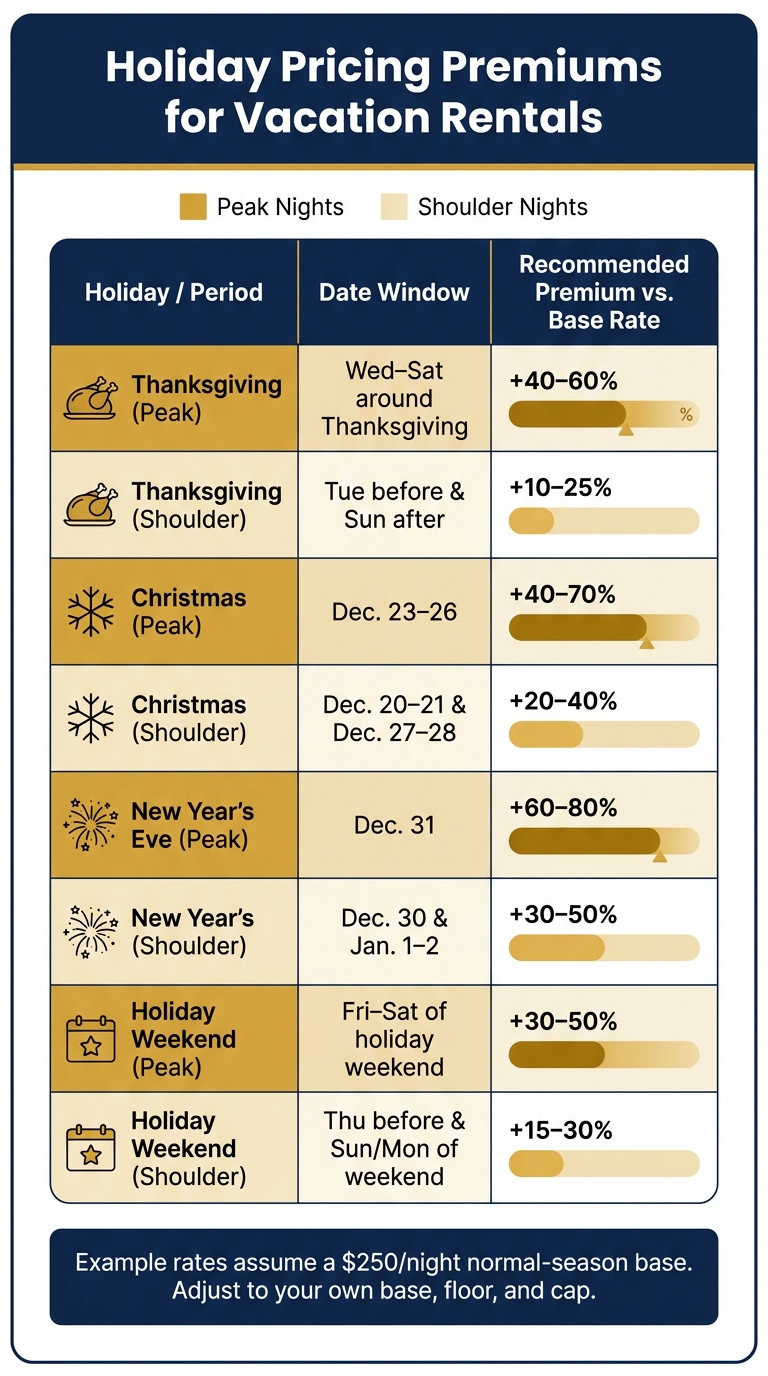
Holiday Pricing Premiums for Vacation Rentals: Peak vs. Shoulder Nights
The Ultimate Short Term Rental Pricing Masterclass (Step-by-Step) for 2025
sbb-itb-103bddb
1. Check past demand and local holiday calendars first
Before you change a single rate, start with the numbers.
Review last year’s occupancy, ADR, and booking pace by holiday
For each major holiday – Thanksgiving, Christmas, New Year’s, Memorial Day, Labor Day, and July 4 – work out occupancy, ADR, RevPAR, and average booking lead time, which is the number of days between booking and check-in. Export the data from your vacation rental management system or channel manager, then sort it in a spreadsheet.
Next, compare each holiday stretch with two or three normal non-holiday weekends from the same season. That side-by-side view helps you decide whether next year’s holiday rates should go up, stay flat, or come down.
Booking pace matters too. Look at how fast each date filled 90, 60, 30, and 14 days before arrival.[7][8] If this year’s pace is ahead of last year’s for a holiday, that’s a good sign to hold your rate and pull back on discounts. If pace is slower, you may want to ease your minimum stay or trim the holiday premium a bit.
Map holiday dates to school breaks, events, and travel patterns
Federal holidays don’t tell the whole story. Local demand drivers – school calendars, college events, sports schedules, and festivals – can turn a normal weekend into a busy one.
In Pittsburgh, that means watching Steelers home games, Penguins playoff runs, commencement weekends, and the downtown holiday markets that run from late November through Christmas Eve.[1][4] In Scottsdale, winter and early spring pack into a high-demand stretch driven by Barrett-Jackson, the WM Phoenix Open, and Cactus League spring training, often from January through March, on top of Christmas, New Year’s, and spring break family travel.[2][3][5][6]
Build a 12-month demand calendar and mark:
- Federal holidays, with realistic travel windows like Wednesday through Sunday for Thanksgiving and Friday through Monday for Memorial Day and Labor Day
- School calendars, university dates, and local events, with extra attention on Pittsburgh and Scottsdale
When several demand drivers stack on top of each other, flag that period for higher rates and longer minimum stays.
Use those peak windows to set your base, floor, and cap rates in the next step.
2. Set a base rate, floor rate, and cap rate
Before you layer on holiday premiums, set three guardrails: a base rate, a floor rate, and a cap rate. Think of them as bumpers. They keep pricing tied to the market when demand is slow and stop you from drifting too low or too high when demand spikes.
Use comparable listings to set your normal-season base rate
Your base rate is your standard nightly price during non-holiday, non-event periods. Start with true comps. Pull 10–20 listings in your exact neighborhood or city that match your bedroom count, guest capacity, property type, and amenity level. Then find the median nightly rate across those listings during a quiet period. In many U.S. markets, mid-January through early March is a solid window.
That median is your starting point. From there, move 5–15% up or down based on what your place does better – or worse – than the pack. Better finishes or a newer renovation may support a higher rate. No dedicated parking or an older kitchen may push you lower.
One thing matters a lot here: don’t compare across guest segments. In Scottsdale, a three-bedroom home without a pool is not competing with a luxury five-bedroom pool home built for golf groups. In Pittsburgh, a suburban family home is not the same as a downtown loft that draws midweek business travel. Mix those segments, and your base rate gets skewed in both directions.[9][13]
Once the base rate is set, the next step is figuring out the lowest number that still protects profit.
Calculate your floor rate from real operating costs
Your floor rate is the lowest nightly price you can take and still make money. To find it, add up your variable cost per night:
- Cleaning allocation
- Platform fees
- Utilities
- Consumables like toiletries and coffee
Here’s a simple example. If cleaning costs $120 per turnover and the stay is three nights, that’s $40 per night in cleaning alone. Add utilities and consumables, then include platform fees. If your break-even point comes out to about $90 per night, set your floor at $110 so there’s still room for margin.[11][14]
The floor rate is for standard nights. Gap nights are different, since the turnover cost is already covered, so those can dip below the floor. But your floor should never become your default holiday price. If your holiday rates are hovering near that number, you’re almost certainly giving up seasonal revenue.
Then you need a ceiling, so high demand doesn’t push rates into “looks great on paper, books nowhere” territory.
Set a cap rate to avoid pricing above what guests will book
A cap rate is your ceiling. It keeps pricing – whether you set it by hand or through a dynamic pricing tool – from climbing so high that guests stop booking, even when demand is strong.[10][12][15]
To set it, look at what comparable listings actually booked for during that same holiday last year, not just what hosts asked for. That’s the part many people miss. List prices can be pure wishful thinking. Booked rates tell you what guests were willing to pay.
So if similar properties in your segment sold out at $350–$375 per night during Thanksgiving week, setting your cap at $500 will likely leave your calendar open while nearby listings fill up. A common range is to set the cap from booked holiday comps, usually 30% to 60% above your base rate for major holidays and 10% to 25% above for moderate ones.[10][12][15]
With those guardrails in place, you can start applying holiday premiums by date window instead of using one flat markup.
3. Apply holiday premiums by date window, not a flat markup
Once you’ve set your base, floor, and cap, price holiday nights by demand window. A flat markup tends to blur the peaks and dips that happen inside the same holiday stretch. One night can book fast at a high rate, while the next may need a lighter bump.
The better move is simple: price each night based on demand, not on the holiday as a whole. Use the holiday calendar from Section 1 and the rate guardrails from Section 2 to shape each pricing window.
Price the full holiday window, shoulder nights, and peak check-in nights
Most major holidays break into three pricing zones: highest-demand nights, shoulder nights, and peak check-in nights.
Highest-demand nights are the core dates, like Thanksgiving week, Christmas week, and New Year’s Eve. Peak check-in nights usually land just before the core window, when families and groups come in early. Shoulder nights, such as the Tuesday before Thanksgiving or December 27–28, still see stronger demand, but that demand can fade fast. In those cases, a smaller premium often works better than one blanket markup across the whole stretch.
Use the windows below as your starting point, then fine-tune based on your market.
| Holiday / Period | Date Window (U.S.) | Recommended Premium vs. Base |
|---|---|---|
| Thanksgiving | Wed–Sat around Thanksgiving | +40–60% |
| Thanksgiving shoulder | Tue before & Sun after | +10–25% |
| Christmas | Dec. 23–26 | +40–70% |
| Christmas shoulder | Dec. 20–21 & Dec. 27–28 | +20–40% |
| New Year’s Eve | Dec. 31 | +60–80% |
| New Year’s shoulder | Dec. 30 & Jan. 1–2 | +30–50% |
| Holiday weekend | Fri–Sat of holiday weekend | +30–50% |
| Holiday weekend shoulder | Thu before & Sun/Mon of weekend | +15–30% |
Example rates assume a $250/night normal-season base. Adjust to your own base, floor, and cap.
Tie these ranges back to your base, floor, cap, and local calendar.[16][17][18]
Adjust premiums for Pittsburgh and Scottsdale demand patterns
Local demand changes how big the premium should be. Scottsdale often starts with a stronger winter base rate, so the holiday bump may look smaller as a percentage. Pittsburgh tends to be more event-driven, which means holiday rates may need a bigger jump when games or university events overlap.
Rank One Stays can manage holiday windows, local events, and dynamic pricing across your calendars.
Next, use booking windows and minimum stays to protect those premium dates.
4. Set booking-window rules and holiday minimum stays
After you set date-based premiums, use booking rules to defend those higher rates. Holiday pricing alone doesn’t do the job. Booking windows and minimum stays decide whether those dates fill early or sit open until the last minute.
Use booking windows to control early, standard, and last-minute demand
For major winter holidays, guests often book far ahead. Christmas week tends to book 3–5 months out, Thanksgiving 2–4 months out, and New Year’s Eve 2–3 months out[19]. A good starting point is to open Christmas and New Year’s 9–12 months ahead, Thanksgiving 6–9 months ahead, and long weekends 4–6 months ahead.
Once those dates are live, manage them in three phases based on how close the holiday is. The idea is simple: match your rules to the strength of demand.
| Booking Phase | Lead Time | Calendar Rules | Pricing Approach | Minimum Stay |
|---|---|---|---|---|
| Early | 90–365 days out | Open major holidays far in advance; block low-value arrival and departure patterns; keep premium dates visible but not fragmented by short stays | Hold holiday cap rates; avoid discounts | 3–7 nights, with longer stays on peak dates |
| Standard | 30–89 days out | Allow more flexible arrivals and departures; ease restrictions on shoulder nights if needed | Hold rates if on pace; adjust shoulder nights slightly if behind | 3–4 nights on peak dates; shorter on shoulders |
| Last-minute | 0–29 days out | Focus on filling gaps; allow shorter stays on isolated nights; enable same-day or next-day booking only when operations can support it | Use modest reductions only if needed; protect peak nights | 1–2 nights on non-peak dates; consider slightly shorter minimums on premium nights only if occupancy is low and time is running out |
At 60 days out, keep rates and rules tight if booking pace is strong. If you’re behind, loosen shoulder-night minimums before you cut peak-date rates. That’s usually the smarter move.
Set longer minimum stays, then review the calendar every week
Once rates are set, minimum stays become your last line of defense for holiday revenue. Set them around how people travel, not what feels easiest to manage.
For Christmas week, a 5–7 night minimum on stays that include December 24–25 can push more family bookings and stop short stays from blocking larger reservations[20]. For New Year’s, a 3-night minimum on any stay that includes December 31 is a common standard, especially in urban and nightlife destinations[20]. Long weekends like Memorial Day or Labor Day often work well with a 3-night minimum tied to a Friday or Saturday arrival.
One of the biggest problems is the single-night gap. That’s the awkward opening between reservations that looks open on the calendar but can’t book because your minimum stay is too high. It happens all the time, and it quietly eats revenue.
Starting about 60 days before a holiday, do a short weekly review:
- Check your current occupancy
- Scan the calendar for gaps
- Compare your rates with similar listings
In Scottsdale, that means checking comparable pool homes during Christmas and New Year’s. In Pittsburgh, it means watching for Steelers home games or events that overlap your holiday window and adjusting as needed.
If a gap shows up, set the minimum stay to match the gap length. Don’t throw open the whole calendar.
5. Track results after each holiday and update next year’s pricing plan
A post-holiday review turns one season’s results into next season’s pricing plan. After the holiday wraps up, compare what actually happened with the plan you set in advance.
Compare your final rates and occupancy against your original plan
Start by pulling six numbers: occupancy rate, ADR, RevPAR, average booking lead time, cancellation rate, and total revenue.[22][24]
Then stack those numbers against your original plan. In most cases, the pattern points to one of three issues:
- Sold out too early: If you sold out 30–45 days ahead of time while similar listings booked later at higher rates, your prices were too low.[21][24]
- Shoulder nights stayed empty: Your shoulder-night premiums or minimum-stay rules were too aggressive.[21][24]
- Bookings came only after late discounts: Your starting rate was above the market.[21][24]
That gives you a clear way to adjust next year’s pricing. You may need to change your cap, shorten or extend your premium window, or ease minimum stays.
Save a holiday pricing checklist for next season
Keep these results in one spreadsheet so you start the next holiday with actual data, not guesswork. Log each holiday and track the holiday name, date range, planned rates, actual ADR, occupancy, RevPAR, revenue, lead time, cancellations, and minimum-stay rules. Add a short notes column for takeaways like "sold out 40 days prior" or "weak demand on Dec. 27–28 shoulder nights."[23]
When you log the same fields after every holiday, patterns start to show up over time. That’s how you build a pricing baseline for your market for next year.
If you don’t want to handle this yourself, Rank One Stays can manage the review for you with portfolio benchmarks and dynamic pricing.
Conclusion: Build a holiday pricing system you can repeat each year
Holiday pricing works best when you treat it like a system you can run every year. Review demand and local calendars, set your base, floor, and cap rates, add date-based premiums, use booking rules to shape demand, and then refine the plan after each holiday.
What makes that system work is simple: each holiday should make the next one easier to price. The aim is a repeatable pricing loop. Every holiday gives you data you can use – occupancy, ADR, booking pace, and discount patterns – so you can fine-tune next season’s rates. Over time, that gives you a steady baseline for your market instead of relying on guesswork.
The habit that keeps pricing sharp is a weekly calendar review. A quick check each week helps you loosen minimum stays on slower shoulder nights and tighten rules when demand starts building early.
If you’d rather have this handled for you, Rank One Stays offers dynamic pricing, calendar control, 24/7 guest support, and professional vacation rental management in Scottsdale, Denver, Pittsburgh, and Lighthouse Point. Fees start at 10%, and owners earn 38% more revenue than the market average.
FAQs
How do I choose the right holiday premium?
Choose a holiday premium by weighing local demand, seasonal spikes, and how your property is doing. Check supply growth, local events, and booking pace to spot high-demand dates when charging more makes sense.
If your calendar is filling faster than the market average, increase rates by 5% to 20%. If handling these changes by hand gets messy, Rank One Stays uses dynamic pricing and market insights to help fine-tune your rates.
When should I lower rates or minimum stays?
Lower your rates or shorten minimum stays when your place is still open within three days of check-in. Even a small discount – around 5% to 15% – can bring in last-minute guests who are ready to book fast.
You can also use 10% to 15% discounts to fill one- or two-night gaps between reservations. Those short openings often sit empty, but the right price can turn them into booked nights.
If managing all of this feels like a lot, Rank One Stays can take care of dynamic pricing and listing optimization for you.
What if I don’t have last year’s holiday data?
Use market benchmarks and local event calendars to get a starting point for demand. Then adjust your rates based on what’s happening in your bookings right now, instead of leaning only on past performance.
If tracking all of this by hand starts to feel like too much, Rank One Stays can manage dynamic pricing with automated rules and real-time rate changes while you build your own history.