

I estimate rental income from booked nights – not the highest advertised rate. I start with 12 months of data and 10–20 similar properties, check how many nights you can legally rent, and subtract costs to estimate what you keep.
I use these five methods together:
- Review active listings: Compare asking prices, fees, amenities, and stay rules.
- Track booked nights: Check confirmed stays and the rates guests paid.
- Map rates by month and day type: Separate weekdays, weekends, holidays, and events.
- Check seasonal demand: Test monthly estimates against booking history.
- Calculate income after expenses: Deduct operating costs, management fees, debt payments, and planned reserves.
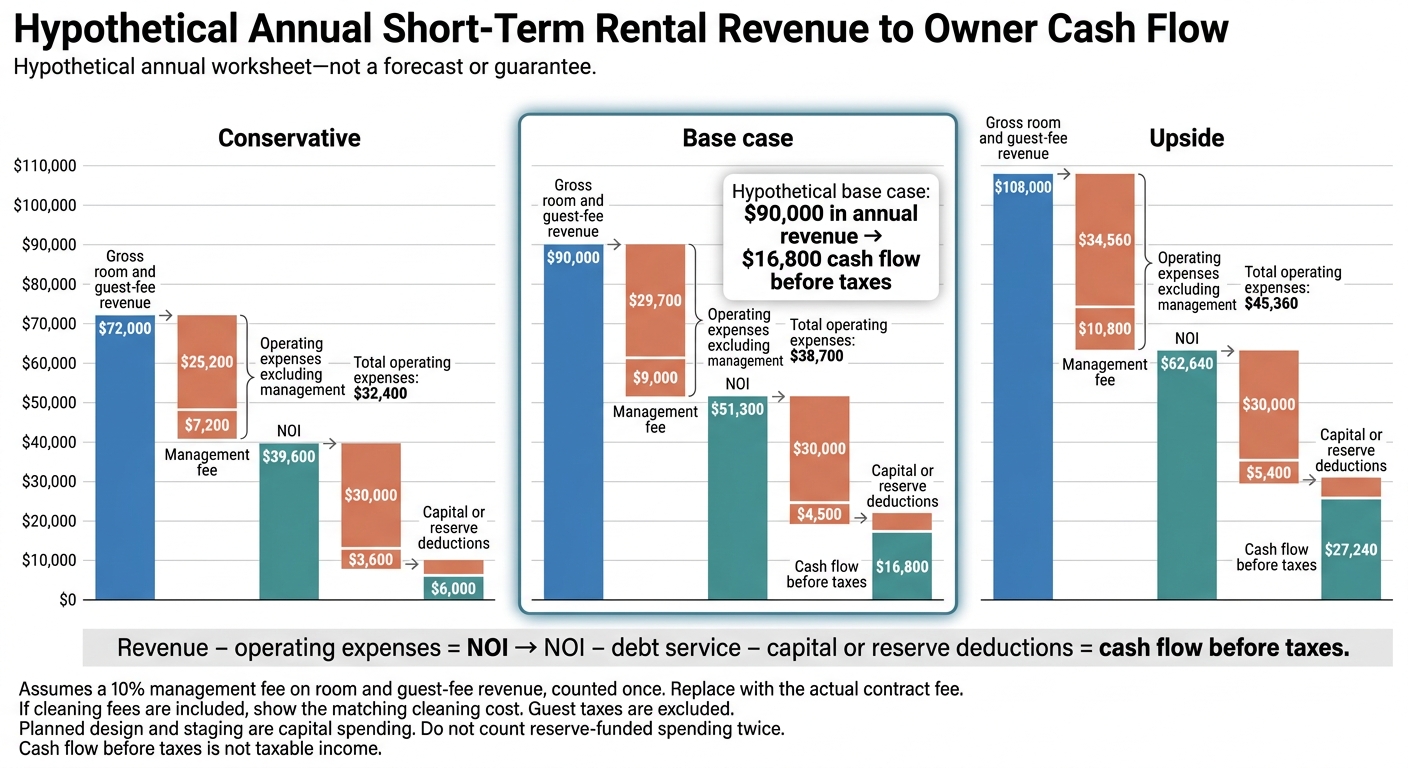
The difference matters: in the article’s hypothetical base case, $90,000 in annual revenue leaves $16,800 before taxes after the listed deductions.
I build conservative, base-case, and upside estimates using the same definitions throughout. My rule: <u>asking prices suggest a starting point; bookings and expenses determine the income estimate.</u>
How to Analyze an Airbnb Market Like a Pro (Avoid These Common Mistakes)
sbb-itb-103bddb
Define Revenue Metrics and Choose Comparable Properties
Start with a trailing 12-month baseline, use the same dates for every comparable property, and label each figure as historical, current asking, or forecast. If recent conditions have changed materially, include a 3- to 6-month trend alongside the annual baseline.[4]
Apply the same revenue definitions before comparing listings. Otherwise, the numbers won’t line up:
- ADR = rental revenue ÷ booked nights.
- Occupancy = booked nights ÷ available nights.
- RevPAN (revenue per available night) = ADR × occupancy, or rental revenue ÷ available nights.
Show occupancy as a percentage, but use a decimal when calculating RevPAN.[6][7][8]
Use gross rental revenue before operating expenses, platform and management fees, taxes, insurance, utilities, maintenance, and debt service. Leave cleaning fees and pass-through taxes out of ADR and RevPAN, and track guest fees separately.[9][10]
Choose 10–20 matched active listings. Match the neighborhood or submarket, property type, bedrooms, bathrooms, guest capacity, sleeping layout, amenities, and condition – not just the ZIP code. Note differences in reviews, minimum stays, photos, and design quality. Keep broader-market listings in a separate reference group. If Rank One Stays manages the property, use the same revenue and fee rules in the forecast. Then check that every comparable property’s available nights reflect the same legal and operating limits.
Available nights set the revenue ceiling. Count only nights you can actually sell. Check city and county licensing, zoning, rental-day limits, minimum-stay rules, tax registration, and HOA or condominium restrictions. Exclude owner stays, maintenance, and planned closures.
Keep those blocked nights separate from vacant nights. They reduce the denominator in occupancy and RevPAN; they don’t signal weak demand. Confirm the requirements with the relevant authorities and qualified advisers before relying on the forecast.[1][2][3][5]
1. Review Active Listings
Revenue Estimates and Required Data
Once you’ve selected comps, check active listings to compare the market’s current asking prices. These prices set the baseline for later revenue estimates.
Save each listing’s URL and the date you checked it. Record the details that help explain rate differences: weekday and weekend asking rates, mandatory fees, displayed total price, visible calendar status, and recent review signals. These details help explain pricing – not prove revenue.
Application Steps
Keep upper-tier and lower-tier comps separate. Search both platforms using the same dates, guest counts, and stay lengths. Repeat across several months, checking one midweek stay and one weekend stay.
Calculate the median asking rate and range for each group. Position your property within that range based only on documented differences. Don’t add a premium for features or photos alone. Label the result a pricing hypothesis, not forecast ADR. It’s your starting rate range before checking booked nights.
Data Limits
Advertised rates aren’t realized ADR, and unavailable dates aren’t confirmed bookings. Use booked-price data when it’s shown; available dates don’t count as bookings.
Remove duplicate homes listed on both platforms. Flag discounts and minimum-stay restrictions, and apply the same gross-rate definition to every listing.
Read recent reviews for repeated complaints about noise, parking, beds, or photo accuracy. Review volume doesn’t prove occupancy. Repeat your search monthly – a single snapshot isn’t a year-round benchmark.
Checks Against Other Methods
Use these asking-rate benchmarks in the booked-night step that follows. Rank One Stays can handle listing optimization and dynamic pricing over time. Carry the rate range into booked-night tracking, then refine it with seasonality and expense modeling.
2. Track Booked Nights
Booked nights show actual demand, not asking prices.
Revenue Estimates and Required Data
Use listings with at least 12 months of history so the data covers peak, shoulder, and slow seasons. Record each reservation’s ID, channel, dates, status, and rental revenue. Apply the occupancy and ADR definitions established above. Keep cleaning fees, discounts, taxes, refunds, and platform fees separate from gross rental revenue.[6][11][12]
Application Steps
Export Airbnb or Vrbo reservation records monthly, and update them weekly during high-demand periods. Treat Friday–Saturday as weekend nights and Sunday–Thursday as weekdays. Separate guest reservations from owner-use blocks, maintenance, and other blocks.
Match reservations to payout statements and save dated snapshots. For canceled-and-rebooked stays, count only the final booked stay. Calculate monthly and trailing-12-month occupancy and ADR, with weekday and weekend results reported separately.
Data Limits
Mark uncertain calendar dates as unconfirmed. An available date is not a confirmed booking. Calendar tracking can miss direct bookings and unlisted periods. It can also mistake blocked nights for reservations when preparation time, advance notice, or minimum-stay rules affect availability.[14][15]
If you have fewer than 12 months of data, label the estimate preliminary. Don’t turn a short peak-season sample into an annual estimate without a separate seasonality adjustment.
Checks Against Other Methods
Compare actual-demand results with a professional analytics platform, using the same market, property type, dates, and definitions. Before comparing occupancy, make sure both methods use the same sellable-night denominator.[7][13]
Check discrepancies against owner-block logs, reservation exports, and payout records. Use the weekday and weekend patterns in Method 3, then feed gross revenue into the expense model.
3. Map Rates by Month and Day Type
Use the active-listing snapshot and booked-night data to set rate bands for specific dates.
Revenue Estimates and Required Data
Using Methods 1 and 2, build a 12-row rate matrix, with one row per month. Include columns for low-demand weekdays, typical weekdays, weekends, holidays, and known event dates. Label each month peak, shoulder, or low season, and use 5–8 matched comparables from your existing group.[17][16]
Application Steps
For each date group, record the median nightly price, total guest price, discounts, cleaning fee, minimum stay, and date collected. Base forecasts on booked ADR – not peak asking rates. Keep cleaning fees and platform fees separate.
Apply weekly, monthly, last-minute, and length-of-stay discounts before forecasting ADR. Put holidays and event dates in their own cells so their premiums don’t inflate ordinary weekday estimates. Calculate revenue for each group as occupied nights × ADR, then divide by available nights to get RevPAN.
Test minimum stays alongside rates.[18] Update near-term prices weekly and longer-range prices monthly. Use these monthly rate bands as the baseline for Method 4’s seasonality check.
Data Limits
Label public-price observations as asking-rate estimates, not completed revenue. The matrix is a pricing baseline – not a final forecast.
Checks Against Other Methods
Check monthly rate assumptions against Methods 1 and 2 and Method 4’s seasonal-demand analysis. A higher ADR doesn’t automatically mean a better result: compare RevPAN before increasing rates.[19][20] If bookings lag, test the rate and minimum stay separately instead of changing both at once.
If you use professional management, ask for monthly ADR, occupancy, and RevPAN assumptions. Then pass projected revenue into Method 5.
4. Check Seasonal Demand
Use the rate bands from Method 3 to see whether seasonal demand supports your assumptions. After reviewing active listings, booked nights, and monthly rate bands, check whether those assumptions hold throughout the year.
Revenue Estimates and Required Data
Review 12 to 36 months of monthly occupancy, ADR, RevPAN, booked nights, available nights, and gross rental revenue to test your rate assumptions against seasonal demand.[22][23]
For each month, account for holidays, school calendars, weather, events, and local business or university cycles.
Application Steps
Match calendar dates with past booking results, then compare weekdays with weekends. Before adjusting occupancy or ADR, check confirmed event dates and recent booking pace.
Account for the market’s weather and event patterns. Beach destinations often slow during cooler months, while ski markets depend on snow and lift schedules. Use the same monthly framework to compare actual booking pace with projected occupancy.
Build conservative, base-case, and upside forecasts for each month:
- Conservative: Use lower occupancy and rates, leave out uncertain event premiums, and account for weather-related closures.
- Base-case: Align assumptions with historical results and confirmed demand.
- Upside: Require stronger booking evidence to support higher projections.
Calculate monthly gross rental revenue as available nights × occupancy × ADR, then add the results for all 12 months. Do not annualize peak-season revenue.
Data Limits
Check whether reported revenue includes cleaning fees, taxes, or platform fees. Compare matching holiday periods across years, and separate recurring demand from one-time events. Weather-related closures can reduce available nights and increase expenses.[21]
Checks Against Other Methods
National demand trends offer context, but they do not replace local booking evidence.[24]
Cross-check seasonal assumptions against active listings, booked-night tracking, and rate mapping. High asking rates alone do not support an upside forecast – you need booking evidence. Pass monthly gross rental revenue and seasonal operating costs into Method 5.
5. Calculate Income After Expenses
Once you’ve estimated revenue using Methods 1–4, subtract operating costs and debt service to see how much income remains for the owner.
Revenue Estimates and Required Data
Build a 12-month worksheet using this formula: monthly gross room revenue = ADR × occupancy × sellable nights. Use each month’s sellable nights, then add the monthly results. Don’t rely on one blended annual assumption.
Track cleaning revenue and cleaning costs separately. Also account for platform fees, management fees, utilities, insurance, property taxes, permits, HOA dues, repairs, supplies, and debt service. These costs turn your market-based revenue estimate into an owner-level income forecast.
Application Steps
NOI = operating revenue − operating expenses. Include management costs, but exclude financing, depreciation, income taxes, and capital improvements. Don’t subtract cleaning costs twice. Check whether management fees apply only to room revenue or also to cleaning fees and other charges.
Cash flow after debt service = NOI − mortgage principal and interest. Show reserve contributions and capital spending separately, and don’t count reserve-funded spending twice.
Assign a labor cost to self-management so you can compare it with paid management. Review income taxes with a tax professional who knows vacation-rental and personal-use rules. Taxable income and cash flow are not the same.[25][26][27]
For a managed forecast, get a written proposal from Rank One Stays. Before adding those numbers to your model, verify the fee basis, included services, and any add-on charges.[28]
Data Limits
Calendar blocks don’t prove bookings. Published revenue may also include cleaning fees or taxes. Use property-specific insurance quotes, utility bills, and maintenance estimates rather than a blanket expense percentage.[29][30]
Checks Against Other Methods
Use the earlier methods to check your assumptions, not to create separate forecasts. Compare self-managed and managed cash flow, not just management fees. Check ADR, occupancy, and seasonality against Methods 1–4.
If gross revenue looks strong but owner income looks weak, pinpoint the effect of debt service, operating costs, or reserves before changing your revenue estimate. Label each assumption by its source: observed, estimated, quoted, or verified.
Revenue Forecast Worksheets and Tables
Short-Term Rental Revenue vs. Owner Cash Flow
Use these worksheets with each method to bring all five methods into one comparable forecast model. For Method 1, record 5–10 matched comparable properties and filter them by property type, size, layout, and amenities.[31]
| Field group | Columns to include |
|---|---|
| Identity and attributes | Listing URL or identifier, neighborhood, property type, bedrooms, bathrooms, guest capacity, square footage, amenities |
| Listing quality and rules | Review count, rating, minimum stay |
| Pricing observations | Weekday, weekend, holiday, and event rates for identical dates; cleaning fee; other guest fees |
| Calendar observations | Available dates, unavailable dates, observation date; unavailable nights are not confirmed bookings |
For Methods 2–4, label each estimate with its date, market, segment, sample size, and source type: observed, modeled, or reported. Make sure the definitions match before averaging estimates.
| Source | Strength | Access | Likely error |
|---|---|---|---|
| Public listing observations | Prices, amenities, reviews, stay rules | Public searches | Missed discounts |
| Professional analytics | Occupancy, ADR, seasonal patterns | Often paid or limited-access | Coverage gaps |
| Owner statements or booking exports | Realized bookings, fees, expenses | Owner or manager permission | Omitted labor or reserves |
Use the same metric reference across every worksheet. Calculate occupancy using available nights, and enter occupancy as a decimal in formulas.
| Metric | Formula |
|---|---|
| Available nights | Calendar nights − owner, maintenance, and other unavailable nights |
| Booked nights | Confirmed guest nights |
| Occupancy (%) | Booked nights ÷ available nights × 100 |
| ADR | Room revenue ÷ booked nights |
| Gross room revenue | Booked nights × ADR |
| Revenue per available night | Gross room revenue ÷ available nights |
| Average length of stay | Booked nights ÷ reservations |
For Methods 3–4, fill in a row for each month, then total the room revenue. Treat this table as a worksheet for forecast inputs, not actual results. Carry the same assumptions from Methods 1–4 – including rate mapping and seasonality – through the monthly rows and into the annual forecast.
| Period | Available nights | Occupancy | Booked nights | ADR | Gross room revenue | Verified demand notes |
|---|---|---|---|---|---|---|
| January | ||||||
| February | ||||||
| March | ||||||
| April | ||||||
| May | ||||||
| June | ||||||
| July | ||||||
| August | ||||||
| September | ||||||
| October | ||||||
| November | ||||||
| December |
Once you’ve filled in monthly revenue, use it to calculate owner-level cash flow below. This hypothetical annual waterfall is a worksheet, not a forecast. It assumes a 10% management fee on room and guest-fee revenue, counted once. Replace that assumption with the fee in the actual contract or proposal.
If you include cleaning fees, also show the matching cleaning cost. Exclude guest taxes, and treat planned design and staging as capital spending.
Line item Conservative Base case Upside Gross room and guest-fee revenue $72,000 $90,000 $108,000 Operating expenses excluding management $25,200 $29,700 $34,560 Management fee $7,200 $9,000 $10,800 Total operating expenses $32,400 $38,700 $45,360 NOI $39,600 $51,300 $62,640 Debt service $30,000 $30,000 $30,000 Capital or reserve deductions $3,600 $4,500 $5,400 Cash flow before taxes $6,000 $16,800 $27,240
Conclusion: Combine All 5 Methods to Estimate Owner Income
Combine the five methods into one owner-income forecast. Use matched comps, booked nights, monthly rates, seasonality, and expenses – not the top performer – as your baseline. Build conservative, base-case, and upside scenarios.
Before finalizing revenue, confirm the legal limits on sellable nights. Approval status sets the revenue ceiling, so check the property’s zoning, permits, rental-night limits, and HOA rules.[32][2] Record the authority you consulted and the permit status. Label projected income subject to approval until cleared.
Show gross revenue, operating expenses, net operating income, debt service, and taxes on separate lines. If Rank One Stays manages the property, use its quoted fee and stated fee basis.
Review the forecast monthly during year one, then quarterly. Recheck the same comps, booked nights, and seasonal assumptions. Save the original forecast version and replace estimates with actual results. When supply, demand, costs, regulations, or booking performance changes, revise the assumptions – not the metric definitions. Treat it as an estimate, not a guarantee.
FAQs
How can I forecast income for a new rental?
Start with your fixed costs: mortgage, utilities, and insurance. Add a 30% to 50% profit margin, then compare that figure with at least 10 similar properties within one mile.
For the first 30 days, set your price 10% to 20% below the market average. The goal is to fill your calendar and get your first reviews.
Rank One Stays uses dynamic pricing and listing optimization to help your property earn more. Its owners earn 38% more revenue than the market average.
What if comparable properties lack booking data?
If you don’t have comparable booking data yet, focus on occupancy before optimizing revenue to help your listing get seen. Price your property 10% to 20% below the market average to earn your first 5 to 10 reviews and improve your search ranking. Set your baseline price using fixed costs – mortgage, utilities, and insurance – plus a 30% to 50% profit margin.
Rank One Stays offers dynamic pricing and listing optimization to keep your property competitive and generating cash flow.
How do I calculate my break-even occupancy?
Divide your total monthly operating expenses by your average nightly rate to find how many booked nights you need to cover costs.
For example, with $3,000 in monthly expenses and a $200 nightly rate, you need 15 booked nights to break even.
Rank One Stays uses dynamic pricing and listing optimization to help you hit these targets. Its owners earn 38% more revenue than the market average.